
lists
No tag filter
Hello,
Using cloud. I have not downloaded and installed the Desktop app.
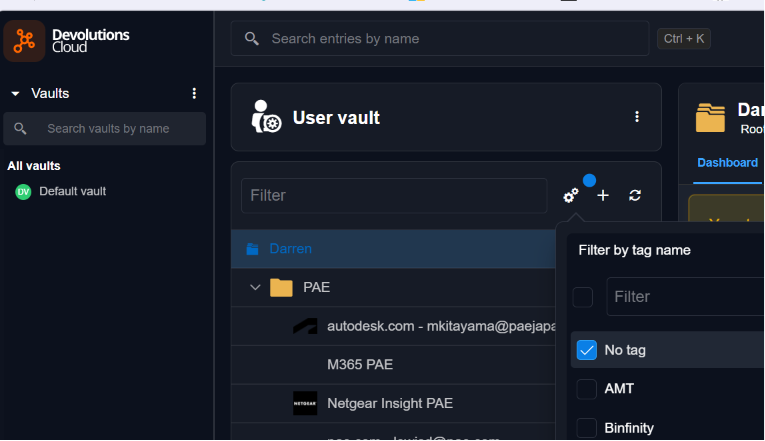
In this screenshot, No tag is picking items that have inherited tag
Regards
Darren
No tag filter
I have entries inherit the tag from the folder, so that I don't need to add them manually. But if I select the "No tag" filter so that I can find entries that may not be in a folder that do not have a tag, then it selects everything including entries that have an inherited tag. Inherited tags should be excluded, because they are actually tagged. My system settings is set to "Custom + Inherited".
Connect to PC joined to AzureAD via RDP
1) On PC you will be connecting to in remote settings, untick "allow connections only from computers running network level authentication"
2) Devolutions properties Connection tab, remove tick from "Activate Network Level Authentication"
3) The username to login to Azure works in this format: AzureAD\darren@myemailaddres.com
I tested this just now and it works.