
Martin H.
Password list - CTRL/SHIFT+CLICK for display credentials in new window
Thank you
SSH through SSH not working any more after upgrading to RDM 2023.1.28.0
Hi Patrick,
sorry for delay. I have been super busy. Few weeks ago we have ugpraded to the latest version and SSH over SSH works again.
Thx,
Martin
SSH through SSH not working any more after upgrading to RDM 2023.1.28.0
Patrick, I cannot confirm that. We are still on version 2023.1. Before every major update we usualy wait couple of months. With every major release there is quick serie of hotfixes - and it is a burden to patch RDM every few days and experience various bugs.
SSH through SSH not working any more after upgrading to RDM 2023.1.28.0
Hi Patrick, any news regarding this issue? It complicates our live as well.
I can confirm that the workaround works, but it requires to provide password manualy to the ssh session (not comfortable]. .
RDM - Devolutions Web Login - Access to the data source refused
Hi Min,
thanks, that was it. I had it enabled as a feature, but disabled on users.
RDM - Devolutions Web Login - Access to the data source refused
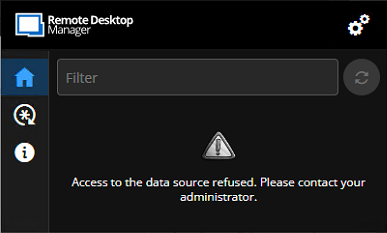
Hello, we have upgraded over the weekend from 2022.2 to 2023.1 (Devolution Password Server and RDM). After that upgrade "Devolutions Web Login" Edge extension stopped working. We are getting error "Access to the data source refused. Please contact your administrator".
We are using "Devolutions Web Login" to communicate with RDM over the HTTP listener.
Do you know if there has been some change or a new configuration setting?
Thank you,
Martin
Devolutions web administration - unable to manage group membership
Ok. I thought that the issue was supposed to be solved by the fix in 2022.2.10 . Since 2022.2.10 the date format issue is not logged anymore. If it would help I can change collation or OS localization to whatever you say.
Devolutions web administration - unable to manage group membership
Hi Richard, today I wanted to add another user and I have hit the issue again. When I am adding new user, the groups get assigned. Hovewer when I try to modify the user, the groups membership get removed (it is emptied). It is so strange issue. Could I ask your help or open a service ticket?
I have noticed, that while I modify the user and save it, there is a event log recorded. The strange on the event is taht the SecurityGroup variable is empty, but it should be filled (I guess) with the assigned groups.

Devolutions web administration - unable to manage group membership
Perfect, thank you very much. Once it is out I will test it and let you know.
Devolutions web administration - unable to manage group membership
Hi Richard,
sorry for the delay in communication, I have been out of office last week.
Our DB collation is "Latin1_General_CI_AS". Should I change it?
Regarding the fix. You mean that you have found the cause of the group membership issue and fixed it? Or you have fixed the "date format" problem?
The problem with group membership is severe for us, as I cannot add or remove users from groups.
Devolutions web administration - unable to manage group membership
Hello Erica,
we were on 2022.2.8.0, but after the issue I have upgraded on the latest version (2022.2.9.0).
We are using only Devolution native authentication (users and groups).
The datasource log contains several instances of one error, but I don't think it is related to this issue (but still I attach it to this post).
Devolutions web administration - unable to manage group membership
We have run into a very strange issue. My colleague tried to add a user into the group. The result was that the group got empty (instead of having the user added to the other members).
Since than I am not able to add any new member into any group. Even by going to group and modify membership. Nor by going into the user defaults and adding him into the group.
I had to restore the database to have the users back to the groups (so the users can continue to work). But still we have this issue and we are unable to modify membership of groups.
Please has anyone experienced that? Is there some space where we could find more debug info?
MS Edge session - Custom Login Script
Thank you Jafran, that was quick 👍🏼.
MS Edge session - Custom Login Script
Happy to help. Thank you Stéfane 👍🏼
MS Edge session - Custom Login Script
Little correction. I am unable to put the custom login JavaScript through GUI the way I have described. It gets blank.
But I am able to do it through PowerShell (this was the way we migrated from Chrome to Edge).
So I am able to:
create new session as Chrome.
Insert the custom javascript login script.
Save it
Open powershell, find the session and just change the engine from Chrome to Edge.
Then if I try to open the session in RDM it gets opened in Edge and the Javascript gets fired.
So still it looks like the functionality is there and working. We just need to modify the GUI to support the custom login scripts for Edge engine :).
MS Edge session - Custom Login Script
Hi Stéfane,
so today I had little bit more time to look into it. So here is a funny fact 😁. The Custom Scripts are working, but in GUI, we are not able to configure them, as the option disappear when you change the browser engine to Microsoft Edge (I have to switch it to Chrome, enter the custom script and then switch it back to Edge). So I guess the feature request shouldn't be hard to implement (just to allow it in GUI)
Here are some examples of custom Javascript for login:
1) Some login forms don't have static ID/names for the input fields - the RDM is not able to detect them and fill them. So we have to use dynamic selectors.
ex: Fortinet EMS (https://fctems.fortidemo.com/signin)
var elements = document.getElementsByTagName("input");
elements[1].setAttribute("value", "$USERNAME$");
elements[1].dispatchEvent(new Event("input", { bubbles: true }));
elements[2].setAttribute("value", "$PASSWORD$");
elements[2].dispatchEvent(new Event("input", { bubbles: true }));
btn = document.getElementsByClassName("btn-primary");
btn[0].click();
2) Some login pages have the login button disabled until you type something into the username/password field. The way the RDM fills those values probably differs from the manual input (I guest not all the events are trigered). So we use Javascript to unblock the login button:
var button = document.getElementById("buttonLogin");
button.disabled = false;
button.classList.remove("btn-disabled");
MS Edge session - Custom Login Script
We have moved to newly improved web session engine "Microsoft Edge". We like that it uses the embedded browser in OS - so it is always up-to-date (more secure) has all the functionality (more than the portable Chrome engine). Besides it solves our problem with freezing RDM while using it on terminal server with open web sessions.
However, we are missing the functionality of providing custom javascript login scripts (Login - Custom - Custom Script). We are using them for login form autofill of some specific webpages, which cannot be filled just by simply providing input fields IDs.
So we would like to ask for this feature :). To be able use custom javascript login scripts with MS Edge engine ((Login - Custom - Custom Script)) as it can be used with Chrome engine.
Martin
Web Login Chrome Extension with RDM
Samuel, thank you very much for the clarification.
Web Login Chrome Extension with RDM
Hi Samuel,
thank you for your reponse. I made it work. However I have some questions, that arise :)
What is the favoured method of web login communication with RDM : Native messaging or http listener?
Why is application key mandatory on terminal server - I thought, that security is based on the "crypto key" which is negotiated during the pairing (RDM and Web Login)?
Why are the registry keys and json files changes needed to do manualy for native messaging to work? Is it, that this method is not favoured?
Web Login Chrome Extension with RDM
Hi guys,
I have seen previous video Web Login (https://www.youtube.com/watch?v=CEcfJh6rDtk) and blog article (https://blog.devolutions.net/2021/04/improved-feature-increased-security-of-the-api-remote-desktop-manager-with-devolutions-web-login).
So I was wondering, if there is anything new on the functionality. I have tried it, but were unable to get it paired. Could I ask you:
Is it supported on terminal server?
Can you use it just with native messaging, or you need to enable http listener as well?
Are there some GPO settings for RDM Browser Extension configuration (file - options - browser extension)?
Thx, Martin
DVLS + RDM - inactivity timeout
Thank you!
DVLS + RDM - inactivity timeout
🤦🏼♂️ I see it now. Thx! I thought that everyhing has moved into the "web administration" in the new version of DVLS.
DVLS + RDM - inactivity timeout
But is there a posibility co control it centrally? Through GPO or DVLS? I believe that before we could control it through DVLS. Recently we did a deployment for new customer and I cannot find the setting anymore.
The thing is that the "logout" policy is important from the security perspective and we cannot just rely on users that they will configure it :).
DVLS + RDM - inactivity timeout
Hi,
Probably my question will be little bit silly, but... we are using DVLS with RDM. I am looking for a "setting" which would force RDM logout after some inactivity time. I believe that in previous versions of RDM/DVLS it existed. Could you point me in some direction?
Thx
Web Login - support for credentials from "Credential repository"
Hi Erica, do you have some news regarding this question, please?