SSH through SSH not working any more after upgrading to RDM 2023.1.28.0
SSH through SSH not working any more after upgrading to RDM 2023.1.28.0

Hi
After upgrading to RDM 2023.1.28.0 SSH through SSH is not working any more.
If I test from a RDM 2023.1.20.0 it still woks with the same RDM User.
Error message: An unexpected error occurred. Error code: FAIL_ABORTED
Running on Windows 11 Client
Datasource: Microsoft Azure SQL
Entry: SSH Shell with VPN type SSH Link
Debug log attached
986f9ed9-8153-4aa3-b433-8e3206da101a.png
sshError.txt
All Comments (13)
Hello Acetico,
Thank you for contacting us about this matter.
We greatly appreciate your concern and assure you that we are aware of this issue.
Our engineering department is currently working to resolve it, and we will post an update here as soon as it is fixed.
We apologize for any inconvenience it may have caused. We are committed to providing the best service possible and appreciate your patience as we resolve this issue.
Best regards,
Patrick Ouimet
Can I suggest putting information about the bug in the release notes for RDM.
Hi,
Is there any ETA on a fix for this? I just accidentally updated my last working computer; now all of my computers have an updated RDM so I can't connect to many SSH servers anymore :-(
Regards,
Ruud
Hello,
Thank you for this feedback.
The engineering department is still working on this issue.
The workaround, for now, is to activate the “interactive auth in terminal” option in your entry properties under the Advanced tab.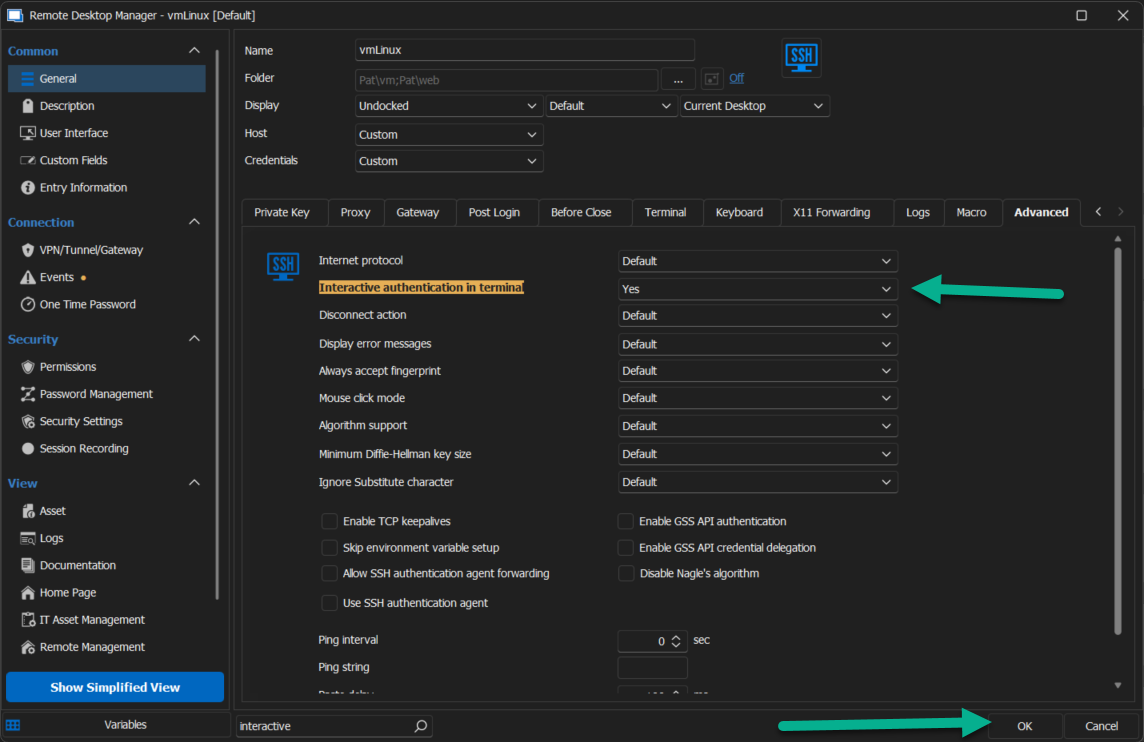
Best regards,
Patrick Ouimet
interactive.png
Hi,
Thanks a lot for your fast response!
Unfortunately, that didn't do the trick for me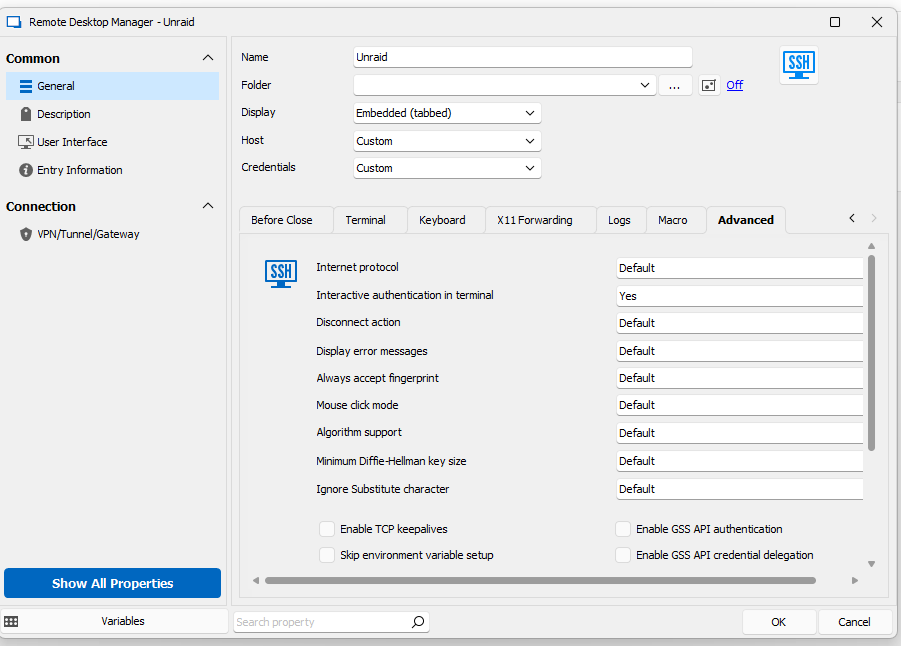
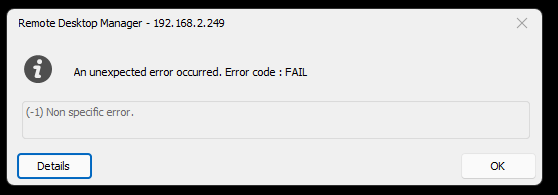
Now I take a second look, it does seem I get a different error on all my SSH connections than the OP. Should I create a new topic maybe?
Regards,
Ruud
0a540102-bf02-4a11-94dc-f78321fdb178.png
c7a3ae68-6b1e-4c52-92b2-29d48a307ab7.png
Hello Ruudvanstijp,
This forum is related to the error (-25).
The error you have sent is related to ( -1)
To fix this, could you follow those instructions here:
https://docs.devolutions.net/kb/remote-desktop-manager/troubleshooting-articles/error-code-fail-1-non-speciffic-error/
Best regards,
Patrick Ouimet
Hi Patrick, any news regarding this issue? It complicates our live as well.
I can confirm that the workaround works, but it requires to provide password manualy to the ssh session (not comfortable]. .
Hello Martin,
Thank you for this feedback.
I've asked the engineering department to have news on this case.
They are still working on it, and I do not have any other information.
I'll keep you informed as soon as possible.
Best regards,
Patrick Ouimet
Hello Everyone,
Thank you for this feedback.
The engineering department is still working on this issue.
They want to know if you have updated to the latest version of RDM.
Do you still have this issue on version 2023.2.18.0?
Best regards,
Patrick Ouimet
For anyone wondering about my FAIL -1 Non Specific Error (that was unrelated to this topic's error, but still was answered by Patrick). Patrick's guide didn't solve my issue.
In the end I found a checkbox 'Use SSH authentication agent' was enabled. This is non-default, and I assume this was somehow set when I migrated from the old database to the new online Vault. After removing the checkbox from all SSH clients, I could connect with them again.
Patrick, I cannot confirm that. We are still on version 2023.1. Before every major update we usualy wait couple of months. With every major release there is quick serie of hotfixes - and it is a burden to patch RDM every few days and experience various bugs.
Dear Martin,
Thank you for sharing your perspective on the matter.
To proceed, would it be possible for you to install the portable version of RDM and perform the test on the local data source? Please keep in mind that the portable version will not affect your main RDM installation. Here are the steps you need to follow:
1. Close RDM.
2. Download the .zip file from https://remotedesktopmanager.com/home/thankyou/rdmbin.
3. Create a new folder on your desktop.
4. Extract the contents of the .zip file into the newly created folder.
5. Go to this folder and run remotedesktopmanager.exe.
Best regards,
Patrick Ouimet
Hi Patrick,
sorry for delay. I have been super busy. Few weeks ago we have ugpraded to the latest version and SSH over SSH works again.
Thx,
Martin