
juergen
Generate Password Button in Credential Entry
Hello,
The Generate button is available only when a password policy is set on the entry. Otherwise, since the system does not know how the password should be generated, the password generator opens automatically. This is likely the behavior you observed.
If you are evaluating a migration to Devolutions Server (DVLS), have you tried migrating your database from RDM to DVLS using the Devolutions Console? Given the difference you noticed with the password generator, I suspect that you may have started with a new DVLS instance. Am I correct?
A full migration can indeed be performed, and you can find the detailed steps in the following documentation: Migrate SQL server to Devolutions Server
Don't hesitate if you have questions.
Best regards,
@François Dubois
Thanks,
yes it is a new Instance (for Testing). Wer are planning the Migration now.
Regards
Generate Password Button in Credential Entry
I found out, that it was a System Setting. Now it is available
Generate Password Button in Credential Entry
We are actually using RDM with Azure SQL Datasource and are evaluating the migration to Devolutions Server Datasource.
I noticed that in Devolution Server Datasource the "Generate" Button does not exist. There is only the "Password generator".
It would be nice to have that button also with Devolution Server Datasource.
Regards


Devolutions web login(DWL), MFA code copy to clipboard after credentials paste
I confirm, that the feature request has been implemented in version 2025.3
Best Regards
Devolutions web login(DWL), MFA code copy to clipboard after credentials paste
I have seen that DWL looks completely different and a fill button has been added. Hope the Copy OTP button is not forgotten for RDM Datasource
Lastpass - unable to connect to Lastpass. Please make sure your information is valid
Hello,
I confirm that it is working.
Best Regards
Lastpass - unable to connect to Lastpass. Please make sure your information is valid
Hello,
I checked the RDM application Logs and noticed that there was a Issue with Lastpass MFA that has to be reset.
After reset. Everything is working again.
kind regards
Lastpass - unable to connect to Lastpass. Please make sure your information is valid
Hello,
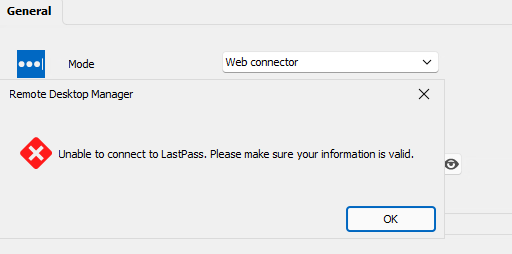
since today the Lastpass Web Connector is not working anymore. The following error appears:
Unable to connect to LastPass. Please make sure your information is valid.
However Pastpass Web Login is functioning without problem. Has anyone else had this problem today?
Kind regards
Devolutions web login(DWL), MFA code copy to clipboard after credentials paste
Hello,
Thanks for the info, is it planned to introduce this for RDM as well?
Best regards
Devolutions web login(DWL), MFA code copy to clipboard after credentials paste
Hello,
We are also waiting for this feature as the autofill often does not work at all on specific websites.
We currently use Lastpass for the passwords and RDM for the connections. We are planning to migrate the passwords to RDM and this feature already exists in Lastpass.

Using wildcards in Search Box
Hello David,
the double && does the trick. This helps a lot. That's wat I was looking for.
Many Thanks
Using wildcards in Search Box
Hi David,
it would be nice to search 2 expressions at once. For example "customer*Admin*"
So that the search mathes when both of the expressions matches. "Customer" for the Customer Folder, and Admin for the "Administrator" Username in a Login Entry.
Using wildcards in Search Box
I know this is an old article. Are there any news on this feature request? Currently running 13.0.14.0 but the Wildcard are not available in the connections search.
Many Thanks