
bwright
Prompt with list of PAM vault entries
This works but pops up all the PAM vaults. I'd like to be able to specify which PAM vault it opens. For example, Server A only shows PAM Vault A and Server B only shows PAM Vault B so when connecting we don't have to scroll through all the different PAM vaults.
Prompt with list of PAM vault entries
Maybe I'm missing it but when I choose a privileged credential for a session it wants to force me to choose just one entry. If I make a vault to work around this I can get it to prompt with all the different PAM vaults. We'd like to have our PAM vaults structured to match customers and don't want to have to look at ALL the PAM vaults when opening a session but we also want to be able to choose from multiple privileged accounts instead of just one. We are able to do this with regular credentials just not with PAM vaults.
Basically, we want the PAM vault to act as a folder and then set that folder in relation to the session we want to connect.
Let me know if I'm missing something or if this is a feature that can be added. Thanks!!
Credential Provider use SSL for Connection - Windows Local Accounts
Hi Bwright,
The Windows Local Provider and AnyIdentity provider for local accounts use WinRM to communicate to endpoints.
In both cases, you have to configure WinRM for HTTPS. I invite you to follow the steps in this article: https://learn.microsoft.com/en-us/troubleshoot/windows-client/system-management-components/configure-winrm-for-https
Let me know if this helps!
Best regards,
I have https/winrm over https working within my environment. My question is how do I get devolutions PAM to be forced to use it? When I try the provider I setup with a local account it only tries http connections and gets denied because I'm only allowing https. Is there a way to "force" a provider to use https?
Credential Provider use SSL for Connection - Windows Local Accounts
Hi - I couldn't find any documentation on this - is there a way to configure the Windows Local Account Provider to use SSL(https) to connect instead of http? - I don't see an option for this, and I tried making the server name SERVER:5986 but that didn't work it's still trying unencrypted connections.
We plan to try using AnyIdentity for our non-domain joined PCs so if it's available there that would be great too.
Thanks for your help!
Bitwarden cache entries
Amazing thank you so much!!!!
Bitwarden cache entries
No, I didn't explain well. The collections are definitely there now and working so thank you.
I'm talking about the "prompt on connection" option - I can't do that and choose the bitwarden vault. And if I choose Linked (Vault) and then "select from list" I can't set it to a folder it has to be one entry. I'm attaching a picture - the first one is my bitwarden. This works but I can't link it to a collection I can only pick one record wheras the second one allows me to prompt from a set of folders within RDM.
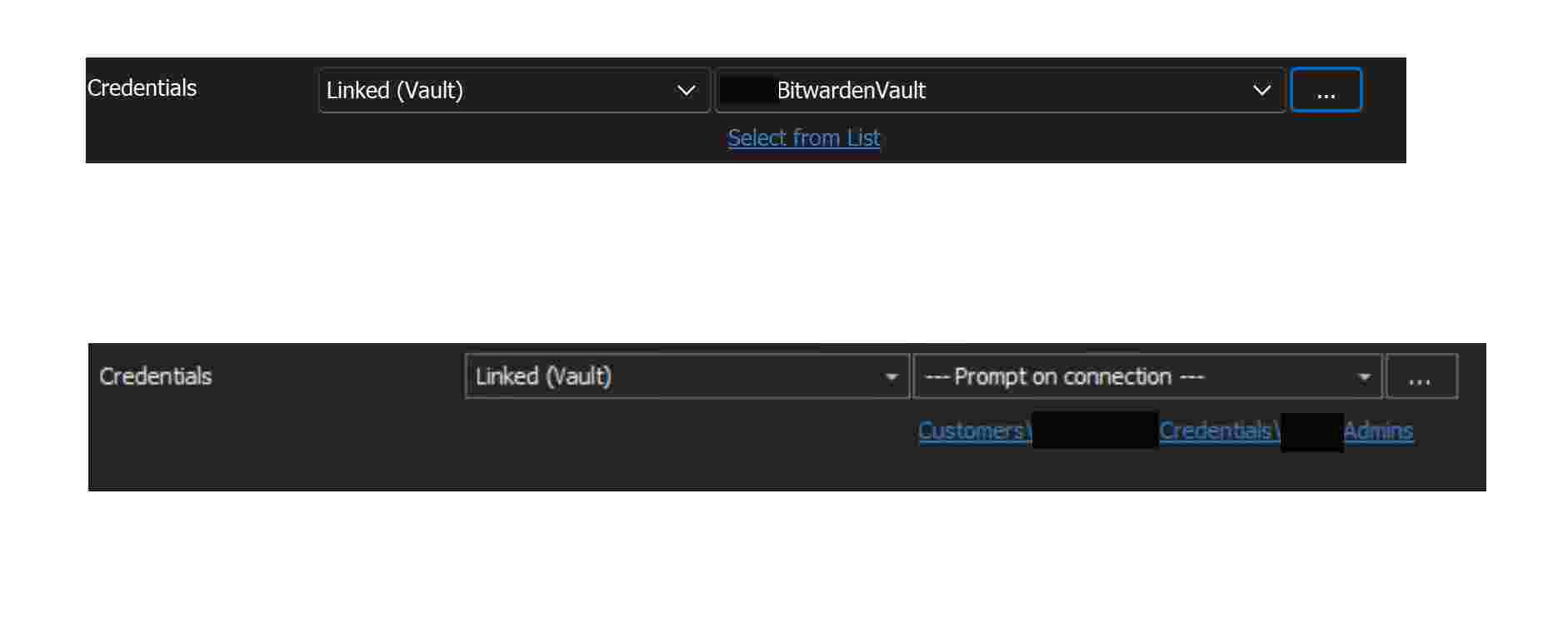
If I can get it alphabetical though that would at least let me see my collections in order, so thank you for that.
Bitwarden cache entries
No worries thank you for the response - Happy Holidays/New Years to everyone!
Bitwarden cache entries
Thank you for this improvement - it's so helpful. I have two questions if you could asnwer
Is there any update about being able to use the different collections in BitWarden as folders when prompting for credentials like RDM does natively?
2nd - is there a way to have it sort the collections alphabetically instead by date created? Mine is showing out of alphabetical order and if we can't prompt by folder it would at least be nice to be alphabetical.
Thanks again for your help!
Bitwarden unable to retrieve credentials
Got it - tried looking through the documentation/forums and couldn't find anything specifying it had to be user but thanks for clearing that up.
Yes - adding the collections would be massively useful to us. Until that is implemented we may have to not use the bitwarden integration as it is too complex.
Thank you!
Bitwarden unable to retrieve credentials
Hi,
When trying to connect to a Bitwarden vault I get the error "Unable to retrieve credentials". This happens if I use my user name/password or if I use the API information for my organization in Bitwarden. If I use my "personal" api information it connects.
client_id:
organization.
vs:
client_id:
user.
User works, organization doesn't. Am I doing something wrong? I'm sure I am.
Also when I do get it working by using the user. API key it doesn't show me any of my Bitwarden collections - does RDM support seeing those? Just seeing a massive list of credentials is much harder to work with.
Thanks in advance for your help.
Connecting RDM to Azure Key Vault
Even using the secret value gives me the same error. Ugh, sorry.
Connecting RDM to Azure Key Vault
I literally created the app registration just for this...That's why I feel like I must be doing something stupid.
I tried making a new Secret but it's failing with the same error. Both my "old" and new secret expire in 2022. Am I just putting in the wrong information or something?
URL = Our Vault URL "x.vault.azure.net"
Tenant ID: Our Tenant ID for Azure
Client ID: App Registration's Client ID
Secret: Secret ID in the App Registration
UserName: my azure login
Secret - I'm clicking the "..." when I get the error. "Error fetching the secret list"
It also fails if I check the "use my account settings"
Connecting RDM to Azure Key Vault
Are there any updates on this? I haven't heard back from anyone yet
Connecting RDM to Azure Key Vault
Awesome thanks for your help!
Connecting RDM to Azure Key Vault
We are currently running the latest version of RDM and use Azure SQL as well as regular SQL DB's. I guess my issue is maybe I'm not entering the right data to connect because I get an error - there was an error fetching the secret list. I'm guessing that means it's not connecting properly.
If could assist - I feel like I'm missing something really stupid here.
For URL - I am putting the URL of our Azure Key Vault
For Tenant ID - I am putting the "Directory ID" of our Key Vault or our Tenant ID of our Azure AD - they are the same
I checked the "Use My Account Settings" box because I filled in that Azure AD info in My Account Settings.
In there I put Client ID/Client Secret of the Azure App I registered for the key vault
Then I put my user name and hit the ... to put my secret and that's where I get the error - error fetching the secret list.
Any help would be greatly appreciated!
Connecting RDM to Azure Key Vault
I can't seem to connect properly to Azure Key Vault - are there any documents I could follow that help with that?
Display Connection Name on Credential Picker
Sorry for my delay in response. I do have the credentials set to "Inherited" from our root group called "EXOS" which would make sense, but if I change it manually in each server's properties it does show the server name on the connection bar. It seems silly that since it's inheriting it still can't display the server name and can only show the inheritance name but I guess I'll go through and stop the credential inheritance if this is the only way to get it to display the server name. Maybe in a future release you could display both the group it's inherited from and the connection name because having the inheritance on credentials really saved me some time.
Display Connection Name on Credential Picker
Of course! As you can see from the image the dialog box says "EXOS" which is the name of the group that this connection is in but not the connection itself so with multiple domains and credentials it gets confusing!
Let me know if you need anything else!
Display Connection Name on Credential Picker
One of my favorite things about Remote Desktop Manager is that when you close out, your session list is saved. My problem is when you go to reconnect to those sessions and the credential picker pops up I have to remember which server/connection that I was in so that I pick the right credentials. It displays the folder name instead of the connection name and it would be awesome if in a future release it could display the connection name.
I can provide some images if you need more information. If this is in a release I haven't downloaded yet feel free to let me know and delete this request.
Thanks!!