Bitwarden cache entries
0 vote

Hello to all,
it would be great, if Remote Desktop Manager can cache the Bitwarden entries like all other Bitwarden native applications. This would allow:
- Faster credentials loading
- Better performance for unstable internet connections
- Possibility to use Remote Desktop Manager with Bitwarden credentials in offline mode (sometimes as an admin you are in a protected network and need to access servers, but have no internet connectivity)
Since you cannot edit any Bitwarden entries in Remote Desktop Manager a one-way-sync would be enough and therefore reducing the complexity. The cache obviously has to be encrypted.
What do you think about this idea?
All Comments (46)
Hello,
With the way RDM works and the requirements you have, I think what you would require is a Bitwarden synchronizer entry. When run, this entry would create multiple credential entries of type "username/password" (our basic credential entry) matching with the entries on the Bitwarden side. On subsequent execution of the synchronizer, RDM would add missing entries, and it would automatically update existing entries with updated passwords for example.
The positives is it would avoid calls to Bitwarden when using the credential entries as they are stored within your datasource, and they would thus be available in offline mode if your datasource supports it.
The possible negatives is that every Bitwarden entry you have would be synchronized to RDM, creating one object in RDM per entry in Bitwarden. This can be heavy if you have a lot of data in Bitwarden.
It also goes without saying that since the credentials would be stored within RDM, they would be subject to the same security as other credentials stored in RDM. If your datasource is DVLS, the data is encrypted at rest so it's secure, for other datasources we recommend configuring a security provider.
Do you think this would work for your scenario?
Regards,
Hubert Mireault
Hello,
thank you for your response. The idea of the caching was, that only linked elements where cached and not the whole Bitwarden Database. So this would work for my scenario if I can choose what to synchronize with RDM. This granularity would be ideal in my eyes:
- Sync personal entries. If yes all or only specific (multiple) folders (including subfolders)
- Sync organisation entries. If yes, all or only specific (multiple) organizations. On the selected organizations sync all or only specific (multiple) collections (including subcollections)?
Regards,
Manuel
Hello Manuel,
I think it would be possible for the synchronizer to specify these informations and not synchronize the entire Bitwarden database. I think we should have all of the information we need to have this granularity.
I've opened a ticket for this new Bitwarden synchronizer entry, we will post back on this thread once we have further information on the feature or if we have any other questions for you.
Regards,
Hubert Mireault
Hello Hubert,
maybe you have already some news?
Regards,
Manuel
Hello Manuel,
The improvement is still in the backlog, I will notify the engineering team, but it will most likely be done after the 2022.1 release (planned for mid to late January).
Best regards,
Richard Boisvert
Thanks!
Hello,
is there any update on this?
Hello,
We are hoping to add the Bitwarden Synchronizer for RDM 2022.2, which is planned for release this summer.
Regards,
Hubert Mireault
Hello,
Just letting you know that a new Bitwarden Synchronizer entry will be available in our 2022.2 release next month.
Please let us know if it fills your needs,
Regards
Jonathan Del Signore
That are great news. Thank you.
Hello,
I installed the latest version and the synchronizer works. Unfortunately there is a mess between personal and different organization entries. The personal entries are synced with the folder structure, but organization entries are all located in the root folder.
Would it be possible to have a folder with all private entries/folders/subfolders and a folder for every organization? Would it also be possible to use the collections from the organizations as folders/subfolders in RDM, maybe as option to use collections as folders?
Hello,
These sound like good improvements. We'll open a ticket and keep you updated on the progress.
Regards
Jonathan Del Signore
Hello Jonathan,
are there some updates regarding my last post? :)
Hello,
This is currently in development, which means it will make it into our next major release this fall.
We'll update this thread with a confirmation once development is done.
Regards
Jonathan Del Signore
Hello Jonathan,
should this be included in the latest release? I installed 2022.3.16.0 right now, but unfortunately no change. The organization entries are still in the root folder.
Regards,
Manuel
Hi Manuel,
No it hasn't made it into the 2022.3.16.0 release, but it will be in one of the next minor releases for 2022.3.
I'll keep you posted.
Regards
Jonathan Del Signore
Hello,
The folder hierarchy for Organizations/Collections has been implemented internally. It will be available in version 2022.3.20.0.
Let us know if there's anything else we can do.
Regards
Jonathan Del Signore
Thanks. Now i can work with Bitwarden inside RDM.
Thank you for this improvement - it's so helpful. I have two questions if you could asnwer
Is there any update about being able to use the different collections in BitWarden as folders when prompting for credentials like RDM does natively?
2nd - is there a way to have it sort the collections alphabetically instead by date created? Mine is showing out of alphabetical order and if we can't prompt by folder it would at least be nice to be alphabetical.
Thanks again for your help!
Hello,
Thank you for the kind words, and for your request. Our offices are closed for the Holidays, but we will verify both points with the engineering department when we are back!
Best regards,
Richard Boisvert
No worries thank you for the response - Happy Holidays/New Years to everyone!
Hello,
Just to be sure I understand correctly, for your first point, are you talking about having collections in the account selection window, as discussed here ? https://forum.devolutions.net/topics/38045/bitwarden-unable-to-retrieve-credentials If so, this is already supported since version 2022.3.11.0.
As for having the collections in alphabetical order, we'll open a ticket to support this in the future.
Regards
Jonathan Del Signore
No, I didn't explain well. The collections are definitely there now and working so thank you.
I'm talking about the "prompt on connection" option - I can't do that and choose the bitwarden vault. And if I choose Linked (Vault) and then "select from list" I can't set it to a folder it has to be one entry. I'm attaching a picture - the first one is my bitwarden. This works but I can't link it to a collection I can only pick one record wheras the second one allows me to prompt from a set of folders within RDM.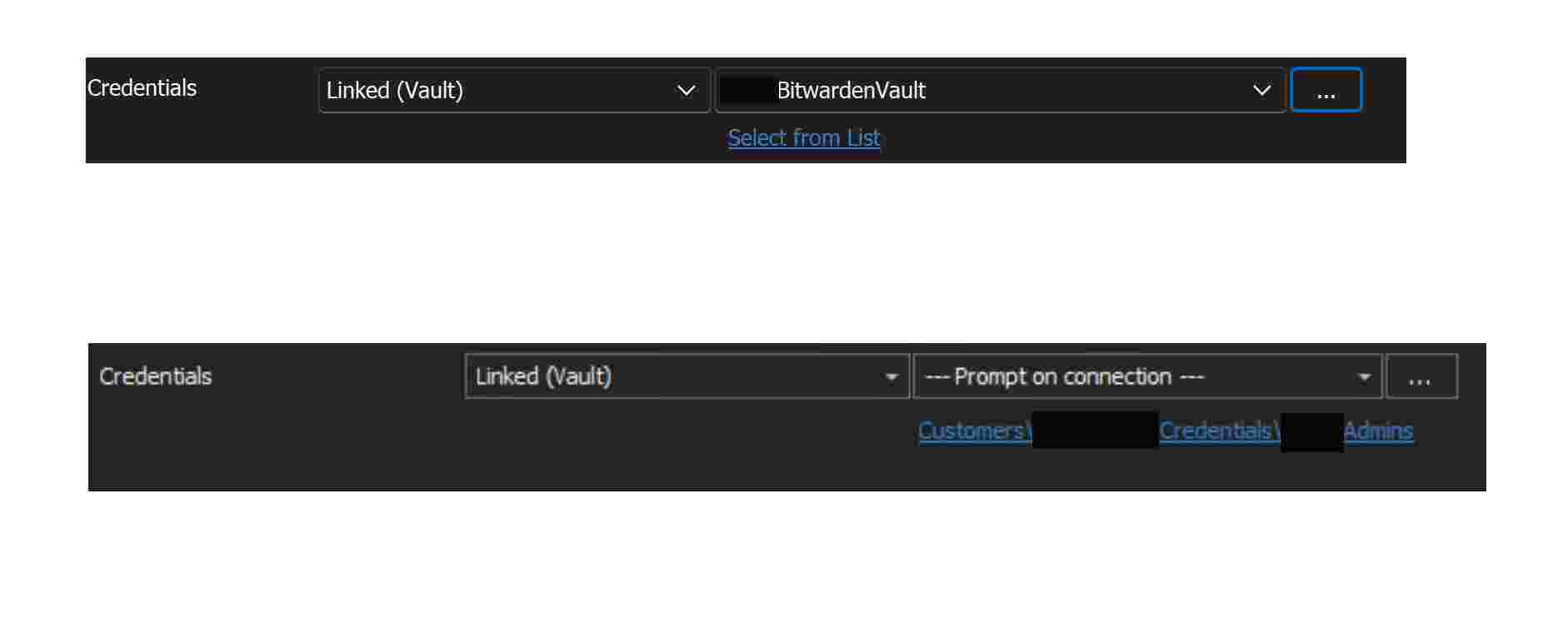
If I can get it alphabetical though that would at least let me see my collections in order, so thank you for that.
RDM-Bitwarden.jpg
Oh I see, thanks for explaining, that makes sense. We'll open another ticket to let you choose a folder as well.
Regards
Jonathan Del Signore
Amazing thank you so much!!!!
Hello,
until now I did not recognize that when I delete collections/items (organization entries) in Bitwarden the items do not get deleted in Remote Desktop Manager after synchronisation.
You can reproduce this by creating a collection, creating some items in this collection, sync with RDM, then delete some entries, sync with RDM, check if the items are deleted, delete the collection, sync with RDM, check if the collection is deleted in RDM with its entries.
Would it also be possible to specify the direction of the sync? I don't want to sync changes from RDM to Bitwarden.
Hello Manuel,
Which version of RDM and what type of Data Source you are currently using? Does the same issue occur if you refresh your data source cache (CTRL + F5) after deleting your collections/items from Bitwarden?
The synchronization should only be made from Bitwarden to RDM, not the other way around.
Best regards,
James Lafleur
Hello James,
I'm using the version 2022.03.31.0. The Data Source is a MSSQL database. When I refresh the data source cache nothing changes.
Hello,
Thank you for your reply!
Would it be possible for you to provide me a screenshot of the properties of your Bitwarden entry via private message?
Best regards,
James Lafleur
Hi James,
you mean a random synced Bitwarden entry or the entry of the syncrhonizer?
Hello,
My apologies for the lack of precision, I refer to the Synchronizer entry.
If you could add another of your File -> Background services windows.
Best regards,
James Lafleur
Hi, there are no entries in the background services window, since I launch the Bitwarden Synchronizer manually. I click on the sychronizer and then open session.
Hello,
Thank you for these screenshots!
If you make any changes in your Bitwarden account, outside of RDM and then run your Bitwarden synchronizer inside RDM manually, do you see these changes, be it a change in any o your entries or just the creation of new entries?
Best regards,
James Lafleur
Hi, sorry I missed your answer.
I did some more testing.
- When I change an entry in Bitwarden, the entry is added as a new one in RDM. The old entry in RDM was not deleted/changed.
- When I delete an entry in Bitwarden, the entry is not deleted in RDM
- Wehen I move an entry in Bitwarden, the entry is added in the new location in RDM, but the old is not deleted
So it seems that new/changed entries are synced as new ones, but the old one that does not exist anymore are not touched. If you wish I can create you a test account on my server, so you can test it.
Hello Manuel,
In the Bitwarden Synchronizer entry, could you go to the Advanced tab, and make sure the "Action on entry mismatch" is configured to "Delete"? The default is none, so it would just leave the entries as is if there is a mismatch, which seems to be your case.
Best regards,
Richard Boisvert
Indeed this was the problem. But when an item is renamed in Bitwarden, why a new item is created in RDM and not renamed also? The items on both side should have ID's. When an item is renamed then I have to change all linked passwords in RDM...
Hello Manuel,
In other type of synchronizers, such as AD, there is an option to update non-critical fields on mismatch. I will verify with the engineering team if this could be added in the Bitwarden Synchronizer.
Best regards,
Richard Boisvert
Thanks
Hello Manuel,
The non-critical fields only works for the description after all, so it may not have the desired outcome, unless that was the field you were updating. If you are renaming the entry, for example, the old entry would still be deleted.
Could you confirm what field(s) you are modifying?
Best regards,
Richard Boisvert
Indeed this was the problem. But when an item is renamed in Bitwarden, why a new item is created in RDM and not renamed also? The items on both side should have ID's. When an item is renamed then I have to change all linked passwords in RDM...
Is there any update to this?
Currently I have a lot of work, if a item is changed, since the item gets recreated instead of updated when a field is changed (e.g. password). There are a lot of items where we have to change the password every 90 days, I can relink at least 3-4 objects a day.
The objects gets deleted and recreated when I change only one of these fields:
- Name
- Username
- Password
I saw now some other weird behaviours:
- The OTP key is not synced.
- The URL of an entry is not synced.
- If in the filter a folder is not seletect a new items gets added neverthless, it it's added after the first sync with RDM.
Hello,
The way synchronizers currently work (Bitwarden or otherwise), RDM doesn't keep any identifier from the sync platform (Bitwarden in this case), making updating their "critical" fields (like name, username and password) impossible. We would have to rework how synchronizers work at their core to be able to enable this. We will see if we can add this to a future roadmap for RDM, as it would be a nice benefit to the synchronizer feature, but at the moment, what you're experiencing is the normal behavior.
For your other points, we will have to investigate and see if we can improve this.
Regards,
Hubert Mireault
Alright, thanks for your fast reply!
Hello,
Is there any new information regarding the synchronizers.
I am also running into this issue with passwords that auto rotate needing to re link them every time one rotates
Best regards,
Jolan
Hello,
In our upcoming 2024.2 version (beta should release next week, full release in a couple of weeks), the Bitwarden synchronizer will now synchronize by ID and it should improve the behavior that was described.
As a note, the OTP and URL are not synchronized at the moment, we have a different ticket opened for that.
Regards,
Hubert Mireault
That are awesome news! Since this is very time consuming, resetting every time all saved credentials.
Hello,
Just letting you know, the Bitwarden synchronizer will now have a configuration to synchronize the OTP and the URL starting with version 2024.2.5.0. Take note the URL will only be synchronized if you are using a template of type Website to import the entries as a website. The username/password credential entry has no field for the URL.
I hope these changes will simplify your workflow. Let us know if you have any additional feedback.
Regards,
Hubert Mireault