
nazzartareev
RDM Variables into cmd
The issue is you have to manually enter a session ID.
Properties is greyed out in drop-down menu
Hello Nazzar,
Our Engineering Department has been able to confirm that this is a bug and a ticket has already been opened with them to fix this. We will provide you an update as soon as we will have news on that matter.
Best regards,
Great, thank you!
Properties is greyed out in drop-down menu
Still grayed out :(
Properties is greyed out in drop-down menu
Hello James, thank you for a quick responce.
My Data Source is Drobpox. I am an administrator. I don't have the edit option anywhere, on browser tabs, ssh, rdp etc.
Our RDM is Enterprise 2021.1.41.0 x64
Properties is greyed out in drop-down menu
Hello. I have noticed, that in later versions, 'properties' option is greyed out when clicking on active tab. This option is active when clicking only in tree-view. Is there a way to make properties available again?

pop up windows in websites
It is an internal website, Cisco Unified Contact Manager Administration.
pop up windows in websites
Hello.
Sorry to pulling up such an old thread.
Where i can find settings for pop-up windows in chrome?
When i work on some website in embedded window mode, there is a pop-up windows that i need to access. New tab opens, but it seems to be blocked, because there is a plain white window with "about:blank#blocked" in address bar.
Can't find corresponding settings in options.
Thanks!
Dell iDrac 6 viewer.jnlp weird name
Great, thank you!
Dell iDrac 6 viewer.jnlp weird name
Yes, a window just like above appears with weird *.jnlp name, and then i hit execute and nothing happens.
Checked a temp files and there is a file viewer.jnlp(10.10.11.13@0@idrac13,+PowerEdge+R710,+User_root@1576045401184@ST1=06acd81226f5261f67e558727afb2bef).jnlp.
It renames with double extension, it is a source of a problem. When i rename it to single extension, it works properly.
Dell iDrac 6 viewer.jnlp weird name
Still looks the same:
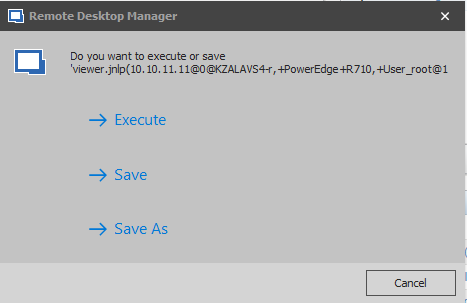
Dell iDrac 6 viewer.jnlp weird name
The update is live, but what exactly should i use to get it work?
I mean, i have set up a browser (chrome) connection to iDRAC 6 host, and i still do get *.jnlp files with weird extensions.
RDM Variables into cmd
Okay, understood.
RDM Variables into cmd
So, here i choose needed RDP connection and execute a script from Alexandre:
@echo off
set /P rcomp="Enter name or IP of a Remote PC: "
query session /server:%rcomp%
set /P rid="Enter RDP user ID: "
start mstsc /shadow:%rid% /v:%rcomp% /control /noConsentPrompt
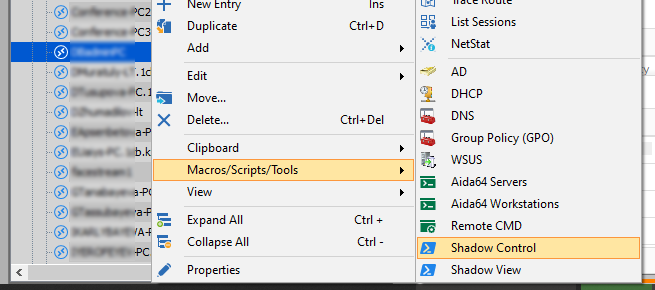
Then, embedded PowerShell windows opens up, where we enter session id:

And finally, external RDP Shadow window pops up externally:
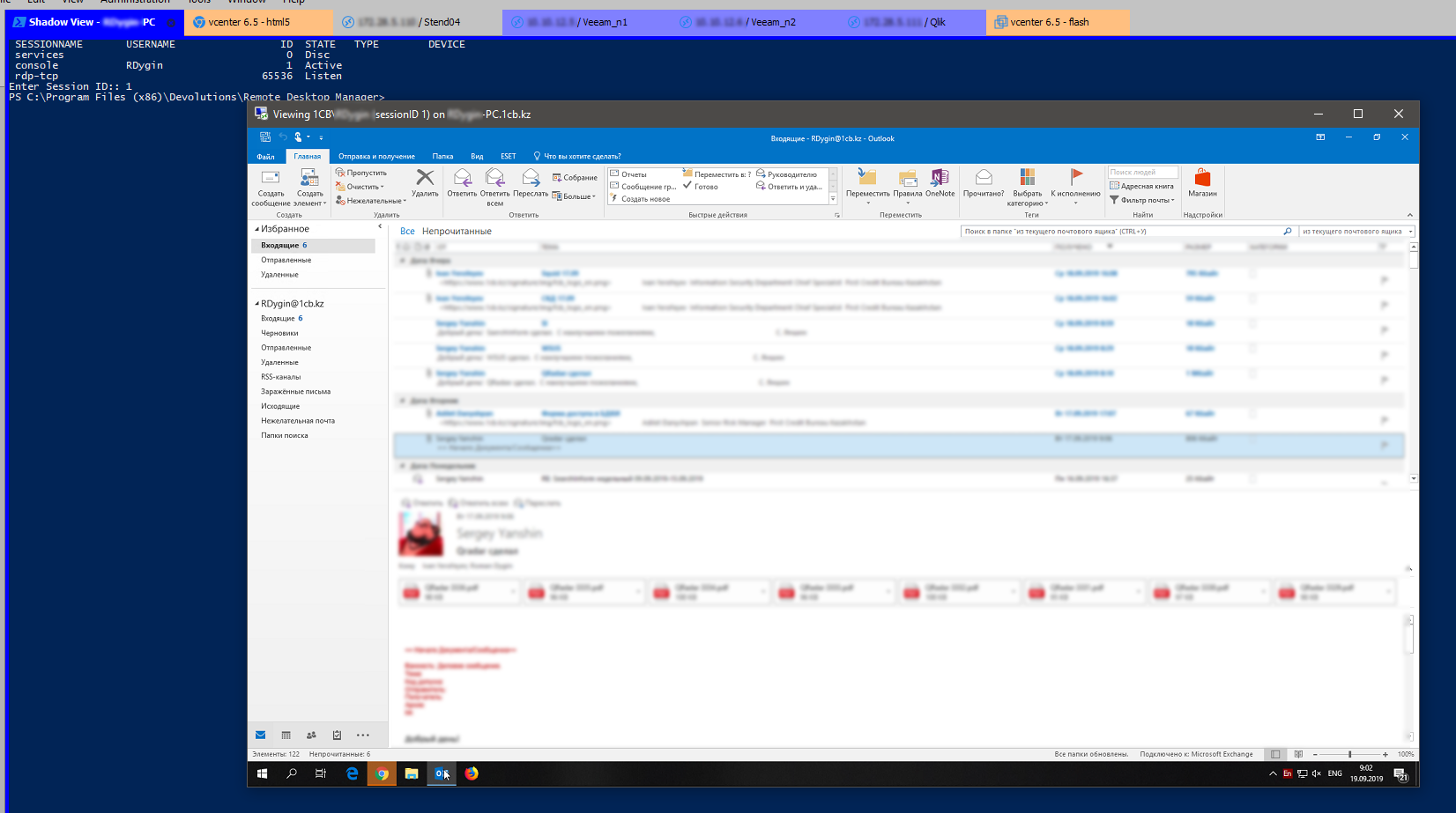
Is there a way to open this RDP window as embedded into RDM?
RDM Variables into cmd
Is there a way to embed RDP window that opens after the script is executed?
Dell iDrac 6 viewer.jnlp weird name
Epic, thank you!
Dell iDrac 6 viewer.jnlp weird name
Hi,
I had a chat with the engineering department and they ask me to open a feature request. Thanks for the browser extensions, base on this they will try to replicate the viewer.jnlp file "rename".
We will inform you as soon as the task is success, our internal ticket number is WIN-1273.
Best regards,
Thank you very much!
Any luck?
MMC & External Application
Just had a discussion with David. Embedding external processes in RDM is somewhat "magical". We use Windows API to grab the process handle and re-parent it within RDM. This works with most processes but a few specific ones, like MMC consoles, it's a different story. My guess is that in the case of a .msc it is actually a re-parented process within the MMC console. Trying to re-parent a re-parented process is probably what is causing the issue. This is something that we've been unable to solve for many years. Maybe one day we will have a "eureka moment" but until then there isn't much we can do.
Thank Stefane.
Fingers crossed :)
MMC & External Application
Thanks for a reply!
As i tested further, the problem is actually in the embedded window mode.
When i open WSUS via mmc or external application, the problem still occurs in embedded mode.
But everything is ok when i use external window mode for both mmc and external application.
Something of a fix, but i would still prefer to use embedded mode.
MMC & External Application
Hi,
Thanks for the test, unfortunately after a chat with the engineering department we weren't able to isolate where the issue could be.
So I transferred this issue to our QA department to build a WSUS server and try to reproduce the issue.
Best regards,
Any luck?
The issue is still present in RDM 14.1.1.0.
Windows 10 1809 with WSUS console from RSAT, installed via optional features.
Chrome and Firefox slowness embedded mode after installing Windows 10 1809
@Nazar,
What version of RDM are you running?
Are you on Windows 10 1809?
Best regards,
Yes. Windows 10 1809, RDM 13.9.11.0
Chrome and Firefox slowness embedded mode after installing Windows 10 1809
It seems that tabs in Chrome does not open. When you click on a link that opens a new tab, only white window appears.
Chrome and Firefox slowness embedded mode after installing Windows 10 1809
Confirming that this workaround works for me.
Integration of Windows Remote Server Management Tools
Calling RSAT tools after Windows 10 1809 update opens just a blank window in embedded mode. However, when you undock tab, everything is looks fine.
All web browser remote connections are failing to open
Confirming the same issue here.
Dell iDrac 6 viewer.jnlp weird name
Hi,
I had a chat with the engineering department and they ask me to open a feature request. Thanks for the browser extensions, base on this they will try to replicate the viewer.jnlp file "rename".
We will inform you as soon as the task is success, our internal ticket number is WIN-1273.
Best regards,
Thank you very much!