Dell iDrac 6 viewer.jnlp weird name

Hello.
When using Dell iDrac 6 remote console, viewer.jnlp file is being downloaded. But iDrac adds some additional characters to the end of the filename, ruining its extension, for example "viewer.jnlp(ip@0@dnsname,+PowerEdge+R710,+User_@14381106@ST1=531f5a20385ee18f48fe5b69041565fc). You have to rename it back to viewer.jnlp every time. This behaviour is not fixable in iDrac itself, as far as i can tell. There is a chrome extension that fixes name automatically: https://chrome.google.com/webstore/detail/fix-idrac-jnlp-file/knpcepbijjjpmlhbpmkjknghbeghiibo.
Can extensions be launched inside RDM? Or is there any way to trunk downloaded filename?
All Comments (17)
Hello.
When using Dell iDrac 6 remote console, viewer.jnlp file is being downloaded. But iDrac adds some additional characters to the end of the filename, ruining its extension, for example "viewer.jnlp(ip@0@dnsname,+PowerEdge+R710,+User_@14381106@ST1=531f5a20385ee18f48fe5b69041565fc). You have to rename it back to viewer.jnlp every time to launch it. This behaviour is not fixable in iDrac itself, as far as i can tell. There is a chrome extension that fixes name automatically: https://chrome.google.com/webstore/detail/fix-idrac-jnlp-file/knpcepbijjjpmlhbpmkjknghbeghiibo.
Can extensions be launched inside RDM? Or is there any way to trunk downloaded filename?
Hello,
After a discussion with the engineering department our Web Browser integration in embedded mode doesn't support any web browser extensions.
The Chrome embedded version use a kind of chromium. A solution could be to change the display mode to External and select as the Web Browser application Google Chrome. You also need to check "Enable web browser extensions link".
When you use an external display link RDM can fill up automatically, the credentials with Devolutions Web Login install in the browser.
Best regards,
David Grandolfo
Is there any other ways? Maybe, alter filename automatically?
Hi,
I had a chat with the engineering department and they ask me to open a feature request. Thanks for the browser extensions, base on this they will try to replicate the viewer.jnlp file "rename".
We will inform you as soon as the task is success, our internal ticket number is WIN-1273.
Best regards,
David Grandolfo
Thank you very much!
Any luck?
Hello,
The ticket opened to our engineering department is still under investigation.
I will try to bump the priority of RDMW-1273.
Sorry for the delay.
Best regards,
Jeff Dagenais
Hello,
We've made some changes to the iDrac integration to add the ".jnlp" extension to a downloaded file that contains "viewer.jnlp" but doesn't end with ".jnlp", emulating the Chrome extension you gave as an example.
This should be available for RDM 2019.1.42.0.
Regards,
Hubert Mireault
Epic, thank you!
The update is live, but what exactly should i use to get it work?
I mean, i have set up a browser (chrome) connection to iDRAC 6 host, and i still do get *.jnlp files with weird extensions.
Hello,
Are you using the iDRAC entry, or the Web Browser entry? The change has only been made to the iDRAC entry.
Regards,
Hubert Mireault
Still looks the same:
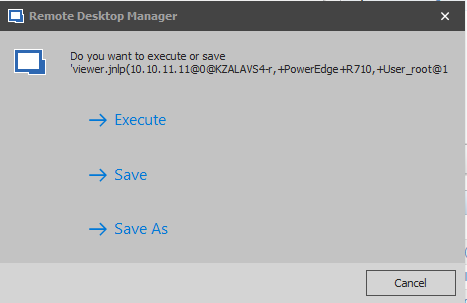
Capture.PNG
Hello,
It should be renaming it after download. Did you try doing Execute?
Regards,
Hubert Mireault
Yes, a window just like above appears with weird *.jnlp name, and then i hit execute and nothing happens.
Checked a temp files and there is a file viewer.jnlp(10.10.11.13@0@idrac13,+PowerEdge+R710,+User_root@1576045401184@ST1=06acd81226f5261f67e558727afb2bef).jnlp.
It renames with double extension, it is a source of a problem. When i rename it to single extension, it works properly.
Thanks for the information. Since we can't test it internally I figured the issue was that it didn't end in .jnlp, but from your description it seems that everything in parentheses is also causing the issue. We'll change how we do the renaming to remove the value between the parentheses (effectively renaming it only "viewer.jnlp") instead of just making sure the extension is there. I'll let you know once it's done.
Regards,
Hubert Mireault
Hello,
We've made the changes internally. This will be available in RDM 2019.2.23.0.
RDM now removes the part in parentheses after "viewer.jnlp" and executes that. Let me know if it works for you after this change.
Regards,
Hubert Mireault
Great, thank you!