
pdugre
Zero-knowledge encryption in more details
Hi,
We actually have a technical whitepaper available in the Trust Center under the title "Devolutions Hub Cryptographic Design - 2024". This document goes in-depth into our encryption approach and security measures. It can be found using the Trust Center link here:
https://devolutions.net/security/
Zero-Knowledge Principle: In this context, zero-knowledge means that Devolutions servers cannot decrypt your data. This principle is upheld by ensuring that the encryption key, derived from your password and other factors, remains local to your device and is never shared with our servers. Since RDM is the client application, it requires the private key to decrypt the data locally. This approach inherently means that data remains inaccessible from the server-side—only the authenticated, local client can decrypt it.
Encryption Process on Login: When redirected to the webpage for login, your password undergoes local pre-hashing with domain separation, ensuring it can't be used to derive your private key. This process uses robust key derivation functions that significantly reduce the risk of brute-force attacks.
OAuth for Authentication: OAuth tokens handle only authentication and session management, with no connection to data confidentiality. While Devolutions does have access to OAuth tokens, they cannot be used to decrypt your data because the decryption key itself is derived directly from your password, hardware key, linked mobile app, or printed recovery code—all of which remain entirely client-side.
For more details on our cryptographic design, please refer to the whitepaper linked in our Trust Center.
We will make sure to update our content and put forward this whitepaper which might be relevant to other users.Thanks for bringing this to our attention and hope my answer will help! Don't hesitate if you have further questions,
Philippe Dugré
Application security and cryptography specialist
Quantum-proof encryption for Devolutions Server
Hello Marcel,
Thank you for your message.
For data storage, we use XChaCha20Poly1305, which is quantum-resistant. For data in transit, we rely on TLS, as we avoid custom encryption protocols; however, TLS does not yet support post-quantum algorithms by default. Additionally, our integration with Devolutions Gateway depends on the JWT standard, which currently lacks support for quantum-resistant signatures.
Please rest assured that we are actively monitoring industry standards and advancements in post-quantum cryptography. As soon as viable quantum-resistant algorithms become available and standardized, we are prepared to implement them to ensure continued security.
Best regards,
Philippe Dugre
Application security and cryptography specialist
After Upgrade to 2021.2.13.0 all my settings and connections are gone
Hello,
Do you have an idea why the user is unable to write a file in the specified path?
Regards
He can write to the path without any issues whatsoever. There is no operating system issue here. The steps below solve the issue with no OS modifications required.
Delete the Devolutions folder in %localappdata%
Options->Security->Other->Disable DPAPI cryptography on local files-Enable
Re-set up data source
Options->Security->Other->Disable DPAPI cryptography on local files-Disable
Something with the upgrade corrupts the local files or renders them unaccessible.
Hi!
I suspect something external to RDM might be messing with the DPAPI keys. Can you try the manipulation I described in my last message?
Unfortunately, it seems like DPAPI causes an issue in your case, so it cannot really be used. Can you try to encrypt a test file manually to see if the same issue exists without RDM? This can be done by right clicking on the file->Properties->Attributes->Advanced and checking the "Encrypt contents to secure data" box. After that, delete your WHfB container, reboot and see if you're able to read the content of the file without admin access.
After Upgrade to 2021.2.13.0 all my settings and connections are gone
BTW, should'nt it say: "...and then reenable DPAPI." For I suspect, that secrets might be unprotected / less secure protected, if DPAPI is not enabled on those files?!
And another BTW: I don't understand how deleting WHfB Container would affect DPAPI in such a way, for (1) DPAPI for RDM could have been initialized using a password based login and (2) computer is member of domain, so DC could/should deliver DPAPI master key restore.
So the reason to this behavior is still untold - maybe.
Hi!
Unfortunately, it seems like DPAPI causes an issue in your case, so it cannot really be used. Can you try to encrypt a test file manually to see if the same issue exists without RDM? This can be done by right clicking on the file->Properties->Attributes->Advanced and checking the "Encrypt contents to secure data" box. After that, delete your WHfB container, reboot and see if you're able to read the content of the file without admin access.
DPAPI is there to protect local data if there is a file permission issue(if another user can read the sensitive files) or if the hard drive is stolen and not encrypted via BitLocker. However, there is another arguably stronger alternative: If you set up an Application Password on your RDM instance(in File->Options->Security->Application Security(Local)), the data will be encrypted with your application password, which would protect the file from anyone that doesn't have the password.
Update to newest version / DPAPI
Hi!
The EFS toast message was due to the way the application checked for DPAPI support. However, we changed how this detection worked in one of the subsequent minor version(to fix another bug) in a way that won't trigger this message, so downloading the new version should fix your issue!
After Upgrade to 2021.2.13.0 all my settings and connections are gone
Hi!
I saw in your first message that you deleted your WHfB containers, which I suspect deletes your DPAPI keys and renders the .enc and .stv files unreadable and un-writable.
Are you able to manually read the content of the RemoteDesktopManagerFree.enc file?
If this is the issue, you could try the following workaround:
Delete all the configuration files in the %localappdata% folder (RemoteDesktopManagerFree.cfg, .bak, .ext, .exb, .stv, .stb, .enc, .enb)
Open RDM and go to Options->Security->Other. From there you can check the "Disable DPAPI cryptography on local files" box.
If you still have any issue from there, delete RemoteDesktopManagerFree.enb, RemoteDesktopManagerFree.enc, RemoteDesktopManagerFree.stv and RemoteDesktopManagerFree.stb.
Re-set up your data source and local database as David mentioned.
I hope this helps!
RDM on terminal server [roaming profiles]
Hi,
Since RDM 13, we released a new Shared Passphrase Security Provider v2 which offer the option to save the encrypted passphrase in the registry for use on terminal server:
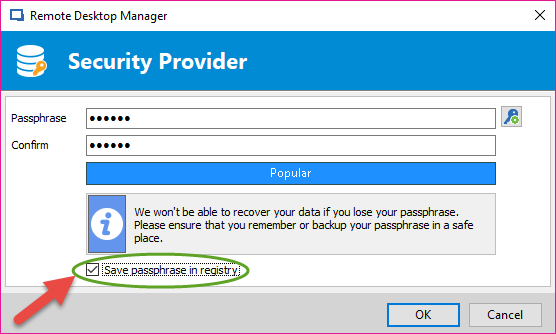
Since it uses a new Security Provider, just make sure that you re-enter the passphrase on each computer using the security provider. Also, every user that require access to the database must user the newest version of RDM.