
maximojo
Running automation
I will try. However, would this be something that would have changed in the last few months? Because it was working for a long time before this.
Running automation
Hi Mark,
Works fine in RDC manager. I think it's something that RDM is doing.
m
Running automation
Hi Mark,
v 3.6.3.0
I am not sure after which version it had stopped working as I just started automation again but it definitely hasn't been working for the past few weeks.
It must be something in RDM as I tried a regular Microsoft RDP window and minimizing my tests still run.
Perhaps you added something to shut down the Windows UI regardless of the settings in the registry values indicated in the article?
HKEY_CURRENT_USER\Software\Microsoft\Terminal Server Client
HKEY_LOCAL_MACHINE\Software\Microsoft\Terminal Server Client
Also I'm pretty sure this doesn't work as well
https://support.smartbear.com/testcomplete/docs/testing-with/running/via-rdp/keeping-computer-unlocked.html
Running automation
Hi there,
I run automation on a bunch of VMs and use this workaround so that when the VM is minimized the test still runs
This has worked for a while but now seems to not work. What does RDM do when (assuming I have multiple RDP sessions running through RDM)
- an RDP session is not visible i.e. it is not the visible tab
- when RDM is minimized
Just trying to track down where this stopped working.
Thanks
m
Tile windows buttons gone?
My bad again! It doesn't show it in the Tab (View only) in Classic UI. Just at the top of the main window caption bar. Thanks!
Tile windows buttons gone?
Hmm though it would seem the custom Keyboard shortcut i setup for RDP Toggle View Only mode no longer works in classic UI mode
Tile windows buttons gone?
ah my bad. I see the setting
Tile windows buttons gone?
What do you mean by the "Classic UI"? Do u mean it's a setting I can change? Or do I have to go back to a previous version of RDM?
Tile windows buttons gone?
Hi there,
Not sure if this is a bug or a boo boo on my part but I can't see any of the Cascade, Tile Horizontal, Tile Vertical options anymore with the latest version of RDM
https://help.remotedesktopmanager.com/index.html?gettingstarted_whatisremotedesktopmanager.htm
http://screencast.com/t/SBhqhdWohlF
Did I disable some setting inadvertently? Or is this a bug?
Does rpd session "time out" ?
Hi there,
I was curious if there was a setting that causes the Windows rdp session to "time out", "go to sleep", "disconnect" or some other method in which the session is disengaged in some way.
I have disabled all the power, screensaver, sleep related settings in Windows that I can find.
Does RDM have it's own timeout somewhere in its settings that will "sleep" the rdp session? Or sleep the Windows GUI?
I know if the session is not in focus windows will shut down the GUID but I have disabled this through the registry.
Thanks for any help
m
"View only" mode still allows mouse movement
Hmm ok could be. I use TestComplete. It runs on the VM but I have no idea how it might interact with RDP itself. All good. Just might not be possible.
"View only" mode still allows mouse movement
Hi there,
Love the View only mode!
However, it seems if my automation is moving the mouse and view only mode is enabled, I can't click in the relevant RDP window, however the mouse WILL MOVE with the automation.
So as I move my mouse across the view only mode rdp session and my automation on the rpd session is moving the mouse around, the mouse ON MY LOCAL PC will move with the automation RDP session mouse.
Probably an unusual situation but if the mouse could be made to not move with the view only RDP session mouse that would be great.
Thanks
Mark
Thumbnail view of active VMs
Microsoft's RD Connection Manager 2.7 is buggy but the one thing I like about it is the thumbnail view
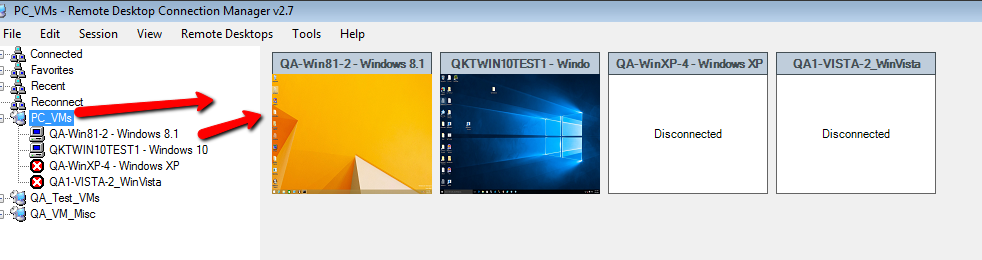
Is there something similar in RDM? The only thing I can find is the ability to tile windows but this is not quite what I'm looking for.
Shortcut key for setting VM to "View Only"
Hubert,
WIth the latest version I downloaded today the CTRL + Viewonly button DOES set all the windows to View-only. Great!
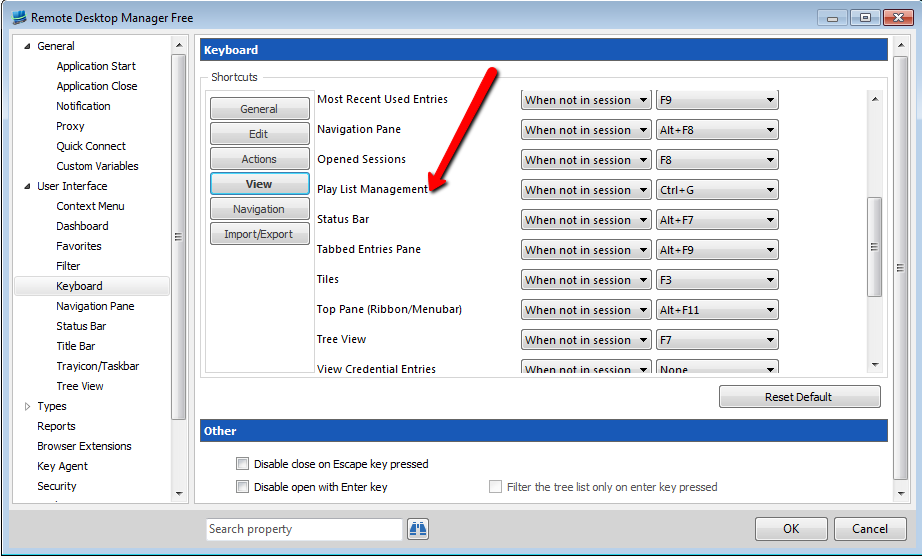
However, there is no option on Keyboard > View yet. See image. Or maybe you meant the release after this one (2.6.0.0)
Ability to set "View Only" on all open windows i.e. active rdp sessions
Awesome! Thank you!!!
Ability to set "View Only" on all open windows i.e. active rdp sessions
I think I've actually tried to press CTRL + View Only to see if that happened to work :)
Sounds perfect to me!
Ability to set "View Only" on all open windows i.e. active rdp sessions
Hi there,
Is there some way to click the Actions > View Only button and have all open rdp sessions set to "View Only"? I know you can do it window-by-window but when I have 8 VMs open and want to set them all to view only it'd be great to have a way to do it in batch.
Thanks
m
Shortcut key for setting VM to "View Only"
Had the problem still but cleared the forum cookie as you said. That did the trick!
Shortcut key for setting VM to "View Only"
Great! Thanks!
FYI for some reason I couldn't view this post on Chrome. Had to go to IE11.
See image for what I saw on Chrome.
Shortcut key for setting VM to "View Only"
I use RDM with some automation testing I'm doing. It'd be great to start some automation and set to View Only quickly so I don't move the mouse and disturb the automation.
Shortcut key for setting VM to "View Only"
Yes. Sorry. That's what I meant :)
Shortcut key for setting VM to "View Only"
Hi all,
Is there a shortcut key for setting a VM window to "View Only"? That would be ideal for me! I just can't find a way to do it!
Thanks
m
Change keyboard mappings for RDM
Sorry my bad. I figured it out.
Thank you
Change keyboard mappings for RDM
Hi there,
I can't find this for the life of me.
When you press
CTRL+LEFTARROW
in RDM it switches windows in RDM.
However, i would like it to go to the VM so I can highlight text.
How would I do this?
Thanks
m
Logging into VM with different time that current time
Apologies I am a bit of a newb at some of this:
"import the rdp session"
What do I import? Is this an .rdp file?