
holger01
VMware vSphere 6.5 HTML5 client "auto submit" doesn't work
By the way, a similar issue exists with the login form for Microsoft resources, like the Office365 cloud and other Microsoft services.
https://login.microsoftonline.com
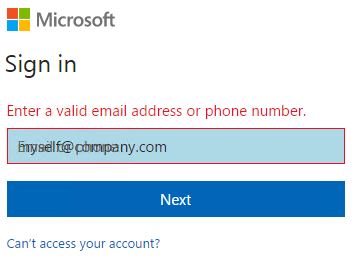
The necessary field "loginfmt" in form "f1" is filled correctly by RDM but auto- and even manual submit doesn't work and the error message "Enter a valid email address or phone number." is displayed. The placeholder text "Email or phone" is overlayed with the RDM supplied value for the username. I guess because the field never received a formal focus when the username got entered, the website assumes no value has ever been entered.
Ultimately, one has to manually modify (add a blank and delete it again) the RDM supplied username in order for the website to recognize a value has been supplied. Especially as overlayed text is displayed, most of my users are confused and fall back to the complete manual way, entering their user name by themselves.
VMware vSphere 6.5 HTML5 client "auto submit" doesn't work
Hi David,
thanks for looking into it (as soon as you have built your vSphere 6.5 Environment)
VMware vSphere 6.5 HTML5 client "auto submit" doesn't work
As stated in the topic, the Autologin feature doesn't work with the new HTML5 (yay, no more Flash!) vSphere Client.
The username/password fields are filled correctly, but the submit button stays disabled and cannot be triggered/clicked. Hence, "auto submit" won't work
Even though the fields are filled, in order to enable the Login (Submit) button, one has to at least once activate/focus the username field and then leave (lose focus) this field again with at least one alphanumeric character entered, or cycle through them with the tab key.
So for the RDM prefilled username password field, this means, clicking in the username field and then click somewhere outside. Alternatively, press the "Tab" key once, which results in activating/focusing the username field and the submit button gets enabled.
As I noticed that behavior with some other websites as well, maybe it's a good idea to not find a specific (scripted?) solution to this vSpehere HTML5 issue exclusively but a more common approach/option for RDM.
Basically it would mean activating/focusing all fields where RDM inserts values into once prior to firing the submit action.
Inconsistent Proxy behaviour for chrome web sessions
Hubert,
thank you. The update indeed overcame the proxy issue and it's confirmed working now.
Very much appreciated!
Add-on Request: Veeam Backup Console
Hi Michaël,
thank you, i can confirm it's working for us now.
"Close Tab" closes active web session tab instead of selected tab
David, Hubert, thank you, as usual, for your blazingly fast support :)
"Close Tab" closes active web session tab instead of selected tab
When using a session from type web session with multiple tabs and doing a right click on an inactive tab, selecting "Close Tab" closes the currently active tab instead of the one right clicked upon.
And in addition, maybe not a bug, but right clicking the empty tab space and selecting "New Tab" creates a new tab and opens the original URL as defined in the session properties, which might not the expected/desired behavior. It might be safer to start with a blank tab.
AD sync ignores OU change of objects
Hi Mark,
you're right, descriptions are indeed updated. Maybe I did something wrong when I checked that.
Deleted objects do not show up in sync log
Thank you David. With "release" you're referring to beta releases, right?
AD sync ignores OU change of objects
Hi Maurice,
the action is set to "Delete".
In addition, I also noticed, that the Description of a session is also not updated if the AD object description field was modified.
AD sync ignores OU change of objects
I'm using the AD sync feature of RDM to sync RDM sessions with AD server objects.
I noticed, when an AD server object is moved to a different OU in AD, it is not moved (or deleted/created) to the new group in RDM on the next sync.
Sync with AD using different credentials imports resources from wrong AD
Definitely a valid reason ;)
As for the synchronizing issue, it's at least reproducible in our environment for any AD sync session I have. If I can supply you with any debug information, I'd be happy to.
Digest Authentication broken
hi Hubert,
I created a completely new web session entry with credentials directly defined in the session entry. Same result. Credentials effectively used are the ones from the user I run RDM with, not the ones defined in the session.
I tried this with multiple different websites to rule out issues with a specific website. Maybe your embedded Chrome component itself was updated recently and doesn't handle digest authentication differently/incorrect?
Digest Authentication broken
Any news on that from the developer? Because some important sessions are really not working for us without this crucial functionality.
Bug with iLO session templates when syncing
This is the situation:
I created a template for the session type "HP Integrated Lights Out (iLO Web)" which includes a sub connection to a session with type "HP Integrated Lights Out (iLO Application)".
I use this template for synchronizing ILO targets from AD with respective sessions in RDM.
First issue with HP Integrated Lights Out (Web):
Even though I specified in General/URL: "https://$HOST$" the synced RDM session contains only the resolved hostname in URL without the preceeding https:// which results in a failed connection to iLO Boards where only https is active.
Second issue with the sub connection HP Integrated Lights Out (iLO Application):
For both, connection Name and General/Host name I specified $HOST$. But only the sub connection name gets resolved to the real name for a synced session, the General/Host Name is still represented by $HOST$ and opening such a session really literally tries to connect to "$HOST$" instead of the real host name, which obviously fails.
Deleted objects do not show up in sync log
Hi David,
thank you for update on that
Digest Authentication broken
Thank you David :)
Digest Authentication broken
I've noticed recently that the Digest Authentication mode of embedded Chrome web sessions seems to be broken.
No matter if I define session credentials, inherit them, use short domain or dns domain names - the credentials used are the ones from the logged on RDM user instead. This was definitely working some versions before (don't remember exactly which was the last functional one).
Some of the affected sites also accept basic authentication which works with the correct credentials supplied. However this is no solution for the websites which exclusively accept Digest authentication.
Sync with AD using different credentials imports resources from wrong AD
Hi Hubert,
thanks for that fix. Though I don't really understand why we would need an option for that instead of always combining username and domain? Would it ever work without combining it?
One more thing. Currently if the logon to a domain for a sync fails for whatever reason, the domain of the user who is running RDM currently gets queried and all objects from that domain are imported, which is definitely never the desired action.
Instead I would suggest to stop the sync and add a meaningful entry to the sync session log, like "Failed to authenticate, sync aborted"
Deleted objects do not show up in sync log
I'm synching RDP sessions with server objects in ADs automatically every night with Mismatch action set to "Delete".
The log contains newly added servers but lacks the deleted ones. I suppose the log should be comprehensive, thus containing deleted (or moved, in case that action is chosen) objects as well.
Sync with AD using different credentials imports resources from wrong AD
Hi Hubert,
yes confirmed, when setting the username format to "domain\username" in advanced session settings, it works. Good finding!
I'll configure my sync sessions accordingly until you release a fixed version. Thanks a lot.
Add-on Request: Veeam Backup Console
Hi Michaël,
you're right. I've used the format "user@long.domain.name" instead of "shortdomain\user" which ends up with the servername prepended to the whole username@domain. Not sure if you can do something about that.
However, "shortdomain\user" is confirmed working, thanks for pointing that out.
By the way, if I put in "long.domain.name\user" it's also working. So there shouldn't be an issue with using long domain name instead of the short one, because our (inherited) accounts usually employ the long domain name.
I also did some more testing with the session credentials. It doesn't matter if it's set to inherited or if I supply an actual credential entry from the credential repository - the domain name is simply not taken into account. I guess it makes sense adding the additional domain field in your add on form and fixing the session credential handling at the same time.
Thanks for your efforts!
Add-on Request: Veeam Backup Console
I've tried the latest version supplied in this thread as well as the one linked on your homepage: https://remotedesktopmanager.com/download/AddOn/Veeam1.0.0.0.zip
But I'm still facing the same problem as Stefan, the content of the RDM field "Username" has the server name prepended in the Veeam Login dialog. And if I supply the credentials using Inherited session credentials, the domain is ignored and only the username of the credentials is inserted - still with the server name prepended.
Sync with AD using different credentials imports resources from wrong AD
Hi Jeff,
in this case no - username and password consist of upper/lower case characters and numbers only. The password is 20 characters long though.
Sync issues with scheduled tasks
A late feedback on this as it might help others who are stuck with the same problem.
I finally figured out, that it is CRUCIAL to configure the scheduled task to be "Run with highest privileges".
Otherwise the above mentioned behaviour of RDM getting started, consuming some CPU and RAM for some seconds then declining to around 50MB RAM usage with 0 CPU consumption and stays there forever, eventually getting killed manually or by the task scheduler configured run timeout. And actually no sync is ever performed.