
stefan
compatibility problem with cryptomator
Same for mounted drives using e.g. AirLiveDrive
compatibility problem with cryptomator
Hi there,
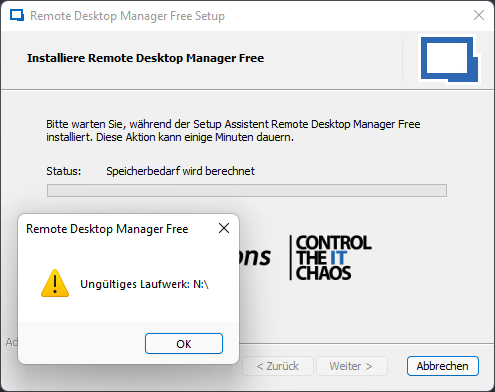
I am using Cryptomator. And every time I try to update RemoteDesktopManager (free) I get an error which says something like "invalid drive: N:\" (N is the drive of my cryptomator safe).
(In my case I am using it with FUSE because it is faster: https://community.cryptomator.org/t/winfsp-how-to-use-it/7980)
The only solution is to unmount all cryptomator safes and then perform the update. (Maybe it is on installation too.)
How to reproduce:
Install Cryptomator and create a safe: https://cryptomator.org/downloads/
Mount the safe as folder (not tested with default Dokany - in my case I use FUSE, see above)
Try to update RemoteDesktopManager
Would be great if this can be fixed. Not only because I have no clue what RemoteDesktopManager is looking for on my encrypted folder - nor should it cancel the installation if there is any cryptomator drive.
Thx
Stefan
SQLite Master-Password
Hi,
I tried the Linux client using XUbuntu but I have some troubles to connect it to my SQLite database.
My database was created using the windows client and I want to continue using it on windows and linux. As it is a file on my nas I encrypted it with a master password. This works fine on windows (asks me every time I start). In the linux version the password option is grayed out and I cannot set "ask every time" or set the password. So it always promts a wrong master password error if I try to use it.
Is this a missing or non supported feature?
Stefan
SSH misbehaviour
Thanks for the information how to switch back to putty - I am going to do that and test again after the next release.
I found one way to reproduce the flicker (Ubuntu 18.04):
- Make sure the screen is filled with information (e.g. do some "ls -la")
- Now press multiple times "tab" or hold it.
You can see that random lines flicker.
SSH misbehaviour
Hello,
I updated to the newest community version of RemoteDesktopManager and having some troubles:
- Using "Insert" key inside the shell (SSH) is no longer working. I used it to switch to the edit mode inside the editor "vim".
- Usinig scroll buttons no longer work (e.g. to scroll through logs).
- Terminal is flickering really oftern.
- Paste using right mouse button is working after left clicking inside the shell multiple times ... no idea why.
I do not know if there are more errors or if these errors are all known. But it would be great to get putty luke behaviour back again.
Thank you very much!
Additional information:
- Product: Remote Desktop Manager Free
- Version: 2019.1.3.0 64-bit
- .Net Runtim: v4.0.30319
- .Net Version 4.7.2 or higher
- At the moment no loaded addons
Firefox AddOn
Hi there,
is there a firefox addon to use the passwords in the browser?
Thx for your help!
Repair SQLite Database
Hello Jeff,
thank you very much for your help. Was very happy to see that the backup has a history.
I was able to restore the last successfull backup which seemed to be created before the database got broken. Currently it seems that I have no losses.
The old database was complete broken and I created a new one. The first thing I did - enabled the Backup function again :-)
Thank you very much for your help!
Just one thing:
The Online backup is not including the documents which are saved directly into the database. Maybe it would be great to have this feature one day :-)
Image already added
Repair SQLite Database
Hello,
I have some issues with my SQLite database. The databse itself is encrypted so I am unable to open it with other tools for repair reasons.
Issues:
- Some entries seems to be broken.
- Unable to view some information
- Unable to open properties for all entries
What I need is this datbase repaired or an export, but currently this isn't possible. Can you please help me to repair it? I also have a configured backup in the devolution cloud but I cannot download or access it (I also have no idea when the database broke).
I tried to use the internal manage SQLite file option to repair it but all I get is (Analyze, Vacuum and Repair):
PRAGMA integrity_check;
======================
*** in database main ***
Page 3390: btreeInitPage() returns error code 11
On tree page 3444 cell 12: Child page depth differs
On tree page 3444 cell 13: Child page depth differs
On tree page 3722 cell 2: Rowid 3305 out of order (max larger than parent max of 3303)
On tree page 3444 cell 113: 2nd reference to page 3723
On tree page 3444 cell 113: Child page depth differs
On page 3444 at right child: 2nd reference to page 3724
database disk image is malformed
database disk image is malformed
REINDEX DatabaseInfo;
REINDEX Connections;
Information
===========
Connections rows : 113
Database version : 127
Sessions
========
Id Connection type Name Group
------------------------------------ ---------------- -------------------------------- --------------------------------
c3a8e539-1780-4f9c-a241-6a8436c2db8b Group Arbeit Arbeit
Data at the root level is invalid. Line 1, position 1.
Loaded Assemblies
=================
Assembly Cache File Version File
-------------- ------------ --------------------------------------------------------------------------------
False 1.0.84.0 C:\Program Files (x86)\Devolutions\Remote Desktop Manager\System.Data.SQLite.dll
P:\Dokumente\Devolutions\Private.db
Size: 4.28 MB
VACUUM;
database disk image is malformed
database disk image is malformed
PRAGMA integrity_check;
======================
*** in database main ***
Page 3390: btreeInitPage() returns error code 11
On tree page 3444 cell 12: Child page depth differs
On tree page 3444 cell 13: Child page depth differs
On tree page 3722 cell 2: Rowid 3305 out of order (max larger than parent max of 3303)
On tree page 3444 cell 113: 2nd reference to page 3723
On tree page 3444 cell 113: Child page depth differs
On page 3444 at right child: 2nd reference to page 3724
database disk image is malformed
database disk image is malformed
REINDEX DatabaseInfo;
REINDEX Connections;
Image already added
TeamViewer contact list import
It seems like the tool is unable to get the group list. I think this is an error because it has not the permission from the app. (Trying it without the group read permission is generating the same error message your wrote on my pc.)
Can you please check if your app has two settings?
group management -> view groups
computers and contacts -> view only
The readme missed these information, so I the app permission details to the github project page.
TeamViewer contact list import
thx
if you plan to include it into the product - feel free to use my logic :cool:
Image already added
TeamViewer contact list import
Hi there,
I built a tool which is able to export all TeamViewer contact list connections (so called devices) including their groups inside teamviewer.
It was built to be able to import them into RemoteDesktopManager so it produces a RDM compatible csv file which can be imported using default csv importer.
If there are any errors or feature requests please feel free to create an issue at github because I am not monitoring this forum post.
Link: https://github.com/MyUncleSam/TeamviewerExporter
Releases: https://github.com/MyUncleSam/TeamviewerExporter/releases
Yours
Stefan
Image already added
Teamviewer and password credentials
(ok got logged out - the last message was written by me)
Teamviewer and password credentials
Ok the credentials seem to be passed correct now. But there seem to be some troubles in general using the teamviewer connection:
We are using teamviewer with a business license. But if I close teamviewer completely and try to connect over RDM to a teamviewer ID I always get an end of test time message from teamviewer. If I start teamviewer and then try to connect it is working.
If I want teamviewer to stay open and close the connection RDM is not switching back and it seems that the session is still running (sometimes it switches back but it takes minutes). I could activate allow multiple connections but I do not want to do that.
Teamviewer and password credentials
thx :-P
Teamviewer and password credentials
If I manually create the command line string like the examples from the teamviewer page it is working.
Using RDM commandline seems to work (I am getting end of trial error from teamviewer - maybe it is executed in another context because it is licensed):
"C:\Program Files (x86)\TeamViewer\TeamViewer.exe" -i $HOST$ --Password $PASSWORD$
Teamviewer and password credentials
I tried it by providing id and password and it worked. So In my eyes the invoked command is broken if the credential is not only specifying a password (as in my case there is username, domain and password).
Teamviewer and password credentials
Hello there,
we have a teamviewer connection using ID and password. The password is identical with the Windows account credentials password. So I wanted to set this credential entry as teamviewer connection credential. But then teamviewer was unable to connect telling me there was a network error.
If I add a second credential entry with only a password (no username or domain) and add it as credential to the teamviewer connection it is working.
What am I doing wrong? For me it should only use the parts from the credential which it needs - so only the password.
Google authenticator
ok thx, we now activated and tested the force google authenticator solution. This is working how we need it. But it would be great if there is something like "force authenticator on datasource changes" (or something like that for the future - but it is not urgent for me) :).
Google authenticator
Hello there,
currently we installed the software as trial version and wanted to check if we are able to use google authenticators.
I have some questions about that and hope you can give me some information about them:
Currently I saw that it is possible to secure the databse using one google authenticator. Is it possible to add multi authenticators which can be used to allow the datasource edit? (because more than one user should be able to edit the datasource)
Is it possible to allow the users to set a per user google authenticator for their account? This would be great because not every employee which should use the system has a company phone.
Setting permissions
Ah thx for the information!
Setting permissions
Hello,
I am having some troubles configuring permissions.
I am using as DataSource a SQL Server 2014 in an AD environment. So I did the following steps:
- Added another user from AD (Database user was created successfully)
- Added a security group and a role
Now if I try to apply a permission I open an entry and try to set permissions:

-->

What do I have to do to set permissions? (I tried to get information using help but wasn't able to find anything.)
Thank you very much for your answer!
RemoteDesktopManager: Lock application on locking windows
Hallo,
currently it is only possible to lock the application by using idle timer or if the application gets minimized. When I leave my PC I normally press WIN+L to lock my Desktop for security reasons. I think it would be a great feature to lock the RemoteDesktopManager Database on locking the PC. This would lock the database not only if the user locks the pc - it would also lock if e.g. a notebook switch into standby mode.
Display Username
Ok that worked fine. I tried now to rename every entry and wanted to get ADDRESS (USERNAME) e.g. http://www.google.com (noreply@googlemail.com)
I checked http://help.remotedesktopmanager.com/index.html?settings_variables.htm to get the variable $HOST$ but I was unable to use it. I tried:
$connection.Name = "$HOST$ (`$USERNAME`$)"
$connection.Name = "`$HOST`$ (`$USERNAME`$)"
$connection.Name = $connection.Host + " (`$USERNAME`$)"
Can you please tell me how to use it (or a link to any documentation of working with batch)?
(Is there any possibility to connect to the datasource using C#.Net and iterate throught all entries and edit them?)
Chrome extension adding credentials
Hallo,
I am new to Password Vault but I have no idea what to do:
If e.g. I login to this forum and click on the chrome extension, it tells me there are detected credentials. After saying "New" it adds them to my Vault ...
After I check my vault there is a new entry called "forum.devolutions.net" but I am having two problems with this entry. Maybe you can tell me how to fix because I searched and havent found anything related to that:
Is there any option to change the default folder? I have a subfolder called "Passwords" for all my internet passwords and I want them to be there (without moving them by hand).
If I check the added entry it has no username nor a password. It told me the correct username by adding it using the chrome extension?!?!?
Thank you very much for your help!
Display Username
Hallo Maurice,
is ther an option to batch rename all entries by adding $USERNAME$ as suffix (for free edition)? (only my password entries because I am using Remotedesktop Manager too)