
jarrod
Locked out of RDM after Windows 10 update today
I knew my password, but there was some bug preventing me from logging in. There was an update available, after installing that update, I was able to login again. I hope this helps!
Reconnect to all RDP sessions
I would suggest the right click menu where reconnect is already placed, so there's two potential spots that make the most sense to me. Please see the image below to see where I mean. Maybe it would make sense to add some logic where the option only appears in the menu if more than one session is open?

Reconnect to all RDP sessions
I tend to remote into my own workstation which causes the display size to change depending on where I remote in from. It would be really handy to have a 'reconnect all' button somewhere to resize the sessions to match the current resolution I'm using.
Cheers
GUI issues
Hello,
If you want to apply Windows combination key, like Alt+Tab, in a remote session, please refer to this post https://forum.devolutions.net/topic24470-alttab-in-remote-session.aspx#post89130.
Best regards,
I've edited my opening post by adding the following information in the hopes of reducing confusion.
[EDIT for clarity]: This has the same effect as when you do an application switch using Alt + Tab on the host system - however I am not invoking an application switch using Alt + Tab, I am simply using the mouse inside of the RDP session within RDM.
Incorrect RDP Session launching
Hi,
Does it always happen for RDP or this happen for another type as well?
I only have one SSH type connection in use and only use it for a few minutes (once) each week. That said I cannot recall it happening when I use the SSH shortcut from the navigation tree.
GUI issues
Hello,
You can check the Always on top option in File->Options->User Interface.
Best regards,
There are so many cool features in this program, thanks for sharing this. I believe it would prevent the issue from happening. The issue is still present if this option isn't enabled, and as expect I have to minimize RDM if I want to use other programs with it being always on top.
thanks again
GUI issues
Hi,
Could you post a print screen of what you mean by popup.
Regards
Hi there, thanks for the quick response. Perhaps a better way of describing this, rather than calling it a pop up, would be the equivalent of pressing Alt + Tab to application switch, except the keyboard combination is being executed on the host machine rather than in the RDP client.
I would have to be recording a video of my screen in order to demonstrate it, but the occurrence is quite infrequent.
GUI issues
This is somewhat rare, happening about once a week. To provide context, I use Remote Desktop Manager Free 2.2.0.0 for about 25 hours a week.
The issue is that I will be working inside of an RDP session and upon clicking something that's no where close to my host computers task bar, an application will sort of "pop up" over top of RDM causing me to have to minimize it to get back to what I was doing. [EDIT for clarity]: This has the same effect as when you do an application switch using Alt + Tab on the host system - however I am not invoking an application switch using Alt + Tab, I am simply using the mouse inside of the RDP session within RDM.
I love this program...minor issue and since its free I wanted to do my part to report the bug.
I'm running Windows 10 x64, everything is fully patched.
thanks!
Incorrect RDP Session launching
I'm running Remote Desktop Manager Free v. 2.2.0.0.
Intermittently, when I double click on a system in the navigation tree, a different RDP session is launched. For a while I thought it was just me misclicking, but today its happened about 5 times and the most recent event launched an RDP session that was about 5 entries away from where I was trying to click. I'm certain this is a bug and have been experiencing it in previous versions of the software.
I'm running Windows 10, 64bit with dual monitors, everything is patched and up to date.
Locked out of RDM after Windows 10 update today
Installing/upgrading to this latest version did the trick, I'm able to get back into RDM Free. I think Microsoft messed things up a bit with this last windows 10 update, it broke Remote Server Admin Tools, my Antivirus had to be reinstalled and this weird issue where I was locked out also occurred.
Thanks for your help.
Locked out of RDM after Windows 10 update today
I'm running RDM Free 2.0.5.0.
Jarrod
Locked out of RDM after Windows 10 update today
The Windows 10 update that I installed this morning took a long time and was a major release, I even had to reinstall RSAT because the tools disappeared.
When I went to launch RDM, it asked me for my windows credentials as I have it setup to do, but every time I try to login it tells me I have an invalid password entered.
I've checked my account isn't locked out, I've tried repairing the installation and rebooting but nothing so far has worked.
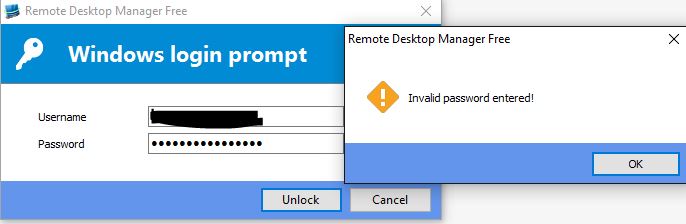
How can I regain access to it?
Thanks!