Locked out of RDM after Windows 10 update today

The Windows 10 update that I installed this morning took a long time and was a major release, I even had to reinstall RSAT because the tools disappeared.
When I went to launch RDM, it asked me for my windows credentials as I have it setup to do, but every time I try to login it tells me I have an invalid password entered.
I've checked my account isn't locked out, I've tried repairing the installation and rebooting but nothing so far has worked.
How can I regain access to it?
Thanks!
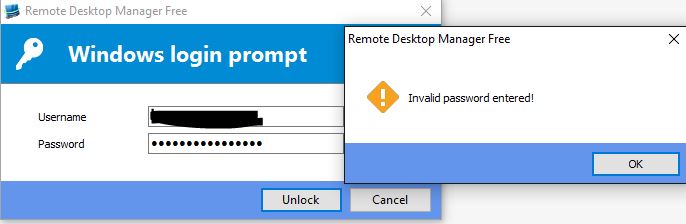
Capture.JPG
All Comments (7)
Hello,
What version are you running? We had released a fix in v11.0.5 or 6 I believe
Regards
Maurice
I'm running RDM Free 2.0.5.0.
Jarrod
Capture[1].JPG
Hello,
RDM Free Edition 2.0.6.0 has been released. Could you give it a try
http://remotedesktopmanager.com/Home/Download
Best regards,
Jeff Dagenais
Installing/upgrading to this latest version did the trick, I'm able to get back into RDM Free. I think Microsoft messed things up a bit with this last windows 10 update, it broke Remote Server Admin Tools, my Antivirus had to be reinstalled and this weird issue where I was locked out also occurred.
Thanks for your help.
i also have the same issue, how can I recover the password?
i found many password recovery on windows 10, but i'm not sure if it works.
source: https://www.iseepassword.com/
I knew my password, but there was some bug preventing me from logging in. There was an update available, after installing that update, I was able to login again. I hope this helps!
@bolly jacjnk,
What version of RDM are you using?
Could you post a print screen of the window that you see.
Best regards,
Jeff Dagenais