
(user deleted)
Hyper-V host list empty
Yes. It will be tomorrow morning since its on my work computer.
Hyper-V host list empty
I dont see a pattern... I just can tell you there are creds missing (they are all the same "type"). I had to manually enter them versus using the repo... I would be happy to do a screen sharing session with you as its still like that.
Hyper-V host list empty
Hi David -
I lost folders that contained "documents" that were linked to local (dropbox) files. Was not a big deal since I had a desktop that was not updated and just exported from there...
Its a local data source, I sent an email in asking about online data source but awaiting a response.
Hope this helps.
Hyper-V host list empty
That fixed it, yes. Thank You..
I noticed when I updated to the .5 build it dumped a lot of my connections, but I will rebuild them... Not a big deal... I did notice on the .7 update that when I go to the "tools" tab to enter the credentials for Hyper-V as required, the credential repository dropdown does not have all my credentials in it now... But it does on the main screen...
Hyper-V host list empty
Any update on this? Thanks :)
Server > VPN
:) Thanks
Server > VPN
I hope you already have this and I just can't find it... BUT..
I would like to setup each server (per-client) so that it does a custom ping (declare the IP to check first) and if it does not respond... It kicks off the VPN.. This is already there, great!
But I have to build this for EVERY server since I cant set it at the "client folder" and set the servers to inherit it. It would be great if there was some dropdown where it could take VPN settings from maybe a VPN configuration in its root folder...
Like I said, I hope you have this, but I just dont see it - been playing with it all day and I have the settings perfect and love what you have going here. As always, David - thanks for what you do! You make my job just that much easier. :)
Hyper-V host list empty
Thanks, David!
Hyper-V host list empty
We use WMI to get the information. Have you specified your credentials in the Tools tab page?
Yes - Tried both "using repository" (which is how I manage all passwords in the program) and entering them directly right there.
Hyper-V host list empty
Here is a success that comes just before the failures...
New Logon:
Security ID: LRE-HYPERV1\Administrator
Account Name: Administrator
Account Domain: LRE-HYPERV1
Hyper-V host list empty
Here is the failure... But this is my laptop... Why would RDM pass this info to the Hyper-V server if I am declaring my credentials in the tabs?
Account For Which Logon Failed:
Security ID: NULL SID
Account Name: Jason
Account Domain: WIN-MSII5V61G32
edited by jlathrop on 11/7/2013
Hyper-V host list empty
I am having this same issue
I see in the security log of the Hyper-V host two success followed by two failures. When I look at the failures, its referencing my laptop login (which is not at all related to this server) but I have checked both pages in the Hyper-V console config in RDM to find that its not being referenced. I have used both the credential dropdown and manually entering them, and it persists.
Any ideas, David? I have put setting this off for a few months because I run into this issue every time. Firewall is not turned on for Hyper-V and I am using the Admin account.
System availability status
David - thats awesome! Thanks :) What version would that be in? I just updated support, I love some of the new features you are doing.
Inventory Report
It would be awesome if we could see the "inventory report" option be apart of any server we add instead of being required to make a new entry (but allow it to be an option still)... I like to pull system information for all my servers to see the memory, cpu and logical drives, not to mention windows updates, etc. I think it would be easier users... I have 100+ servers and I have already entered the info once, I dont want to do it twice.
See fill attached...
Thanks in advance!
Notes - Adjust window size
Yeah that's better than what it was, but I think we could do better yet; it still has a lot of wasted space (if you have more than ~17lines you have to scroll while its only using half of the screen. This is no complaint, its better than what I had so thank you!
Notes - Adjust window size
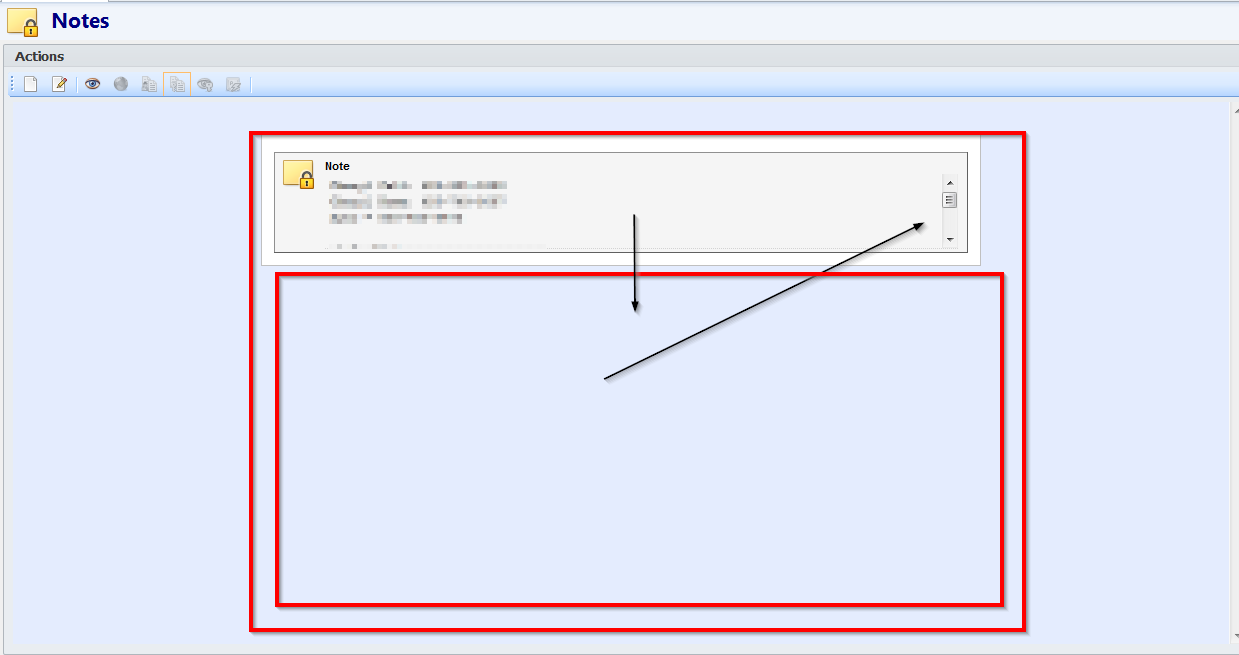
It would be great to be able to see more than three lines in the "notes" entry for items... If you have the window (RemoteDesktopManager) in full screen, you have a lot of room to be able to expand that, but I have to scroll as it stands now.
See Screenshot Attached...
"
"
Online Help
It was not, but is now and that appears to have fixed it. Thanks for the response!
Online Help
It has the time stamp of when I closed it, yes. So to test it I contracted everything, closed it, checked the time stamp and re launched the app... The time is correct but the current state is not.
Online Help
This could be a bug, or just lack of understanding on my part... When I open RDM every time a bunch of the lists on the left are expanded which is a pain in the (you know what)... I can "contract" them all but every time I close and open it again, some of them are all expanded again... Am I missing something? Why does it not save its previous state, open contracted or all be the same? I have found no explanation as to why it does this.