
_rayden_
Attachments bug
OK good news!
I tried on another computer with Windows 10 64 bit and same issue. But...
I've been suspecting it's a problem in the file selection logic of the Attachments window and I just thought to try disabling Auto Hide to see if that will help. There have been issues with focus and Window layout in the past with Auto Hide and perhaps it was messing up the file selection logic. That was the problem!
With Auto Hide disabled, the selected file is properly saved and there are no issues. With it enabled, it returns to the same issue.
Attachments bug
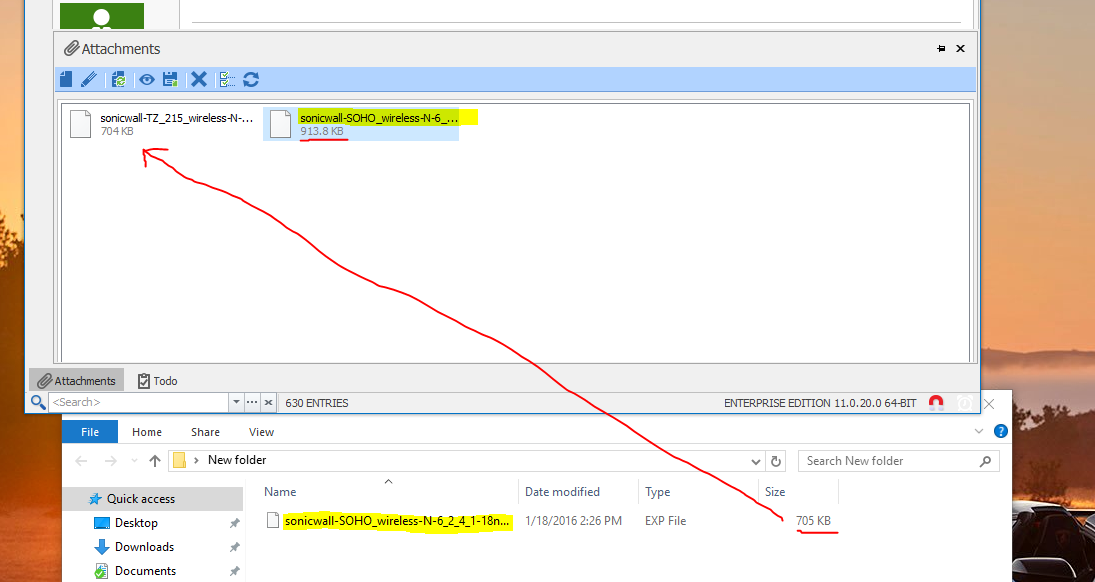
It happens with any file - here are two I just tried.
If you can't reproduce it it must be something to do with my computer. I'll test on another machine and report back.
Attachments bug
Hi,
I add one file at a time by using the 'Add Attachment...' button on the toolbar:
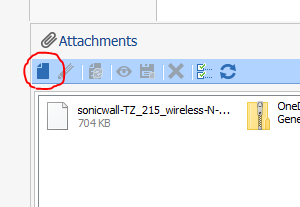
It doesn't prevent me from doing that multiple times.
Attachments bug
OK, thanks for the quick responses.
Attachments bug
Also, it would be a nice bonus if the timestamp of the file could be preserved when attaching and saving the file. We attach config files for network devices and the timestamp helps to know the age of the config.
Right now the time of the file changes when creating the attachment and again when saving the file.
Thanks
Attachments bug
I've deleted both files and added again, tried different file types, more than two files - all produce the same result.
Attachments bug
Hi,
That's correct. The file is intact and contains the contents of the TZ_215 file. There is no corruption of the contents.
Attachments bug
No, whether I right-click or click on the toolbar it's the same result. Here's a pic:
Attachments bug
Hi,
For the last couple versions of RDM I've been experiencing a bug when I save multiple files as attachments to an entry. The files will attach OK but no matter which file I select to 'Save As', only the first file that has been attached is saved. The file name and extension are correct when saving, but the file size and content are equal to the first attached file and not the selected file.
I have to delete the first file to get the second file, and have to delete the second file to get the third file. I've tested using different files and file types and multiple entries with the same results.
I was on RDM 11.0.18.0 and just tried 11.0.20.0. Windows 10 64 bit.
Lost Quick Access Toolbar
Thanks that worked!
Lost Quick Access Toolbar
Hi,
A few days ago it seems RDM reset the UI settings: I lost any customizations I made and the UI reverted to a "bare minimum" look with things like the navigation and status bar hidden. It didn't take much to restore everything but I can't find how to restore the Quick Access Toolbar. I checked the online help and I know I can add buttons to the toolbar but I can't find a way to add the Quick Connect bar, data source refresh, etc.
I tried Window - Reset Layout but it didn't affect the Quick Access Toolbar. I have 'Application security (local)' enabled with a custom password if that makes a difference. Also MSSQL data source; I renamed my domain user account recently and updated to 8.1 (but the UI change happened about a week or two later). Is there a way to restore the toolbar?
User Specific Settings lost upon account rename
OK that's good to know. Rename user would be a good idea I think: especially in the case where a new user takes over for someone else and needs access to the previous user's data.
Thanks
User Specific Settings lost upon account rename
Wouldn't it be better to encrypt using the User's Windows or domain SID? (though I can imagine since you're trying to make this multi-platform that might not be the best solution)
It's not uncommon for usernames to change and if I had a lot of data encrypted with my username, that would be risky. I assume you can change the username back to get access to the encrypted data again?
It's not an issue this time but I'm glad I know this before I had a lot of data encrypted with my username.
User Specific Settings lost upon account rename
Hi,
I renamed my domain account's username and noticed that on the few entries in which I had user-specific settings I no longer have access to it (the user-specific settings are blank as if I'm considered a new user). Under Administration -> Users I can see my old account but can't rename it as the field is grayed out. Using SQL Server data source with domain accounts. Is there a way to simply rename my RDM user account? The SID for the account should have remained the same.
Fortunately this was only a few entries and I can recreate the settings if I need to.
Thanks
Unable to login to Win2k8 servers
Your laptop may be attempting to use the DNS servers of your local connection instead of routing DNS queries for that domain over the VPN. You need to make sure that the DNS servers for the domain and the domain name itself are showing up on the virtual VPN adapter when you do ipconfig /all. The "Connection-specific DNS Suffix" needs to have your domain in it: i.e. company.local. That's how your laptop will know to route DNS queries involving that domain over the VPN to the domain's DNS servers.
You can manually check if your domain's DNS servers are responding properly by doing an nslookup:
nslookup myserver 111.222.333.444
nslookup myserver.company.local 111.222.333.444
(where 111.222.333.444 = IP of domain DNS server)
Unable to login to Win2k8 servers
Could it be a DNS (over VPN) issue since this is intermittent? Are you using FQDM for the server? Could be connecting to the wrong server. When it fails to connect, can you connect using RDC?
I'm on Win 8 and have no trouble launching the built-in RDC with RDM installed - I even run both at the same time. Any error when launching it?
Macro password and special characters
Thanks David! Just to update this, I've since installed a fresh copy of Win 8 Pro 64 bit RTM (I was on Release Preview before) and the first app I installed is RDM to try this again, and the problem is still there.
No rush on this as currently it only affects some routers and switches I manage.
discussion about best practices, or suggestions.
OK I can relate to that. I have a very similar setup of Site->Network/Servers/Printers/Etc->Device and I've been experimenting with using a folder or a session as the parent, like you have. Using a session as a parent does present the confusion you mentioned.
What we started doing is to use RDM for documentation too. So we make liberal use of the Data Entry node and currently I'm using that as the parent with sessions as sub-connections. I've requested for the Other tab of the Data Entry node to be expanded with more columns so it can be used more like a spreadsheet, but you can still record a good amount of info in the Data Entry node.
We also use different icons for these nodes to better differentiate the devices visually and it really helps when you have hundreds of entries. I've found that I can almost eliminate the use of HTTP sessions because you can specify a URL in a Data Entry and set it to open embedded so that the login is auto-typed. So it's become the primary node in a lot of situations and we're standardizing on that for now. Once sub-connections can be moved around, etc this will work better.
Here are example screenshots of a Data Entry node with sub-data entries and sub-sessions:


edited by _RNK_ on 1/14/2013
Show attachments in the navigation tree
Document manager sounds great. I'm thinking centrally organizing docs and linking them to entries like shortcuts. Right now we don't use attachments much for the same reason: it's not easily visible and tends to be ignored or forgotten. There should be a visible indicator for entries with attachments - at least an option that can be turned on.
A bit off topic but since you mentioned a document manager: we use a TrueCrypt container for managing our secure docs. A big advantage is when opening an Excel spreadsheet containing sensitive info like logins, Excel creates a temporary working file (hidden) and this too gets stored on the TrueCrypt mounted volume. So sensitive data is not recorded to the HDD in unencrypted form - especially important on field laptops. I imagine the document manager isn't going to have a feature to mount encrypted volumes for working with secure docs but that would be awesome! It would allow us to get rid of TrueCrypt.
edited by _RNK_ on 1/7/2013
discussion about best practices, or suggestions.
I'm not sure I see how the variables suggestion is significantly better. To reference the parent's variables you'll need a list of all such variables anyway, like we have now. It's unrealistic to expect display names of controls to be as terse as typical variable names.
Regarding sessions: the concept of a group/folder/container and respective entries/files/items is understood by everyone, whereas having one entity represent all of them is not as intuitive. Also, you can have non-session type entries like the data entry or credential entry - where would they fit? A UI for a one-size-fits-all type of entry would be more complex, I imagine.
If you want to make it simpler my suggestion is to use sub-connections only where referencing the parent's variables is needed (e.g. changing a password in the parent should apply to children) and ignore the ability to use or reference any variables in a group/folder - I imagine there are others who use this feature. This is how I manage my ~350 entries.
Don't want to derail the topic too much, but to answer your last question: my iPhone is simpler to use than my Galaxy S2 but as a technical person I much prefer the flexibility of Android. This program is aimed at technical users and I'm sure managing simplicity vs capability (complexity) is a challenging task. I guess it's somewhat like Word or Excel: tons of features but the majority only need a subset of it. I don't think there's one specific way to use this program.
Perhaps taking regular polls on various aspects of the program might help shape it and give everyone an idea of how others use the program.
Macro password and special characters
Here's the session file with credential.
edited by _RNK_ on 1/2/2013
Macro password and special characters
Here's the export file.
Also, I use SQL Server data source with shared passphrase security provider to fully encrypt the database. In case that causes any issues when storing/retrieving the macro keys.
edited by _RNK_ on 1/2/2013
Macro password and special characters
I tried the same macro on a Win 7 Ultimate 64 bit laptop with v8.0.11 with same results for the % symbol.
But now there is another strange issue only on Win 7: special keys in macros like {TAB} and {ENTER} behave strangely and don't type out. With username asdf and password &asdf the macro $USERNAME${TAB}$PASSWORD${ENTER} results in asdf&asdf. When it gets to the {TAB} part it appears to type in ALT+TAB because the Task(Window) Switcher pops up (and stays on the screen). Also the ENTER key doesn't appear to be typed out. Lastly if I repeatedly try this macro, sometimes the macro is cut short like these: asdf&as, asdf&a, asdf&.
** OK I tried setting an Initial Wait time of 2 sec for the macro and this fixes all the issues except the % symbol one. With initial wait of 1 sec there are still the odd times where there are some issues. It appears to me that with wait time of 0 sec the macro starts so fast that it registers that I'm still holding down one or more of the CTRL+ALT+A keys and modifying the typed character (even though i have physically stopped pressing the keys before the macro even starts typing). Strangely this doesn't occur on the Win 8 desktop. Win 7 laptop uses Intel Core i5-560M with 8GB RAM; desktop uses Intel Core i7-3770K w/ 16GB RAM.
Macro password and special characters
Hi,
I just created a new data entry with username asdf and password %asdf
My macro is $USERNAME${TAB}$PASSWORD${ENTER}
I used notepad and the result is: asdf{TAB} (then Windows makes the 'ding' sound, same as if I press ALT+%)
If password is asdf% the result is: asdf{TAB}asdf (again ding sound)
If password is &asdf the result is: asdf{TAB}&asdf
If password is $asdf% the result is: asdf{TAB}$asdf (ding)
Only the % symbol seems to be a problem. I'm running 8.0.10 on Win 8 Release Preview (I'll be changing to Win 8 RTM in the next few days).
BTW - working on a holiday? That's dedication! :)
$PARENT_PASSWORD$ variable missing?
thx