
cpatterson
Error adding new users
Logged in with an SA account. I still do not see the icon. Included the setup of the account I am logged in with, and how it is set up on the SQL side.
Error adding new users
Here ya go...
Error adding new users
I cannot get to a view where I see that icon. I have updated to the latest version and made sure I am an SA.
Error adding new users
The other guy in my group who tested is running the 13.5.8.0 version. Same errors.
Error adding new users
I am trying to add some new users to RDM for the first time in a while, so I am not sure when this started. However, I get an error that I cannot add a new user to the database that says "Unable to Connect to your Data Source" (see attached image), followed by a message that states a lack of permissions, followed by another error that states "Unable to save user." These errors don't make a ton of sense, though, as I can go to another user and edit any of their settings, or delete them entirely. I asked another member on my team, and they get the same result. We are both administrators in the system. Additionally, I have dbo access to the database.
RDM Version 13.5.0.0
SQL Version 2012
Keywords/tags bulk update grayed out
I see this change in the new beta. Thanks!
Tab refocusing
I have installed the beta. Without altering the settings above I have noticed that this behavior has been corrected. Thanks!
Tab refocusing
I have attached a video. As you can see, I open a session to a server while I am in the "All" tabbed group. It redirects me to the tabbed group for that server. I understand it doing that at least, but I would prefer it does not. Next, I go to another server in a different tab. I sign out of that server, and it immediately throws me back to the previous tab which makes little sense to me. I have a colleague getting the same behavior.
Tab refocusing
12.5.4.0
Tab refocusing
We have tabs set up for various server groups such as "IIS Development" and "IIS Production," among many other categories. This generally works great, except a lot of the time I am working outside of these tabs and using the "All" tab. However, if I log out of a server it throws me into the tab of the most recent connection I made. This is especially frustrating if I log out of a server, go start working in another server and the next thing I know I am focused on another server. If I happened to look away for a second this would be a very easy way for me to accidentally make changes to a production box thinking I am still in a development server.
I don't want to entirely disable tabbing as there are times we use that as well. But the refocusing is annoying and might cause an issue eventually. Is there a way to have the program to stop this refocusing? I can't seem to find it if there is.
Thanks!
Keywords/tags bulk update grayed out
Hello Jeff,
Thanks for the response. We are aware of the ellipsis button. We wanted a workaround for this because it is less convenient than the old method. I will have my colleague with the update issue respond.
Thanks.
Keywords/tags bulk update grayed out
I can't find anywhere if this is an expected an update or something along those lines, but those of us on 12.5.4.0 have the Keywords/tags field for entries grayed out, whereas those of us on 12.0.8.0 are not seeing this and are still able to use the bulk update. Is this a known issue, or is there a way to fix this? As a side note, those on 12.0.8.0 are not able to detect a new version of the software neither by restart or a manual update check.
Windows File Shares
Great catch! That did the trick!
Windows File Shares
I recreated the entry, which fixed the external connection issue. Entering that information into the "Host" field did not change anything. I still do not have the elevated access that account would generally grant.
Windows File Shares
Hey Hubert
They way I currently have it set up is as a File Explorer connection type. The two main settings I have in place currently, which is the name of the folder and the "Credentials" which are "My personal credentials." The credentials I have stored there are those to my account with elevated privileges. Additionally, I have the display set to "External" and it is still opening in a tabbed mode.
I have also tried setting a host, which causes the File Explorer to simply open my system's root drive. I've also tried under tools setting the "Credentials" section to "User my personal credentials" as well which are, once again, my elevated privileges account.
Thanks!
Windows File Shares
Was the recently released 10.5 version supposed to have fixed this? I am seeing the same behavior as before.
Windows File Shares
Thanks!
Tag searching for keywords individually
We are making heavy use of the tagging feature and saw something with the filtering that we were wondering about...when you use the filter it obviously shows what you filtered on....the issue we're seeing though is that filtering multiple terms is based on exact match.
For example, two filters we have are "Production" and "SharePoint." If we search for "SharePoint Production" we get the following as expected:
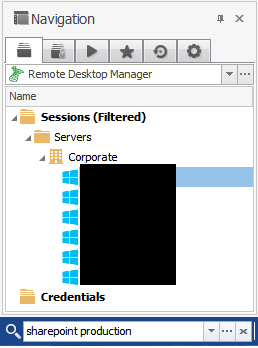
However, searching for "Production SharePoint" gives no results:
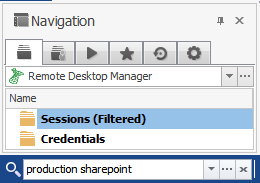
Not a huge deal, but is a bit confusing for people who are looking for an array of information such as "Server 2012 R2 SQL" and something we thought might make the filtering a little more user friendly.
Windows File Shares
Here you go...
edited by cpatterson on 3/3/2015
Windows File Shares
I've tried both external and embedded with no luck.
edited by cpatterson on 3/2/2015
Windows File Shares
Any further ideas on this?
Windows File Shares
File Explorer
Windows File Shares
This doesn't seem to work for me. I attempted the Edit Entry (User Specific settings) and switched the override credentials to my Domain Admin account. It made no difference.
I'm not sure how the Private Vault would help as the credentials I have stored in "My personal credentials" are the credentials I need this share to be launched with.
Windows File Shares
I've looked a bit for the answer here and have had no luck. Basically, our team needs to set up file shares which will be accessed using different credentials than the one we launch RDM with. The other credentials are our Domain Admin creds, which everyone has set to their "My personal credentials." We create the file share and set the "Credentials" to "My personal credentials." It still accesses the file share as our standard account.
I've tried setting the session to "My personal credentials" under the "Tools" tab for the session properties with no luck. I looked at this forum post, but I cannot get it to work either:
https://forum.devolutions.net/messages.aspx?TopicID=2691
Any guidance in this area would be great!