Error adding new users

I am trying to add some new users to RDM for the first time in a while, so I am not sure when this started. However, I get an error that I cannot add a new user to the database that says "Unable to Connect to your Data Source" (see attached image), followed by a message that states a lack of permissions, followed by another error that states "Unable to save user." These errors don't make a ton of sense, though, as I can go to another user and edit any of their settings, or delete them entirely. I asked another member on my team, and they get the same result. We are both administrators in the system. Additionally, I have dbo access to the database.
RDM Version 13.5.0.0
SQL Version 2012
error3.PNG
error2.PNG
error1.PNG
All Comments (10)
Hello,
Could you try RDM 13.5.8.0?
You can download this version here
https://remotedesktopmanager.com/home/download
Best regards,
Jeff Dagenais
The other guy in my group who tested is running the 13.5.8.0 version. Same errors.
Hello,
Do you have access to the credentials of the SA account?
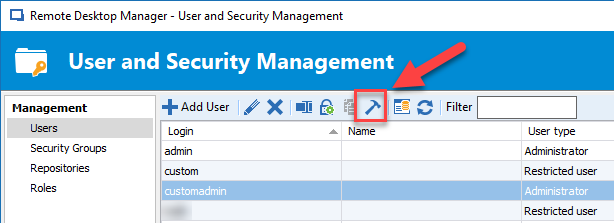
If yes, in RDM 13.5.8.0, could you connect on the data source using this account and perform a Fix SQL Login on your account.
Then, restart RDM on your computer to reload properly your profile and try to create a new user.
Let me know if that works or not.
Best regards,
Jeff Dagenais
2018-05-17_10-41-22.png
I cannot get to a view where I see that icon. I have updated to the latest version and made sure I am an SA.
Hello,
This is stange that you don't see the Fix SQL Login icon. Could you post a screenshot of what you see in Administration -> Users?
Best regards,
Jeff Dagenais
Here ya go...
Capture.PNG
Hello,
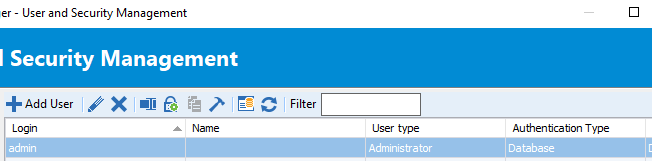
OK, I see. The icon will be present (or not) depending on the type of account that you select in the list.
The authentication type of your account should be Database. The user type should be administrator since your mentioned me that you are an administrator.
When you select the appropriate user, does the icon appear or not?
Best regards,
Jeff Dagenais
2018-05-18_16-34-34.png
Logged in with an SA account. I still do not see the icon. Included the setup of the account I am logged in with, and how it is set up on the SQL side.
Capture2.PNG
Capture.PNG
Hello,
I will send you a link via email to shedule a remote session with one of our level 3 technician to have a look at this with you.
Best regards,
Jeff Dagenais
Hello @Everyone
This setup is using Database users / Integrated Security on SQL Server.
The issue was that his user account didn't have the Server Securable : Alter Any Login.
Once it has been granted, everything went back to normal.
Regards,
Alex Belisle