
MarcST1984
notifications for activity logs
Hello,
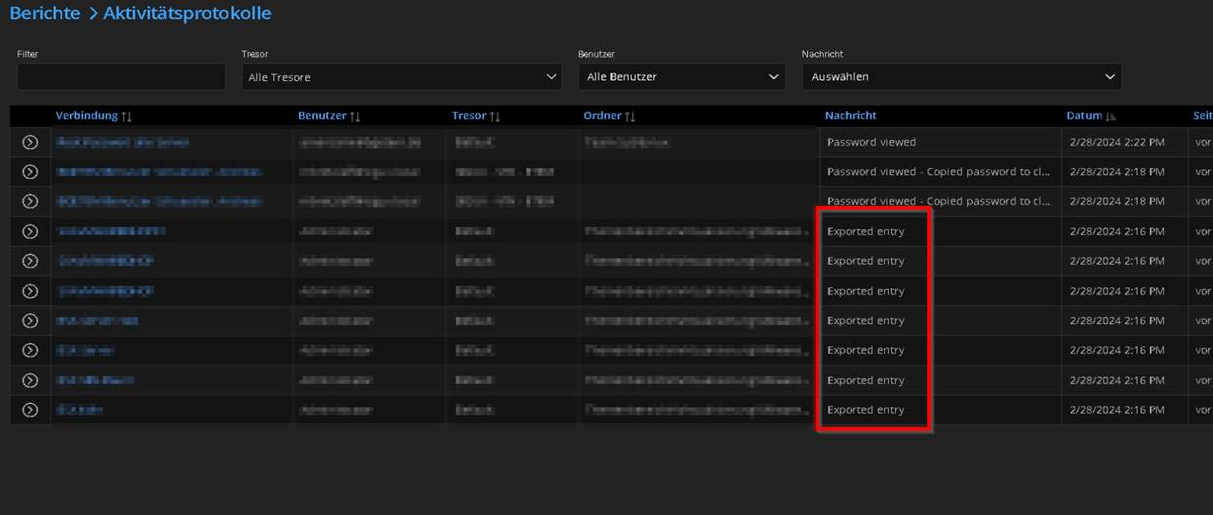
I would like to create a feature request for Devolutions Server. I need a
notification as soon as an export of entries is performed.
This can be seen in the activity logs.
However, I cannot create notifications for these logs.
BREAKING CHANGE Initial OAuth support. Windows authentication is no longer supported with 2FA
Hello Richard,
we use the 2FA with radius (Forti Authenticator). Our Radius system supports push functionality. Can you implement push mode ( RADIUS Access-Challenge) in your Radius request ?
Best Regards
Marc Stawitzki
BREAKING CHANGE Initial OAuth support. Windows authentication is no longer supported with 2FA
Hello Richard,
I use DS 2022.1.10 and RDM 2022.1.20.
In the older versions the 2FA was requested in the RDM application.
Now there is a redirect to the web frontend. I liked the old way better.
But yes, 2FA with Windows authentication works
BREAKING CHANGE Initial OAuth support. Windows authentication is no longer supported with 2FA
I would be happy about a blog entry
Session Types iside Browser possible
Thanks for the quick reply :-)
Session Types iside Browser possible
Are there any thoughts to add an embedded RDP/SSH in form of a HTML page to the web interface.
Keyword replacement RDM Launcher ?
BREAKING CHANGE Initial OAuth support. Windows authentication is no longer supported with 2FA
Thank you for the quick feedback.
Especially the 2FA in combination with Windows Authentication had a high level of protection. With the pure Windows Authentication without 2FA I take out a layer of protection.
If you deactivate Windows Authentication, you get to the DPS site via a redirect. The old variant was very comfortable.
BREAKING CHANGE Initial OAuth support. Windows authentication is no longer supported with 2FA
Hello Devolutions Team,
we are using 2FA with our Windows Authentication.
Since the last update of the DPS Core, this function is no longer available. How can I make sure that a token login can be used before the RDM starts ?
Windows Authentication with 2FA has worked well over the years.
Kind Regards
Marc Stawitzki
Password Management User Access Rights
Hello Erica,
i have try the permissions. If the user doesn't have any rights to view the passwords, is it possible to hide the password ?
So if a user have no rights, so he doen't have to see it.
Our imagination is that, any Admin can see any session entry.
The Passowrds are only visible for the responsible person, which cared for network storage or somthing else.
Our Head of IT can see every passwords.
Password Management User Access Rights
Hello Erica,
i can view the passwords entry, even if i put the rights.
I have one folder Cisco Telepresence, a user group "Cisco Telepresence" have full rights.
One specific User should have only access to the sessions, not to the passwords.
How can i handle that ?
Password Management User Access Rights
Hello,
the current DPS Release have no possibility to manage access to the passwords.
If i have permissions to view entrys, i have permissions to passwords as well.
I miss the possibility to separate that.
Windows Authentication feature not working with DPS 6.0/RDM 14
The domain config with NETBIOS works, the FQDN don't work fo us.
Add Mateso Passwordsafe as Password Storage
i have ivolved the Mateso support as well.
Do you have contacts to the mateso developer ?
Windows Authentication feature not working with DPS 6.0/RDM 14
For your information,
any tries to sign in failed, with any authentication.
Workaroud:
I edit the DPS settings, go on Domain and save the settings again.
After that, the authentication was successfully.
I had the same mistake yesterday morning.
Add Mateso Passwordsafe as Password Storage
Hi Jeff,
this are the the results of the debug process.
I send this result to support with subject "Issue Mateso Addon"
Silent: PsrApi.PsrServiceException: Die Eingabe ist keine gültige Base-64-Zeichenfolge, da sie ein Nicht-Base-64-Zeichen, mehr als zwei Leerstellen oder in den Leerstellen ein Zeichen enthält, das ungültig ist.
bei PsrApi.Internals.ServiceClients.PsrWebServiceClientBase.ParseResponseForServiceException(String responseString)
bei PsrApi.Internals.ServiceClients.PsrWebServiceClientBase.<Get>d__15`1.MoveNext()
--- Ende der Stapelüberwachung vom vorhergehenden Ort, an dem die Ausnahme ausgelöst wurde ---
bei System.Runtime.ExceptionServices.ExceptionDispatchInfo.Throw()
bei System.Runtime.CompilerServices.TaskAwaiter.HandleNonSuccessAndDebuggerNotification(Task task)
bei PsrApi.Managers.AuthenticationManager.<PrepareWebService>d__13.MoveNext()
--- Ende der Stapelüberwachung vom vorhergehenden Ort, an dem die Ausnahme ausgelöst wurde ---
bei System.Runtime.ExceptionServices.ExceptionDispatchInfo.Throw()
bei System.Runtime.CompilerServices.TaskAwaiter.HandleNonSuccessAndDebuggerNotification(Task task)
bei PsrApi.Managers.AuthenticationManager.<LoginInternal>d__10.MoveNext()
--- Ende der Stapelüberwachung vom vorhergehenden Ort, an dem die Ausnahme ausgelöst wurde ---
bei System.Runtime.ExceptionServices.ExceptionDispatchInfo.Throw()
bei System.Runtime.CompilerServices.TaskAwaiter.HandleNonSuccessAndDebuggerNotification(Task task)
bei PsrApi.Managers.AuthenticationManager.<Login>d__7.MoveNext()
--- Ende der Stapelüberwachung vom vorhergehenden Ort, an dem die Ausnahme ausgelöst wurde ---
bei System.Runtime.ExceptionServices.ExceptionDispatchInfo.Throw()
bei System.Runtime.CompilerServices.TaskAwaiter.HandleNonSuccessAndDebuggerNotification(Task task)
bei Devolutions.RemoteDesktopManager.Managers.MatesoPasswordSafeManager.cfafc71ae14ae20c28e22217c444dcd54.MoveNext()
5 - Connection States: Refresh : 0 ms
Silent: PsrApi.PsrServiceException: Die Eingabe ist keine gültige Base-64-Zeichenfolge, da sie ein Nicht-Base-64-Zeichen, mehr als zwei Leerstellen oder in den Leerstellen ein Zeichen enthält, das ungültig ist.
bei PsrApi.Internals.ServiceClients.PsrWebServiceClientBase.ParseResponseForServiceException(String responseString)
bei PsrApi.Internals.ServiceClients.PsrWebServiceClientBase.<Get>d__15`1.MoveNext()
--- Ende der Stapelüberwachung vom vorhergehenden Ort, an dem die Ausnahme ausgelöst wurde ---
bei System.Runtime.ExceptionServices.ExceptionDispatchInfo.Throw()
bei System.Runtime.CompilerServices.TaskAwaiter.HandleNonSuccessAndDebuggerNotification(Task task)
bei PsrApi.Managers.AuthenticationManager.<PrepareWebService>d__13.MoveNext()
--- Ende der Stapelüberwachung vom vorhergehenden Ort, an dem die Ausnahme ausgelöst wurde ---
bei System.Runtime.ExceptionServices.ExceptionDispatchInfo.Throw()
bei System.Runtime.CompilerServices.TaskAwaiter.HandleNonSuccessAndDebuggerNotification(Task task)
bei PsrApi.Managers.AuthenticationManager.<LoginInternal>d__10.MoveNext()
--- Ende der Stapelüberwachung vom vorhergehenden Ort, an dem die Ausnahme ausgelöst wurde ---
bei System.Runtime.ExceptionServices.ExceptionDispatchInfo.Throw()
bei System.Runtime.CompilerServices.TaskAwaiter.HandleNonSuccessAndDebuggerNotification(Task task)
bei PsrApi.Managers.AuthenticationManager.<Login>d__7.MoveNext()
--- Ende der Stapelüberwachung vom vorhergehenden Ort, an dem die Ausnahme ausgelöst wurde ---
bei System.Runtime.ExceptionServices.ExceptionDispatchInfo.Throw()
bei System.Runtime.CompilerServices.TaskAwaiter.HandleNonSuccessAndDebuggerNotification(Task task)
bei Devolutions.RemoteDesktopManager.Managers.MatesoPasswordSafeManager.cfafc71ae14ae20c28e22217c444dcd54.MoveNext()
XML.SaveConnection...
PrivateConnectionManager.Refresh : 29 ms
XML.SaveConnection : 175 ms
PrivateConnectionManager.Refresh : 30 ms
Tree view is loading 1 connections
TreeView.LoadConnectionList...
GetGroupInfos : 0 ms
BeginUpdate...
*** WARNING [Load Connections Detailed] Enabled ***
Loading Credential Mateso [84538eb2-42fa-437d-8ac5-a2b4b8319727]
LoadConnectionList : 0 ms
ApplyGroupCustomImages : 0 ms
LoadConnectionInTreeNode : 14 ms
PreCreateGroups : 0 ms - Count : 1
BeginUpdate : 55 ms
TreeView.LoadConnectionList : 91 ms
SelectionChanged...
LoadConnectionList : 0 ms
SelectionChanged : 34 ms
Windows Authentication feature not working with DPS 6.0/RDM 14
Hi,
this is my output.
DPS V 6.0.2.0
RDM 14.0.4.0
fill in Credentials manually.

Windows Authentication - successful

Properties:
Domain: FQDN without .local , @
This setting working good, for us.

Add Mateso Passwordsafe as Password Storage
Hi,
we have enterprise plus license, i had fill in the required information.
I can't login to the mateso server.
Maybe anyone can help me in a remote session
Enviroment:
RDM 14.0.4.0
Mateso: 8.6.0.15386


Windows Authentication feature not working with DPS 6.0/RDM 14
Hello,
yes i'm able to log with windows authentication.
Windows Authentication feature not working with DPS 6.0/RDM 14
Hello,
i configured a user account which have enough privilege
I change the settings from"current windows session" to "use custom credentials".
This change had a success.
I will send you a DPS report as well.
Windows Authentication feature not working with DPS 6.0/RDM 14
DPS Report is delivered
Windows Authentication feature not working with DPS 6.0/RDM 14
I get the same error, i have been happy too early
Windows Authentication feature not working with DPS 6.0/RDM 14
Hello,
the new DPS V 6.0.2.0 is available.
This Version fix the issue with windows Authenticatio.
I update and works.
RDM Application freeze at Folder Permissions
Hello,
we run the following enviroment.
RDM V. 14.0.3.0
DPS V. 6.0.1.0
If i try to edit the folder permission ( standard to custom ) the application freeze.
My last possibility is, killing the rdm process.
The fault consits in RDM and Web as well.
Windows Authentication feature not working with DPS 6.0/RDM 14
Hello Erica,
thanks.
Windows Authentication feature not working with DPS 6.0/RDM 14
Hi,
still there with DPS 6.0.1.0 and RDM V.14.0.2.0