Password Management User Access Rights

Hello,
the current DPS Release have no possibility to manage access to the passwords.
If i have permissions to view entrys, i have permissions to passwords as well.
I miss the possibility to separate that.
All Comments (5)
Hello,
What permissions have you set on your entries?
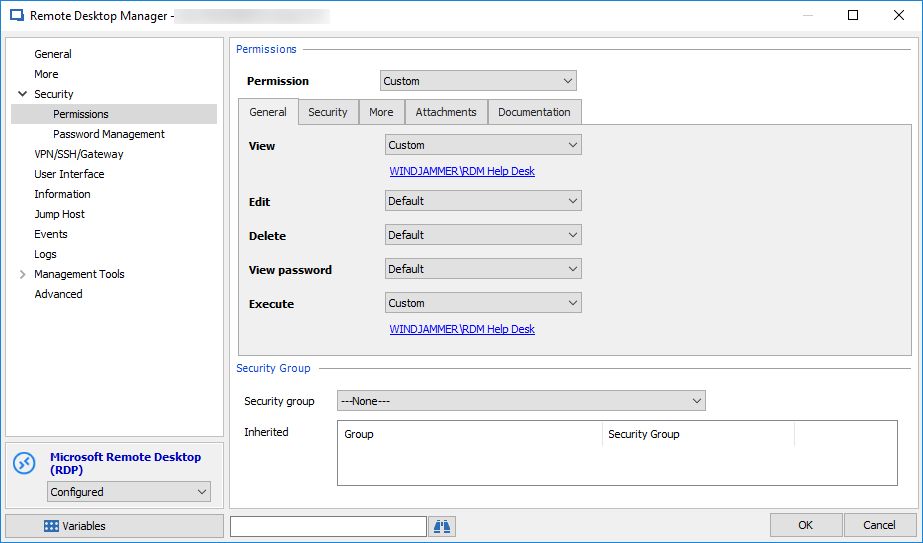
Setting the View and Execute permission allow you to only use the entry without being able to see the password.
In the following screen shot, the RDM Help Desk role is configured in the View and Execute permission. This way, the users that are a member of the Windjammer\RDM Help Desk can only view and open the RDP entry.
Best regards,
Érica Poirier
2018-12-18_9-19-31.png
Hello Erica,
i can view the passwords entry, even if i put the rights.
I have one folder Cisco Telepresence, a user group "Cisco Telepresence" have full rights.
One specific User should have only access to the sessions, not to the passwords.
How can i handle that ?
Hello,
Even if the user can view the Credential entry, if he doesn't have the View Password and the Edit permissions, the user will not be able to view the password.
In order to open any entry that relies on a credential entry, the user must have access to that credential entry, otherwise RDM will prompt for credentials.
Best regards,
Érica Poirier
Hello Erica,
i have try the permissions. If the user doesn't have any rights to view the passwords, is it possible to hide the password ?
So if a user have no rights, so he doen't have to see it.
Our imagination is that, any Admin can see any session entry.
The Passowrds are only visible for the responsible person, which cared for network storage or somthing else.
Our Head of IT can see every passwords.
Hello,
You can hide all entries/folders that should not be available to standard users with proper permissions.
But as soon as the credential entry is required for a standard user to open any entry type like RDP, Cisco, etc, the user must have access to the credential entry.
Here is a sample of what a standard user must see in the tree view to open a RDP entry that is bind to a credential entry.
The following permissions are set on the Windows parent folder. You must be sure that the Edit and the View password permissions are block for the standard users. On the following screen shot, I have set those permissions with the RDM Admins role. 
The following RDP entry, WindowsComputer, is set with the WindowsCredentials entry as the credential.
Then, when connected as a standard user account, I can see the credential entry in the tree view, use it to open the RDP entry but unable to view or copy the password of the credential entry.
You will find more information about the Permissions on the following online help page.
https://help.remotedesktopmanager.com/securitysystem.htm
I hope these explanations are clearer with those screen shots. We understand that permissions can be hard to understand and if you need further help on this matter, please send an email to ticket@devolutions.net to book an appointment for a remote session.
Best regards,
Érica Poirier