
Space2Place
Neu Installation - Import Sessions in eine MariaDB
Guten Morgen Min,
Genau das war der Fehler. Ich habe die Datenbank neu angelegt und den Haken entfernt.
Jetzt hat der Import funktioniert und ich kann mir den Einträgen wieder arbeiten.
Danke für die Hilfe!
Gruß
Sascha
Neu Installation - Import Sessions in eine MariaDB
Hi Min,
ich benutze das letzte Release.. Die Datenbank habe ich komplett geleert und die Datenquelle neu angelegt.
Dann habe ich nach der Erstellung der neuen Datenquelle das Schema neu erstellen lassen.
Bis dahin gab es auch keinen Fehler. Erst beim Import kam dann der Fehler wie oben im Screenshot
Gruß
Sascha
Neu Installation - Import Sessions in eine MariaDB
Hallo zusammen,
ich nutze schon länger RDM mit einer MySQL-Datenbank.
Das hat alles mit der RDM V 14 und einer MySQL Ver 14.14 Distrib 5.5.60 funktioniert.
Nun wurde mein Rechner ausgetauscht und ich habe jetzt Windows 10 (Vorher Windows 7) auf meinem Rechner.
Zusätzlich musste ich meine Sessions in einer MariaDB (mysql Ver 15.1 Distrib 10.3.10-MariaDB) speichern.
Die Verbindung zu der Datenbank funktioniert und das Schema konnte auch mit RDM angelegt werden.
Als ich die Sessions importieren wollte habe ich diese Meldung erhalten:

Gruß
Sascha
Unexpected error while installing an addon
Hi..
Yes - I use german in the gui.
But after updating to 7.1.1.0 i had the same problem.
Now i'd change the gui to english and now it works.
Is it only a translation issue?
Unexpected error while installing an addon
Hi there..
I'd installed the new version of RDP manager today..
After upgrading i wanted to update the addons "Tools=>Addon-Manager" but i got every time an error:
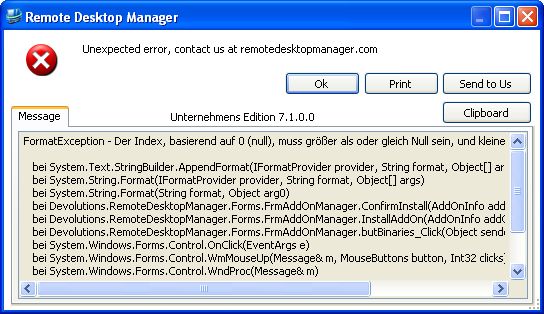
Here the complete error message:
FormatException - Der Index, basierend auf 0 (null), muss größer als oder gleich Null sein, und kleiner als die Größe der Argumentenliste.
bei System.Text.StringBuilder.AppendFormat(IFormatProvider provider, String format, Object[] args)
bei System.String.Format(IFormatProvider provider, String format, Object[] args)
bei System.String.Format(String format, Object arg0)
bei Devolutions.RemoteDesktopManager.Forms.FrmAddOnManager.ConfirmInstall(AddOnInfo addOnInfo, Boolean uninstallation)
bei Devolutions.RemoteDesktopManager.Forms.FrmAddOnManager.InstallAddOn(AddOnInfo addOnInfo, Boolean uninstall)
bei Devolutions.RemoteDesktopManager.Forms.FrmAddOnManager.butBinaries_Click(Object sender, EventArgs e)
bei System.Windows.Forms.Control.OnClick(EventArgs e)
bei System.Windows.Forms.Control.WmMouseUp(Message& m, MouseButtons button, Int32 clicks)
bei System.Windows.Forms.Control.WndProc(Message& m)
bei System.Windows.Forms.Label.WndProc(Message& m)
bei System.Windows.Forms.Control.ControlNativeWindow.OnMessage(Message& m)
bei System.Windows.Forms.Control.ControlNativeWindow.WndProc(Message& m)
bei System.Windows.Forms.NativeWindow.Callback(IntPtr hWnd, Int32 msg, IntPtr wparam, IntPtr lparam)
I hope you can help me with this issuse.
Best regards
Sascha Bay
Openvpn support in Version 7.0.3.0
Ahhhh.. Thanks... I did not look there because i had installed it in the last version.. On upgrading the setting got lost.. Thanks for advice
Openvpn support in Version 7.0.3.0
Hi...
I'd updated to the version 7.0.3.0...
Today i wanted to connect to a server which is available over openvpn. But i got only a message and no vpn client should be opened.
I don't find any configuration for openvpn.
Did you remove the support for openvpn?
RDP and Hard Drives
Great advise...
I did install the patch, and now it works!
RDP and Hard Drives
Ohhh sorry...
I didn't read your last question...
I'd tested the following issues...
External => Specified Drive = No Drive appears
Embedded => Specified Drive = No Drive appears
External => All Hard drives = every drive appears
Embedded => All Hard Drives = every drive appears
RDP and Hard Drives
I have the version 6.0.6001 (Shellversion),
RDP and Hard Drives
Hi together,
i'd create some templates for RDP connections.
There i use in local devices and resources the option "Secific drives" and select only drive d.
But after the connection i don't see the drive d.
If i change back to all drives everything works fine!
Can you check this issue?
Thanks