
BKechler
Autotype macro in command line
Ok, I found it myself :) I use SQL Server as the Datasource. You can enable "Allow password in macro "send keys" under the Data Source Settings in Password Policy.
Autotype macro in command line
Hello,
I'm trying to setup an autotype macro for a command line. The command line is the following:
runas /netonly /user:DOMAIN\Administrator "mmc dsa.msc /domain=DOMAIN"
DOMAIN ist replaced by the real domain of our customer.
I've also setup an autotype macro in the events with:
$PASSWORD${ENTER}
Unter "Security" I also enabled "Allow passwords in variables".
The problem is, that the password is filled in as $PASSWORD$. I changed the command line to "cmd" and the macro to "$PASSWORD$ $USERNAME$". The username is shown as administrator, the password as $PASSWORD$.
Am I missing something?
Edit: When I leave out the macro and type the password manually it works.
Regards,
Benjamin Kechler
Upgrade to V11 - Timeout
Yes, thanks Stefane.
Great support, especially at this time :)
Upgrade to V11 - Timeout
Sent our Schema via PM, thanks a lot :)
Upgrade to V11 - Timeout
Good morning,
we cannot upgrade our database because the timeout expired.
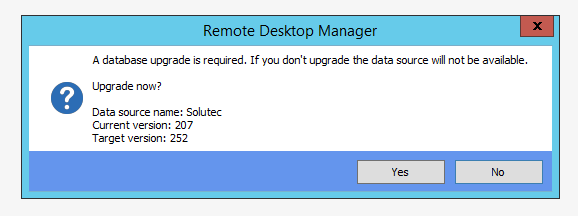
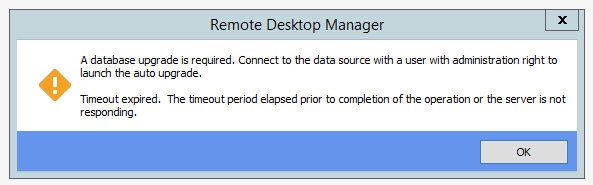
We use MSSQL Server as our source. Is there any setting around this error?
Thanks!
Best regards
Benjamin Kechler
RDP connection hang
Thank you very much!
Email is on the way.
Should I still test to disable the "Warn if already opened" feature?
RDP connection hang
Thank you :)
Profiler hangs together with the rest of RDM, after that it shows the following error:
Silent: System.Data.SqlClient.SqlException (0x80131904): Timeout expired. The timeout period elapsed prior to completion of the operation or the server is not responding. ---> System.ComponentModel.Win32Exception (0x80004005): Der Wartevorgang wurde abgebrochen
at System.Data.SqlClient.SqlConnection.OnError(SqlException exception, Boolean breakConnection, Action`1 wrapCloseInAction)
at System.Data.SqlClient.TdsParser.ThrowExceptionAndWarning(TdsParserStateObject stateObj, Boolean callerHasConnectionLock, Boolean asyncClose)
at System.Data.SqlClient.TdsParser.TryRun(RunBehavior runBehavior, SqlCommand cmdHandler, SqlDataReader dataStream, BulkCopySimpleResultSet bulkCopyHandler, TdsParserStateObject stateObj, Boolean& dataReady)
at System.Data.SqlClient.SqlDataReader.TryConsumeMetaData()
at System.Data.SqlClient.SqlDataReader.get_MetaData()
at System.Data.SqlClient.SqlCommand.FinishExecuteReader(SqlDataReader ds, RunBehavior runBehavior, String resetOptionsString)
at System.Data.SqlClient.SqlCommand.RunExecuteReaderTds(CommandBehavior cmdBehavior, RunBehavior runBehavior, Boolean returnStream, Boolean async, Int32 timeout, Task& task, Boolean asyncWrite, SqlDataReader ds, Boolean describeParameterEncryptionRequest)
at System.Data.SqlClient.SqlCommand.RunExecuteReader(CommandBehavior cmdBehavior, RunBehavior runBehavior, Boolean returnStream, String method, TaskCompletionSource`1 completion, Int32 timeout, Task& task, Boolean asyncWrite)
at System.Data.SqlClient.SqlCommand.RunExecuteReader(CommandBehavior cmdBehavior, RunBehavior runBehavior, Boolean returnStream, String method)
at System.Data.SqlClient.SqlCommand.ExecuteReader(CommandBehavior behavior, String method)
at System.Data.Common.DbDataAdapter.FillInternal(DataSet dataset, DataTable[] datatables, Int32 startRecord, Int32 maxRecords, String srcTable, IDbCommand command, CommandBehavior behavior)
at System.Data.Common.DbDataAdapter.Fill(DataSet dataSet, Int32 startRecord, Int32 maxRecords, String srcTable, IDbCommand command, CommandBehavior behavior)
at System.Data.Common.DbDataAdapter.Fill(DataSet dataSet)
at Devolutions.RemoteDesktopManager.Business.DataSources.DatabaseConnectionDataSource.GetData(String sql, IDbDataParameter[] parameters)
at Devolutions.RemoteDesktopManager.Business.DataSources.SQLServerLogSubDataSource.GetOpenedConnectionInfo(Guid connectionID)
ClientConnectionId:8003671f-7633-45a9-996b-08da5c937fc1
Error Number:-2,State:0,Class:11
RDP connection hang
I believe I don't quite follow :) Where is this Profiler? There is nothing in the Window Tab.
RDP connection hang
I exported as .rdp, works fine.
I don't think opening the connection is the problem, it seems like something before that. When I click on the entry, RDM itself hangs, I can't do anything while the connection is being opened.
I don't know what happens before the actual connection, maybe there are logfiles or possibilities to get that information?
RDP connection hang
I was able to confirm that the problem also exists if I open the connection external mode.
If I use mstsc.exe directly the connection works with no problem.
The problem also exists on at leat one other workstation.
RDP connection hang
The connection to the server is via VPN, but we don't use RDM to make the VPN connection. Other than that there is nothing special.
One thing i noticed this morning: I opened a connection, it took about 20 seconds. I closed it, immediately opened it again and it took about 5-10 seconds. After that it opened with no delay.
And of course this is the only time this problem occurred this morning.
RDP connection hang
Hello,
I don't see a pattern in this problem yet, but most of the time when I open an RDP connection via RDM, RDM hangs for about 20 seconds, then opens the connection.
We are using the sessions embedded.
Other embedded sessions like putty oder winscp work fine.
Is there any way to troubleshoot this problem?
Thanks in advance!
Best regards,
Benjamin Kechler
Chrome Extension not working anymore
Hi,
is there any way to get this working again (without the macro) without using the beta?
Regards,
Benjamin
Chrome Extension not working anymore
Hi there,
this kinda works. It jumps to the password field and only populates that.
Isn't this a workaround anywhere? As I said, the chrome extension worked before and still works on some sites.
Thanks for the information, i'll give the beta a try :)
Chrome Extension not working anymore
Hello,
the Chrome Extension doesn't work anymore on some websites. I am not sure, but I think it worked before Version 9.2.10.0. The Extension is loaded normally, but doesn't find any logins. I tried reinstalling the Plugin, but no luck. The passwords are stored in RDM directly.
Sites like Dell iDRACs work while sites like https://www.1und1.de/login do not work.
Regards
Benjamin
RDP "bleed through"
Hello,
wow, fast reply :)
Thanks for the information, I will keep an eye on the announcements.
RDP "bleed through"
Hello everybody,
sometimes I notice that mouse movement from another RDP Session in RDM can "bleed throught" to the current session.
That only happens if the other RDP session is in the background (embedded) and another person accesses that server via Teamviewer or VNC. If the other person moves the mouse on the screen of the server, the movement is of course visible via RDP, but also in every other active embedded RDP session. I have to close the RDP session my colleague is connected to via Teamviewer/VNC.
I hope this was understandable :D
Is there any way around this?
Thank you and greetings
BKechler