Upgrade to V11 - Timeout
Good morning,
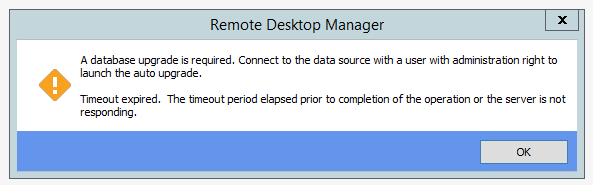
we cannot upgrade our database because the timeout expired.
We use MSSQL Server as our source. Is there any setting around this error?
Thanks!
Best regards
Benjamin Kechler
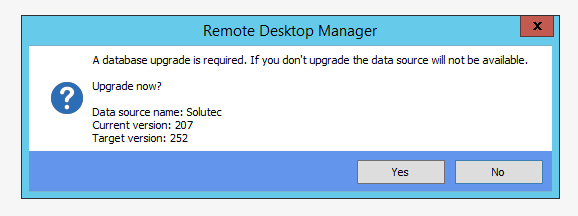
2015-10-02 08_13_06-so-db01 - Remotedesktopverbindung.png
2015-10-02 08_11_49-so-db01 - Remotedesktopverbindung.png
All Comments (9)

Not a solution to you problem but maybe related:
I just tested the database upgrade by donwloading the zip file for RDM 11 (so I didn't have to upgrade RDM 10.6.7 yet) and connected it to a copy of the currect production database I made. The upgrade itself was performed without any issues but when I tried reconnecting with RDM 10.6.7 (to see if this 10.x version still can connect - we have had issues for users still using version 9.x and after upgrading to 10.5 they could no longer connect) I also got a time-out (including a SQL Server like error). A retry was successful however ...
Hi, same problem here, Azure SQL.
any help please?
Cheers James.
@all - The timeout are most likely due to the optimization we are trying to do to improve performance with the connection log table. In some instances the table is large enough that the upgrade step times out.
If each of you could send me your DB schema I will analysis and get back to you. (File -> Data Sources -> Upgrade (tab) -> CTRL + "Email Schema to Support"). The CTRL + click will copy the schema to your copy buffer, simply email me the schema directly (the support guys may no be awake yet, it's 5:45am) My email slavergne-at-devolutions-dot-net or you can private message me on the forum.
Best regards,
Stéfane Lavergne
@jan-pieter - so are things working for you? What are the connection errors? Could you send me them please.
FYI, you can always control versions using the Version Management feature. Force, min/max versions to be used.
http://help.remotedesktopmanager.com/index.html?administration_datasourcesettings.htm#VersionManagement
Best regards,
Stéfane Lavergne
Sent our Schema via PM, thanks a lot :)
Same here.
This was my fix:
FYI - I recommend you backup the database before
First count the rows, expect a big number
select count(*) from dbo.ConnectionLog;
GO
Now delete old logs, here we keep the last 60 days (change the number if you want to save more or less) This will take some time depending how many logs there are.
delete from dbo.ConnectionLog where CreationDate < (getutcdate() - 60)
GO
Thanks Stefane
Yes, thanks Stefane.
Great support, especially at this time :)
It is working for me however I don't have the exect error anymore. As we will still need to upgrade in production the error may occur once more and I will make a copy of the error and send it to you.
I have the Version Management configured however we need to be very carefull as some of our users do not have internet access thus don't get alerts on updates. And I stopped at version 10.1.9 supplying them with the updates ... shame on me - that's also why I asked (and have received :-)) the most recent 10.x version download in another question.