
FuzzyTech
Bitwarden "Unable to retrieve Bitwarden credentials!"
James,
The feature is still not working - same result as before.
I upgraded RDM to the latest enterprise version (2019.1.41.0 64-bit) and I'm still receiving the same error message.
The debug log is showing a different message though
[8/8/2019 11:28:48 AM - 2019.1.41.0 64-bit]ERROR PasswordManagement.Common.InternalErrorException: IV is not supported in RSA modes
at A.c1f57b84205cb27139aa599f782a5a300.c4b577c0a9e303ef3ec4b74d0d1689811(c372466f1d150869477b20ca0a19ed679 c17de7030565f43077466095dd50c1438, Byte[] cfc2303882919b4e87539c56808e7283a, Byte[] c78abdea59c706bba55425e574fe5e167, Byte[] c5a717517f725a1abcc181c5d9d0f2228)
at A.c1f57b84205cb27139aa599f782a5a300.c13e9669a3ce2d5ada7d1754ed3bb3a91(String c96fe9c2b64c8d51afbd90f8038fe21c8)
at A.c6b3d78f0d279943abb261d557b0ebabe.ce7f413198261915d84779c3b03e59d02(String c3c52eaff7cf03934e02176c9f0e01f66, Byte[] cd8a0778a3399215c5b6a993e0e0d0600)
at A.c6b3d78f0d279943abb261d557b0ebabe.c4a64a394ff46b119176f90c87a36bc4b.ca31e9ff3352db092092c70ab3529a3a0(Organization cc2ca667102e049892761c49c11ddef2b)
at System.Linq.Enumerable.ToDictionary[TSource,TKey,TElement](IEnumerable`1 source, Func`2 keySelector, Func`2 elementSelector, IEqualityComparer`1 comparer)
at A.c6b3d78f0d279943abb261d557b0ebabe.c5cf7124b9fda5fd04e9657457621499c(Profile cf7784f03291d814df22fcee7e38db509, Byte[] ca0865ed12a5a3dadec92167dece0ec00)
at A.c6b3d78f0d279943abb261d557b0ebabe.cb40d79723bd5d006e6ebe314738bf764(Vault c44eef07b7b0caf67b7e6880fd2d0c96e, Byte[] cd8a0778a3399215c5b6a993e0e0d0600)
at A.c6b3d78f0d279943abb261d557b0ebabe.c77435cee3d84f42b6bcb99578b7887e2(String c4c707ece3170514f8504b161d5b38c17, String ceb81d1ee93f91e0bc57f34876c263863, String c13c2452e5d45f6bf4238b28d566a03df, String c45c09b986091cf99ed4698dab2366f41, Ui ca1afb27a060538635c8a201e82a02eef, ISecureStorage c28ced8c096d81ba8cd60cf1994a7bf5a, IHttpClient c7db9ccbcc9e363b4afa5482d2e2b187a)
at PasswordManagement.Bitwarden.Vault.Open(String username, String password, String deviceId, String baseUrl, Ui ui, ISecureStorage storage)
at Devolutions.RemoteDesktopManager.Managers.BitwardenManager.Initialize(String username, String password, String customUrl)
Is there a way to show more relevant logs?
Bitwarden "Unable to retrieve Bitwarden credentials!"
James,
That shouldn't be a problem, I'm just not sure what shared folders feature is in this context.
I do have a premium account with Bitwarden and an Organization for sharing passwords but I don't think Bitwarden even supports sharing a whole folder, just credentials to organizations.
Please let me know and i'll get that information for you.
Forum "Update Message" Doesn't Work
Thanks for getting to it so quickly - that's impressive.
Edit: Editing works :applause:
Forum "Update Message" Doesn't Work
The forum posts no longer allow edits it seems, not sure if this is desired behavior or unintended - reporting it for visibility :)
Note:
- Disabled all content-blocking in browsers
- Tested with latest Firefox & Chrome in Windows
Bitwarden "Unable to retrieve Bitwarden credentials!"
Forgot to add
Datasource Type:
- XML
Bitwarden "Unable to retrieve Bitwarden credentials!"
RDM Version:
2019.1.25.0
Operating System:
Windows 10 LTSB
Arch:
64-bit or 32-bit
Environment:
Clean installation (no existing configuration, no existing datasources, and fresh %APPDATA%)
Bitwarden Config:
- Premium Bitwarden account
- No 2FA configured or used
- Bitwarden Windows is installed.
Reproduction Steps:
- Create a new Bitwarden Session
- Set Username/Password
- Attempt to query credentials in session configuration
Expected Behavior:
- List of bitwarden credentials to use
Observed Behavior:
- Error "Unable to retrieve Bitwarden credentials!"

- Error Log (debugging enabled)
[5/30/2019 1:01:53 PM - 2019.1.25.0 64-bit]ERROR PasswordManagement.Common.InternalErrorException: Invalid/unsupported cipher mode: 6
at A.c5b1df15f4540c7f0a07f792e5ec69829.cdc308a94f006c6e465b226fab995d6be(String c3c52eaff7cf03934e02176c9f0e01f66)
at A.c5b1df15f4540c7f0a07f792e5ec69829.c13e9669a3ce2d5ada7d1754ed3bb3a91(String c96fe9c2b64c8d51afbd90f8038fe21c8)
at A.c0c9b4376a95c83cda5c8aaa674f0a770.cfec65ea3417e871d12f76330d84f5243.ca31e9ff3352db092092c70ab3529a3a0(Organization cc2ca667102e049892761c49c11ddef2b)
at System.Linq.Enumerable.ToDictionary[TSource,TKey,TElement](IEnumerable`1 source, Func`2 keySelector, Func`2 elementSelector, IEqualityComparer`1 comparer)
at A.c0c9b4376a95c83cda5c8aaa674f0a770.c5cf7124b9fda5fd04e9657457621499c(Profile cf7784f03291d814df22fcee7e38db509, Byte[] ca0865ed12a5a3dadec92167dece0ec00)
at A.c0c9b4376a95c83cda5c8aaa674f0a770.cb40d79723bd5d006e6ebe314738bf764(Vault c44eef07b7b0caf67b7e6880fd2d0c96e, Byte[] cd8a0778a3399215c5b6a993e0e0d0600)
at A.c0c9b4376a95c83cda5c8aaa674f0a770.c77435cee3d84f42b6bcb99578b7887e2(String c4c707ece3170514f8504b161d5b38c17, String ceb81d1ee93f91e0bc57f34876c263863, String c13c2452e5d45f6bf4238b28d566a03df, String c45c09b986091cf99ed4698dab2366f41, Ui ca1afb27a060538635c8a201e82a02eef, ISecureStorage c28ced8c096d81ba8cd60cf1994a7bf5a, IHttpClient c7db9ccbcc9e363b4afa5482d2e2b187a)
at Devolutions.BitwardenManagement.Vault.Open(String username, String password, String deviceId, String baseUrl, Ui ui, ISecureStorage storage)
at Devolutions.RemoteDesktopManager.Managers.BitwardenManager.Initialize(String username, String password, String customUrl)
SSH over SOCKS proxy no longer works
Upgraded RDM from 14.1.3.0 to 2019.01.20 and SSH no longer works with an SSH SOCKS proxy.
- SSH sessions don't use the proxy when defined, this was tested by manually starting an SSH dynamic forward with "-vvv" logging to observe connection attempts. Connection made from a PuTTY client using this tunnel are successful but RDM SSH client connections don't product any output indicating that a connection attempt wasn't even made.
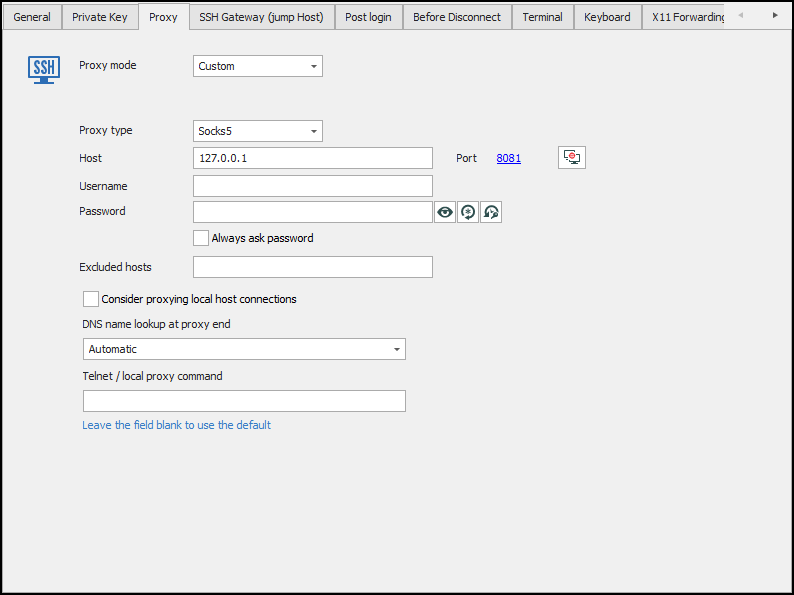
The configuration is as follows
- Session1 = SSH Proxy is an SSH Tunnel type configured in dynamic mode on port 8081
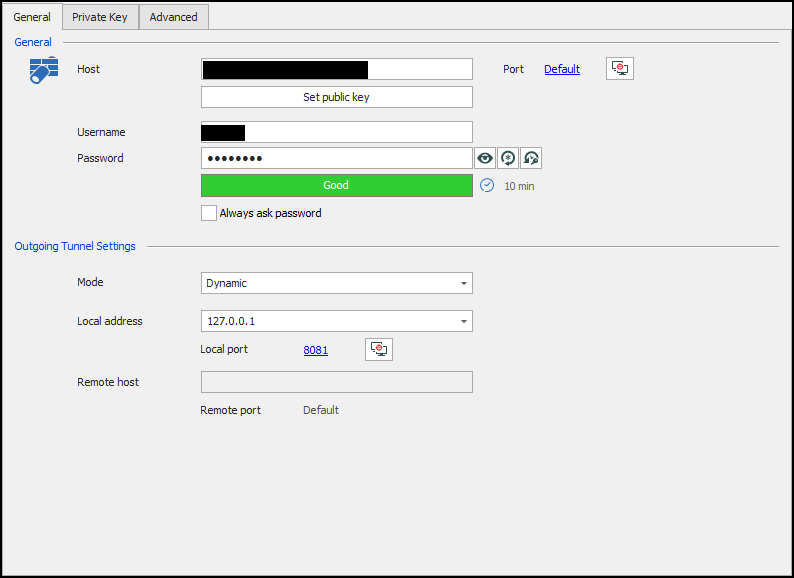
- Session2 = SSH Session, configured to use proxy from Session 1
sFTP Session Bugs
Sorry I should have included that
RDM Version:
14.1.3.0 64-bit (latest Enterprise)
Data Source:
Local XML File
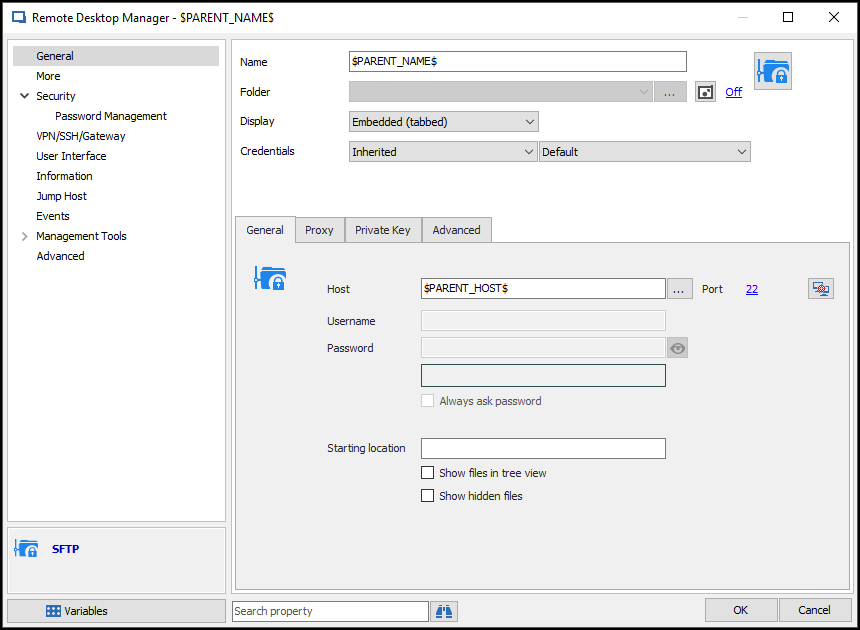
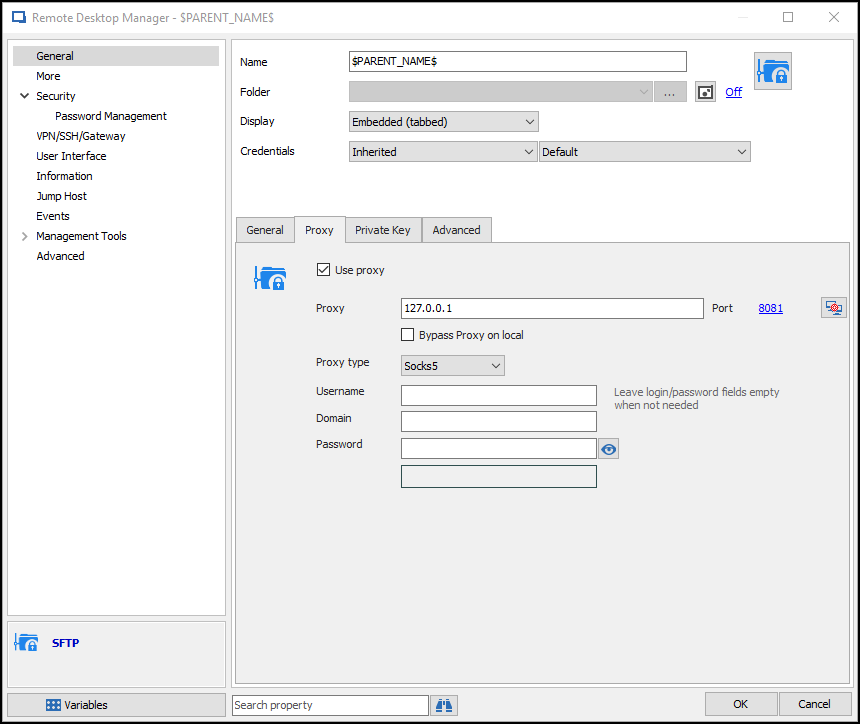
sFTP Session:
Default RDM sFTP
sFTP Session Screenshots:
- Settings
- Proxy Settings
sFTP Session Bugs
Disregard 2. Credential Store Support
I just can't update the forum post - tried FF, Chrome, and IE :|
sFTP Session Bugs
Trying to use the built-in sFTP session and ran into a few bugs
1. The Proxy configuration isn't saved
Using the GUI the proxy configuration isn't saved properly
I can work around this by editing the XML connection and adding the flag
<UseProxy>true</UseProxy>
2. Credential Store Support
The session doesn't support using credentials, at least not from the GUI
I can work around this by editing the XML connection to add the flags
<CredentialConnectionID>CREDGUID</CredentialConnectionID>
<CredentialConnectionSavedPath>Site\Credential\Path</CredentialConnectionSavedPath>
2. Fingerprint isn't saved, no option to "Always Accept"
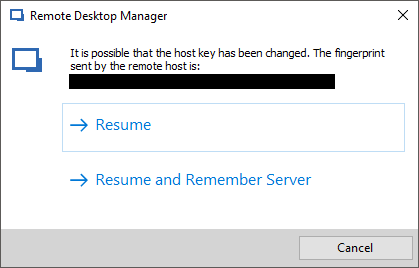
Initial connection results in a warning about the host key being changed - the "Resume and Remember Server" doesn't actually save the server fingerprint so it repeats on every connection attempt.
The session is missing a "Always Accept Fingerprint" option.
I attempted to create an SSH session with the "Always Accept Fingerprint" option disabled, save the fingerprint, then connect the sFTP session but that results in the same prompt anyway.
Prompt
SSH Session - Port Override
The SSH session configuration doesn't seem to support setting the port in the Host entry but instead requires using the port configuration option.
Is this behavior by-design? Would it be difficult to alter the behavior to override the port configuration if the host entry is defined as <HOST>:<PORT>?
The example below will still attempt to connect to 127.0.0.1:22 instead of 127.0.0.1:3020

Terminal Visual Bell - Not Working
Thanks for the quick response :)
It's strange that this hasn't been reported yet but it might just be a niche usage.
Terminal Visual Bell - Not Working
The SSH Shell sessions terminal Bell Behavior "Visual (flash window)" option isn't working. It successfully mutes the bell but does not flash the window like it's supposed to.
RDM v13.0.6.0
Test Scenario
Configure SSH Shell session using (not Putty or Redux)
Set General->Terminal->Bell->Bell Behavior option to "Visual (flash window)"
Log in to session
Simulate bell using command "echo $'\a'"
Observe no flash
Working Scenario
Configure SSH Shell session using (not Putty or Redux)
Set General->Terminal->Bell->Bell Behavior option to "Sound"
Log in to session
Simulate bell using command "echo $'\a'"
Observe audible bell sound
SSH Tunnel VPN Entry - Dynamic Port Usage
We will add a variable called $DYNAMICPORT$ which you will be able to use in the alternate hosts. Using this, your scenario should be possible. Look forward to it in the next RDM version!
Regards,
That's great! :woohoo:
Thanks for the quick turnaround guys, can't wait to try it out. Should really simplify our process.
SSH Tunnel - Support connections without shell
Hubert,
Thanks for the quick turnaround :)
Looking forward to using no-shell tunneling sessions!
SSH Tunnel VPN Entry - Dynamic Port Usage
Hi,
You did the right thing by posting here. I want to be honest we are short on staff because of the vacation. I will assign this thread to Hubert and he will answer you as soon as he get back. We will verify if we can do something for this.
Regards
David,
No rush, I'm just glad you'll be looking into it. It'll be great if we don't have to manage the local SSH tunneled ports manually :)
I'll await Huberts review and response, thanks again!
SSH Tunnel - Support connections without shell
Can you please add support for connection without a shell/terminal in RDM SSH Tunnel entries?
We've found that having a Linux user with no shell useful for tunneling as it allows tunneling to a target without having local access to the SSH server itself.
This is accomplished by creating a Linux user with a /sbin/nologin shell and passing the "-N" option to SSH when connecting or setting the "Don't start a shell or command at all" option in PuTTY.
In its current state the RDM SSH Tunnel entry doesn't have support for this connection scenario, instead it just connects and exits.
SSH Tunnel VPN Entry - Dynamic Port Usage
Not sure how best to ask this question so i'm going to start with an outline of my connection scenario and go from there.
The general gist is i'm trying to create an RDM RDP entry that would work on the Local LAN and via SSH tunnel (when needed).
Please bear with me :)
Scenario:
[LOCALPC] My current machine
[TARGET] Target RDP machine, not directly accessible. Need to SSH tunnel through a multi-homed linux server.
[SSHSRV] SSH Tunneling server, multi-homed
Connection-General:
Name: TARGET-TEST-Connection
Computer: TARGET
Port: 0 (default)
Valid User/Pass
Connection-VPN/SSH/Gateway-General:
Open: Ask for Confirmation (for testing, will probably set to "Connect if unable to ping/scan" later)
Close: On Session Close
Type: SSH
Connection-VPN/SSH/Gateway-Settings:
Host: SSHSRV
Port: Default
Valid User/Pass
Local Address: 127.0.0.1
Local Port: "Use Dynamic Port"
Remote Host: $HOST$
Remote Port: Default
Upon testing the above configuration the SSH tunnel is established successfully but then the RDP connection is attempted to TARGET[:]DYNAMIC-SSH-PORT instead of LOCALHOST[:]DYNAMIC-SSH-PORT
I tried to get around this behavior by creating an Alternate Host entry with localhost[:]DYNAMIC-SSH-PORT but there's no variable that exposes that port value. I tried using the $PORT$ variable but it's always blank in this scenario.
Ex.

If i hard code the SSH local port (uncheck "Use Dynamic Port") and use that same port in Alternate Hosts then everything works as expected.
Would it make sense for the SSH tunnel entry to override the existing $HOST$ entry with localhost or at least expose the SSH Tunnel dynamic port as a variable value to be able to use it in Alternate Host configuration?
Not sure if this should be submit as an official support request (have a site license) or if a forum post is sufficient. Please let me know if i posted in the wrong place :)
Best regards
Edit:
RDM Version 11.6.2.0
Note: I know i can just hardcode all the ports i need but that requires managing a long list of ssh tunneled ports to ensure i don't introduce any conflicts with my current data source or any future data sources (huge pain)
Ping localhost:port failing
Could you export me your session?, I will test it directly. I don't need the credentials.
I sent you a private message with the connection profile xml.
Thanks!
Ping localhost:port failing
Hi,
Ping does not support a port so I don't understand why it was working before. However we now support in RDM 9 a port scan instead. Could you verify if it's what is configured?
David,
Maybe my explanation wasn't great, i might have confused things referencing the port number.
I'm trying to use a localhost SSH tunnel as an alternate host - the localhost host exists so the connection should be successful.
This is complete speculation on my part:
I don't know how i can debug this but i'm guessing that the ping being performed on the alternate host is not stripping out the port number correctly and that's what is causing the ping to fail.
Ping localhost:port failing
A configuration that was working in RDM 8 is no longer working after upgrading to RDM 9.
I have a connection profile that i use to connect to various servers when i'm at home and when i'm at the office. At the office the connection is direct, but when i'm at home i manually start an SSH connection that's configured with various port forwards. I'm basically using the linux box as a jump box since it's accessible over VPN while the other servers aren't.
Example:
server1
==> 10.127.127.50
==> Auto detect (ping) ==> localhost:65000
tunnel_ssh
==> 10.10.10.10 (available over vpn) + (port forward) 65000:10.127.127.50:3389
After upgrading to RDM 9 the connection pings 10.127.127.50 then attempts to ping localhost:65000 - the second ping attempt seems to fail and it never connects.
I have verified that i can manually connect to localhost:65000 so the tunnel configuration and the server are not the issue. I tried to disable ipv6 on my console and tried 127.0.0.1 instead of localhost but to no avail.
I tried to enable debugging to provide more info but even with the highest debugging level (3071) i'm still not seeing any logs relating to the ping attempts.
Is this a bug? I guess it could be considered a feature since RDM is now attempting to verify the status of the alternate host before connecting.
How can i resolve this and return to the previous operational mode?
Unrelated question:
Is there another support channel or is it limited to the forums? I'm currently using a site license but i'm not sure if there's a different support channel for licensed RDM.