Unable to start RDM

Hi!
We are using RDM 13.0.6.0 and have 5 licenses.
Starting from today, I noticed that I can't start RDM anymore - it nearly instantly switches to "Not Responding".
I tried to "delete" the configuration by renaming the folder "C:\Users\USER\AppData\Local\Devolutions\RemoteDesktopManager" and when starting, I get to enter license information, as expected. If I cancel this window, it's "Not Responding" again. If I enter the correct license information, I get the following error message after a while:
Devolutions.RemoteDesktopManager.Business.TryGoOfflineException: The remote name could not be resolved: 'crm.devolutions.net' ---> System.Net.WebException: The remote name could not be resolved: 'crm.devolutions.net'
    at System.Net.HttpWebRequest.GetResponse()
    at Devolutions.RemoteDesktopManager.Managers.RDMOManager.SendRegistrationEnterprise(RDMOCreateAccountInfo accountInfo, String serial)
    --- End of inner exception stack trace ---
We are using many customer connections in a MSSQL database. Does this error message mean that we can't use RDM at all when crm.devolutions.net isn't reachable? Our internet connection is fine otherwise.
After a while there is also a message with "Web Browser" title, saying "Stop running this script? A script on this page is causing your web browser to run slowly. If it continues to run, your computer might become unresponsive". Also my colleague that had RDM already running over night received this message, but he didn't restart RDM, so he is the only one now that can connect to our customers with RDM. All other colleagues experience the same issue as described above when trying to start RDM.
Any help? Is this a temporary issue?
Thanks!
All Comments (17)
Hello,
Thank you for reaching out and for the detailed information.
Based on the behaviour you’re describing, the issue is very likely related to the version of Remote Desktop Manager you are currently using. Version 13.0.6.0 is significantly outdated and is no longer supported by Devolutions.
There are two important implications here:
- This version no longer receives updates, meaning any issues, especially those related to connectivity (such as resolving crm.devolutions.net), cannot be resolved.
- Older versions of RDM rely on services and endpoints that may have changed, been deprecated, or are no longer fully compatible with the current infrastructure. This can result in exactly the type of startup freeze and “Not Responding” behaviour you're seeing.
We strongly recommend upgrading to the latest version of Remote Desktop Manager. Newer versions:
- Are actively maintained and supported.
- Include fixes for connectivity and performance issues.
- Address important security concerns present in older builds.
If you have any further questions, please don't hesitate to let us know.
Best regards,
Maxim Robert
Hello,
To add to maxim post it is also possible that your current Windows version is contributing to the issue. RDM 13 dates back to around 2017, when Windows 7 was still widely supported. Modern environments (such as Windows 10/11) may no longer fully support components or dependencies used by that version. Conversely, newer versions of RDM (2023+) have dropped support for older operating systems like Windows 7.
We strongly recommend upgrading to the latest version of Remote Desktop Manager. Newer versions are actively maintained, include important fixes for connectivity and performance, and ensure compatibility with current operating systems and infrastructure.
If you have any constraints preventing an upgrade, please let us know and we can help explore possible workarounds.
Best regards,
Carl Marien
We are all on Windows 11 Pro (25H2).
I asked another who normally uses it and it's working fine on his machine (he only got the "Web Browser" window, which he simply closed).
So we have 2 users with the described behavior, one where it works normally and one that doesn't want to restart because of the risk that it doesn't work anymore.
Nothing changed on our machines and we were able to use RDM normally last week.
While I understand that you suggest an update (also something that I wanted to suggest for a while now already), could you please tell us what the error message means? Is this happening because crm.devolutions.net can't be reached?
Thanks!
Can we use our MSSQL database that we're currently using (for RDM 13) when we switch to the latest version?
We have a lot of things in this MSSQL database - logins, rdp, vnc, files, links, etc.
Hello,
Thank you for your patience while we investigated the issue.
At the moment, the service http://crm.devolutions.net/ is currently down, which is causing the error you are seeing:
Older versions of Remote Desktop Manager (such as 13.0.6.0) rely on this service during startup and licensing checks. Since the endpoint is not reachable, it results in the application freezing or becoming unresponsive.
This is also why:
- Users who already had RDM open can continue working
- Restarting RDM leads to the issue for others
About your MSSQL database
Yes you can absolutely reuse your existing MSSQL database when upgrading to the latest version of RDM. Your entries (sessions, credentials, etc.) will be preserved, and the database will simply be upgraded to the newer schema when opened.
Next steps
I would be happy to assist you with an upgrade session to ensure everything goes smoothly and minimize any disruption.
I will follow up shortly with another email including the next steps and to schedule a session with you.
Best regards,
Carl Marien
Hello,
Thank you for your patience while we investigated the issue.
At the moment, the service http://crm.devolutions.net/ is currently down, which is causing the error you are seeing:
Older versions of Remote Desktop Manager (such as 13.0.6.0) rely on this service during startup and licensing checks. Since the endpoint is not reachable, it results in the application freezing or becoming unresponsive.
This is also why:
- Users who already had RDM open can continue working
- Restarting RDM leads to the issue for others
About your MSSQL database
Yes you can absolutely reuse your existing MSSQL database when upgrading to the latest version of RDM. Your entries (sessions, credentials, etc.) will be preserved, and the database will simply be upgraded to the newer schema when opened.
Next steps
I would be happy to assist you with an upgrade session to ensure everything goes smoothly and minimize any disruption.
I will follow up shortly with another email including the next steps and to schedule a session with you.
Best regards,
@Carl Marien
Hello there.
To add to this, we are seeing similar behavior on our end.
For us, when RDM starts up, it tries to open What's New, Release Notes, etc. at which point the program becomes unresponsive due to the same 'script' (JS?) error, Ilikely stemming from from "http://crm.devolutions.net/" being down.
We are running licensed RDM version 2025.2.13.1 and, since yesterday, we've been dealing with this issue.
Our RDM is deployed on VMs running Windows 10, with plans to fully transition to Windows 11 soon.
Do you know of any ETA for getting "http://crm.devolutions.net/" back up and running?
Additionally, are these forums the default way of communicating with us (as clients)? Our previous contact at Devolutions seems to have left the company.
Thank you.
I have this exact same problem. Can I upgrade RDM without admin rights on the computer? If not can the URL that the application wants for operation (http://crm.devolutions.net) be put back into service?
Can RDM be upgraded without admin rights on their computer? Keep in mind there are a lot of people who use RDM for their job and may not have any administrative access to their machine, hence if the above URL doesn't get restored then I will have no choice but to abandon this software.
Sorry, this is not acceptable. We are running a even older version 11.7 (which is fine for us) and cannot use it anymore. An upgrade is not possible as the license doesnt permit it.
We bought the product and licence on a on off basis. Nowhere it was mentioned that we and RDM is dependant on the mercy of a Devolution server being available somewhere in the internet.
Get the server back on and release a fixed version for this as soon as possible!
@Carl Marien
Hi there (original poster here).
I did an additional test by installing RDM 13.5 on an old Windows Server 2016 - there are no issues here and the tool can be used normally. Even the registration process worked normally (where I get the previously posted error message on my Win11 machine).
As for our 4 regular users with Win11: One still doesn't dare to restart it, for 2 of us it doesn't work at all (RDM closes silently) and for another user it works if he just waits 2 minutes and clicks on "Yes" when the "Web Browser" window appears and asks to stop a script that takes many resources.
About:
I would be happy to assist you with an upgrade session to ensure everything goes smoothly and minimize any disruption.
I will follow up shortly with another email including the next steps and to schedule a session with you.
That's nice to hear, but do you plan to fix the issue? As other users pointed out, it's a bit harsh to disable your previously sold software that way.
Thanks!
Hello,
Thank you for reaching out and for the detailed information.
Based on the behaviour you’re describing, the issue is very likely related to the version of Remote Desktop Manager you are currently using. Version 13.0.6.0 is significantly outdated and is no longer supported by Devolutions.
There are two important implications here:
- This version no longer receives updates, meaning any issues, especially those related to connectivity (such as resolving crm.devolutions.net), cannot be resolved.
- Older versions of RDM rely on services and endpoints that may have changed, been deprecated, or are no longer fully compatible with the current infrastructure. This can result in exactly the type of startup freeze and “Not Responding” behaviour you're seeing.
We strongly recommend upgrading to the latest version of Remote Desktop Manager. Newer versions:
- Are actively maintained and supported.
- Include fixes for connectivity and performance issues.
- Address important security concerns present in older builds.
If you have any further questions, please don't hesitate to let us know.
Best regards,
@Maxim Robert
Hi Maxim,
given the fact that one of my colleagues mentions the same error occurs in 2025 version of RDM, which is less than one year old - do you have any change logs or announcements on this topic and if so, can you please present the link to that announcement?
Having software "obsolete" less than one year after release does not make too much sense in my opinion, especially in enterprise environments where changes are much slower than usual. I would expect you support those environments as well, given the large revenue received from such customers, and proper announcements on deprecations are a must in such cases.
Can you or your team investigate this issue further and pinpoint exactly which version of RDM / Windows / .net / other software is problematic, so we can adjust our environments accordingly? We are currently in a blocker state, where more than 100 users are unable to work due to this error. Please look into this ASAP. We will also write to your team via support e-mail and ticket, as we have the platinum version with support.
Hello to everyone,
Our development team and devops team have worked on a fix and the fix has been deployed,
We have performed tests with RDM 13.0.6.0 and it's working on our side.
Is it the case for all of you?
Best regards,
Jeff Dagenais
Hello to everyone,
Our development team and devops team have worked on a fix and the fix has been deployed,
We have performed tests with RDM 13.0.6.0 and it's working on our side.
Is it the case for all of you?
Best regards,
@Jeff Dagenais
Hello.
I'm reporting with RDM version 2025.2.13.1 (should be about year old!) on Windows 10.
For us, it doesn't seem the issue is resolved, still hangs on startup and eventually the same error appears.
Please keep us updated as you work towards the fix as this is preventing us from work.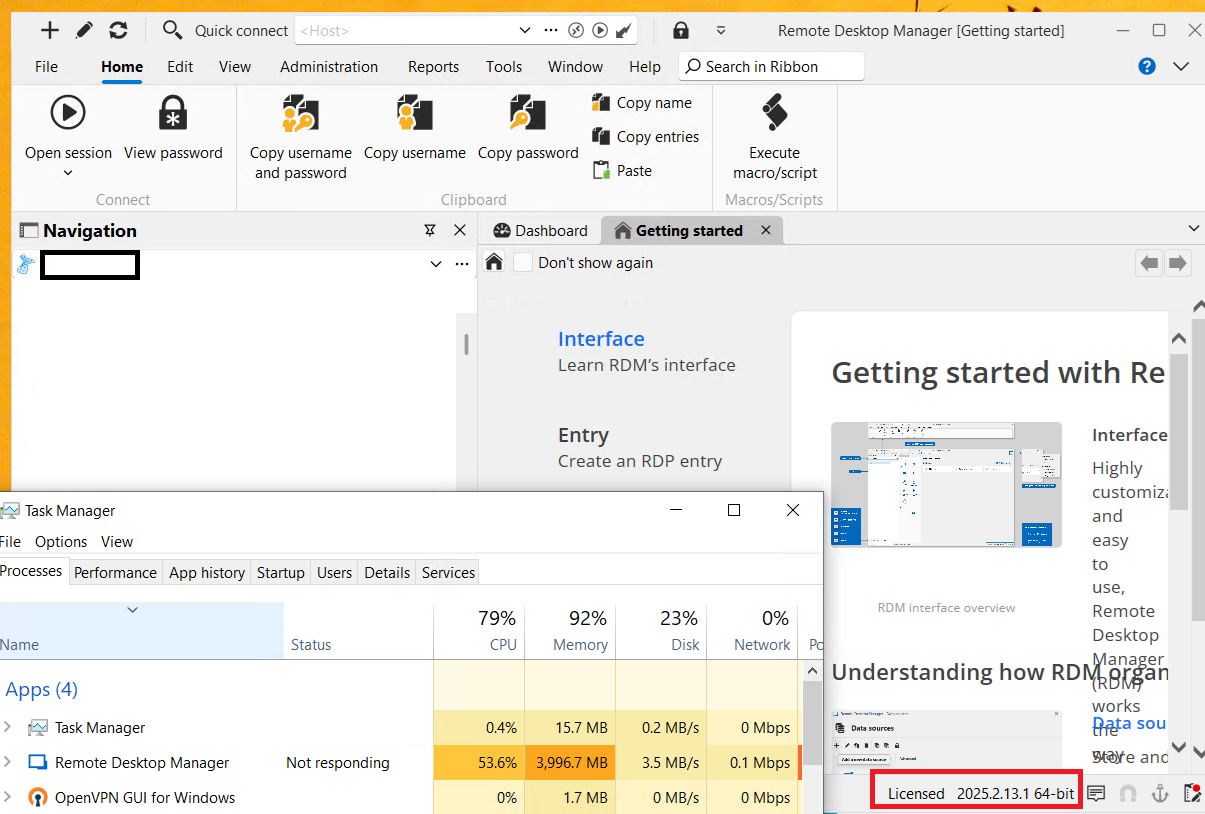
85d0a661-58cc-435a-ae11-7abceb07611b.png
Hello to everyone,
Our development team and devops team have worked on a fix and the fix has been deployed,
We have performed tests with RDM 13.0.6.0 and it's working on our side.
Is it the case for all of you?
Best regards,
@Jeff Dagenais
Same here, issue is not fixed (RDM 13.5)
Sooner or later the "Web Browser" popup appears in the background (until then, RDM is "Not Responding"). If you click "No" (don't stop the script), another minute or so passes with the same issue and the "Web Browser" window appears again. If you select "Yes" (stop the script), RMD just closes itself.
Hello everyone,
If you are experiencing an issue with a newer RDM version that is not 11, 12 or 13, such as 202x.x, please open a new thread or email us at service@devolutions.net.
@Norman Since you are using a newer version (2025.2.13.1), I recommend you update to version 2025.2.30.0, the latest build of 2025.2. Your issue is not related to this current one, which involves versions 11, 12 and 13. If you use a SQL data source, you will find the upgrade instructions here. If the performance issue persists, please email service@devolutions.net, and a support agent will assist you with troubleshooting.
@Tim From the support ticket you opened, my colleague Jacob sent you a link to book an emergency session. He will assist you in troubleshooting the problem.
For the main issue, we are still investigating.
Thank you for being so patient.
Best regards,
Érica Poirier
Hello @everyone,
The issue appears to be resolved on versions 11, 12 and 13, as one of our members no longer experiences the problem.
Please try it out and let us know if the application is now working and stable.
Thank you for your collaboration.
Best regards,
Érica Poirier
Hello @everyone,
The issue appears to be resolved on versions 11, 12 and 13, as one of our members no longer experiences the problem.
Please try it out and let us know if the application is now working and stable.
Thank you for your collaboration.
Best regards,
@Erica Poirier
Hi!
I can confirm that it's working again on our side (RDM 13.5), thanks!
Hello @mcsida ,
Thank you for your feedback.
That's great news that it's now working again as expected.
Best regards,
Érica Poirier