System Information Report entry questions

Hello,
Would you be able assist with the following questions I have regarding the System Information Report entries please:
1) Can the information generated by the report be access via PowerShell? If so, how?
2) Can the report generation be initiated by PowerShell?
3) How can historical reports be deleted?
4) There is an option to load information from an '.inv' xml file, how does one generate this file without installing RDM? For example if I needed to generate this information on a machine inaccessible over the network, and manually load the data into RDM.
5) What firewall ports are required to support the inventory generation, i.e. WMI or PowerShell remoting, or both
6) Can the inventory be generated for/on non windows endpoints
Thanks
Joe
All Comments (30)
Hello Joe,
Thank you for your questions about the System Information Report entry.
Here are the answers I got so far.
1) No, it's not possible to get the results from PowerShell. I can ask our developers if it's something they can implement.
2) It can be initiated from PowerShell with the Open-RDMSession. This will open the report in RDM if installed on the machine.
3) I don't think there is any method to remove the historical reports. We will investigate and get back to you.
4) It's our own XML format file to store the results from WMI calls for this entry.
5) It uses WMI calls.
6) We will have to check if we have something for SSH entries.
I hope this helps!
Best regards,
Érica Poirier
Thanks Erica.
Re #2) When opening the connection manually, if pre-existing reports exist, it prompts whether to open one, or generate a new one. Is there a way to handle that prompt with PowerShell?
Re #4) Is it possible for devolutions to provide a script that uses the same WMI calls to generate the XML file? This could be run on an offline machine, and the resulting xml manually loaded into RDM
To provide some context to these questions, I'm trying to automate as much as possible the collection of inventory information, and then use PowerShell to query the data and create/update details of application entries. Additionally, the inventory data would be used in custom reports, for example to generate a report of versions of software installed acrros multiple RDM entries.
Hello Joe,
Thank you for being so patient.
Sadly, it's not possible to handle the prompt from PowerShell. The OpenRDMSession cmdlet only triggers the open command. The RDM UI manages the following steps.
Regarding the WMI commands, which have over 20 different commands in the code, they are not easily extractable and readable.
Finally, the historical reports are in the Attachment table, and we don't have any features to clean them. An improvement ticket has been sent to the developer team.
Best regards,
Érica Poirier
Hi Erica,
Thanks for looking into my questions.
Regarding the WMI commands, I would be comfortable attempting to convert them to a PowerShell script if you could share the existing code snippets that collect the info and export them to an xml file.
Regarding the 'Attachment table', can that be queried / updated via the Devolutions PowerShell module?
Thanks
Joe
Hi Joe,
Thank you for your feedback.
I will again ask the developer team if they can extract the WMI commands. If so, this can take some time as they are spread in multiple places in the code.
Regarding the Attachment table, unfortunately it is not possible to query it using our PowerShell module.
Best regards,
Érica Poirier
Thanks Erica. Have also create a feature request related to this https://forum.devolutions.net/topics/41694/system-information-report-powershell-capabilities
Hi Joe,
Thank you for your feedback.
They will try to extract the WMI commands. As mentioned in my previous post, getting everything may take a while.
Do you have any command you would like to get in priority?
Best regards,
Érica Poirier
Thanks Erica, appreciate it. The items I'd like to at least be able to enumerate are Products, System, Network Adapters, Logical Drives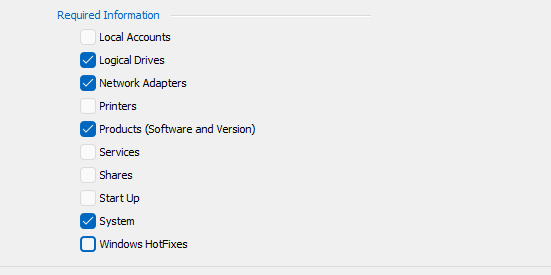
c6658c52-a10b-4ef6-8b85-3a5283abb997.png
Hi Joe,
Thank you for being so patient.
Here is what the application does regarding the options you've checked. From this post, we will create a knowledge base article that will be updated with the other commands.
Logical drives:
We perform the WMI query "Select * from Win32_LogicalDisk" and then filter on the result.
Network adapters:
We perform the WMI query "Select * from Win32_NetworkAdapterConfiguration" and then filter on the result.
Products:
We look in the following registry keys for the installed software through WMI using the StdRegProv class.
In HKEY_LOCAL_MACHINE:
Software\Microsoft\Windows\CurrentVersion\Uninstall
Software\WOW6432Node\Microsoft\Windows\CurrentVersion\Uninstall
Software\Classes\Installer\Products
In HKEY_CURRENT_USER:
<USER SID>\Software\Microsoft\Windows\CurrentVersion
<USER SID>\Software\Microsoft\Installer\Products
For the most part, all of the necessary information we get for the list of products is contained within these registry keys.
System:
The system setting contains multiple different calls over WMI.
Bios information: We fetch the information in the Win32_Bios class
TPM information: We fetch the information in the Win32_Tpm class
CDRom information: We perform the query "SELECT * FROM Win32_CDROMDrive" and then filter on the result.
Computer system information: We fetch the Win32_ComputerSystem class
Memory information: We perform the query "SELECT * FROM Win32_PhysicalMemory" and then filter on the result.
Monitor information: We perform the query "SELECT * FROM Win32_DesktopMonitor" and then filter on the result.
Motherboard information: We perform the query "SELECT * FROM Win32_BaseBoard" and then filter on the result.
Processor information: We perform the query "SELECT * FROM Win32_Processor" and then filter on the result.
Sound device information: We perform the query "SELECT * FROM Win32_SoundDevice" and then filter on the result.
Video controller information: We perform the query "SELECT * FROM Win32_VideoController" and then filter on the result.
Other device information:
We perform the following queries and filter the results:
"SELECT * FROM Win32_Keyboard"
"SELECT * FROM Win32_PointingDevice"
Operating system information:
For the main OS version, we fetch the Win32_OperatingSystem class.
For the build version, we use the StdRegProv class to access the registry key SOFTWARE\Microsoft\Windows NT\CurrentVersion to check the version.
Antivirus: We switch to the WMI context SecurityCenter2, then fetch the information from the AntivirusProduct class.
Best regards,
Érica Poirier
Hi Joe,
Here are the other WMI commands we use with the System Information Report entry.
Local accounts:
We perform the query "SELECT * FROM Win32_Account" and then filter on the result.
Printers:
We perform the query "SELECT * FROM Win32_Printer" and then filter on the result.
Services:
We perform the query "SELECT * FROM Win32_Service" and then filter on the results.
Shares:
We perform the query "SELECT * FROM Win32_Share" and then filter on the result.
Startup:
We perform the query "SELECT * FROM Win32_StartupCommand where User != '.DEFAULT' and User != 'NT AUTHORITY\SYSTEM'" and then filter on the results.
Windows hotfixes:
We perform the query "SELECT * FROM Win32_QuickFixEngineering" and then filter on the result.
Best regards,
Érica Poirier
Hi Erica,
Thank you very much for this information. Its probably enough to get me started on a script that collects same info and outputs to an xml file. Will let you know if I have any further questions on this.
Joe
Hi Erica,
Circling back on this one, I have created a PowerShell script that collects the info for all categories except 'System' and outputs to an XML (aka INV) file. Currently, enabling the 'System' category in the RDM gui causes a crash so I cannot generate an example file that contains the 'system' info. Pls see following post for this issue https://forum.devolutions.net/topics/41595/checking-system-in-the-required-information-of-a-system-information-re#191576.
While that is being addressed, are you able to provide a sample export of a 'system information report' entry that has the system data included pls. I need this in order to format the XML output of the respecive WMI queries allready provided.
Pls let me know if you would like any additional information.
Thanks
Joe
Hello Joe,
I will ask our developer when the fix will be available.
I have asked them too if they can provide the XML format of this System category.
Thank you for being so patient.
Best regards,
Érica Poirier
ok, thank you Erica.
Joe
Hello Joe,
The development team informed me that the fix for the System report issue will be available in the next RDM 2024.1.31 version.
From that version, you should be able to generate a report to get the XML format.
Best regards,
Érica Poirier
Hi Erica,
Collecting 'system' information still not working with 2024.1.31.
Joe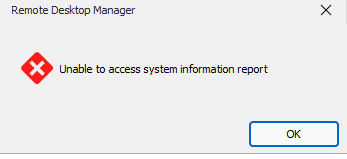
d8881ed3-5f27-41c4-aecc-d471957996b5.png
Hello Joe,
Thank you for being so patient.
This problem is still under investigation.
What do you get when using the Get-Tpm cmdlet in a PowerShell prompt with elevated privileges?
Do you get the same result as the System Information Report entry with an older RDM, like version 2023.3.39? Using the Portable installation, you can install this version side-by-side with your current version. Here is the link to download this version.
https://cdn.devolutions.net/download/Devolutions.RemoteDesktopManager.Bin.2023.3.39.0.zip
Thank you for your collaboration.
Best regards,
Érica Poirier
Hi Erica,
Thanks for the update.
Below is a screen shot of the output for Get-TPM. The respective machine is a VM without TPM/SecureBoot enabled.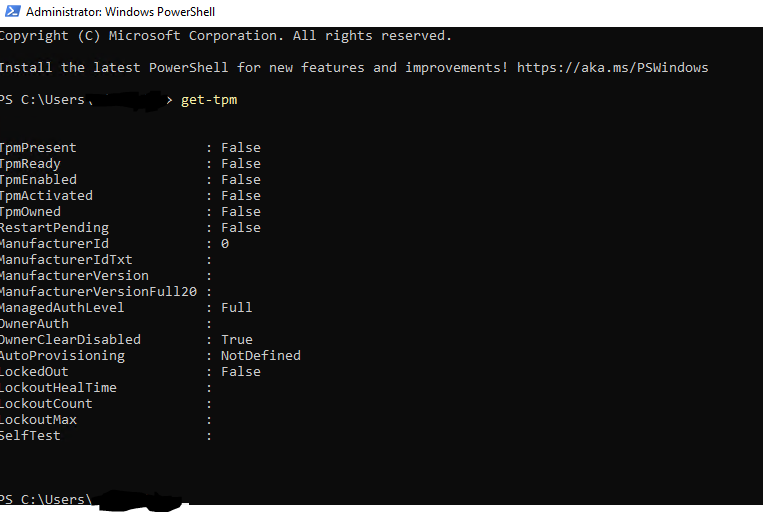
When I tried the older version, it doesnt work at all for any of the categories of system information. Receive the following error: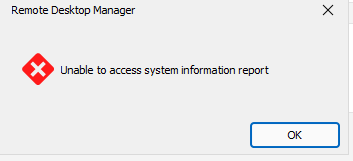
Pls let me know if you would like any additional info.
Joe
0e15eb59-6db2-47f1-a980-7bbc75582637.png
81daf0c7-8d9b-4a85-b16d-0911b35e52fd.png
Hello Joe,
Thank you for the information.
Once I'll hear from the developer team, I'll keep you posted.
Thank you for being so patient!
Best regards,
Érica Poirier
Is is possible that you could provide a separate executable/ps1 file that could be copied to our remote servers, executed and an Inventory File capable of being imported back into RDM would be good.
We have several servers that do not have WMI/RPC enabled from our central office for security reasons.
Is is possible that you could provide a separate executable/ps1 file that could be copied to our remote servers, executed and an Inventory File capable of being imported back into RDM would be good.
We have several servers that do not have WMI/RPC enabled from our central office for security reasons.
Hello @DMOZ
Do you have other requests besides the commands already mentioned above (see these 2 posts in the thread)?
https://forum.devolutions.net/topics/41596/system-information-report-entry-questions#190752
https://forum.devolutions.net/topics/41596/system-information-report-entry-questions#190793
Best regards,
Érica Poirier
@Erica Poirier
Thanks
I think I have worked it out using a combination of a sample .inv report and the various WMI calls you are making.
Thanks
@Erica Poirier I have discovered that the WMI calls for some parameters/values return "True" or "False" however the inventory import option expects "true" or "false" -- suggesting that the import code does not treat "True" and "true" (or "False" and "false") as the same value.
eg. Built-In inventory generator produces
<NetworkAdaptors>
<RemoteNetworkAdaptor>
.....
<DHCPEnabled>true</DHCPEnabled>
....
</RemoteNetworkAdaptor>
</NetworkAdaptors>
However the WMI call (concerted to XML) returns the following which fails to import
eg. Built-In inventory generator produces
<NetworkAdaptors>
<RemoteNetworkAdaptor>
.....
<DHCPEnabled>True</DHCPEnabled>
....
</RemoteNetworkAdaptor>
</NetworkAdaptors>
@Erica Poirier you may want to let the dev team know that there is a significant issue with Import Inventory (RDM 2025.2.7.0) which i have also confirmed goes back even to 2022.2.14.0
I Inventory scanned my local laptop with an RDM entry already created using 2025.2.7.0 DM.
The Inventory report (prior to 'Save to entry') shows everything as expected.
I saved the report as a .inv file to my local laptop
I then exited RDM and restarted but this time, when prompted I selected 'Load Inventory' and navigated to the previously saved file.
It reported successful loading, all details appeared correct and I clicked on 'Save to Entry'
Several elements did not import or display including:
Host IP
Socket Count (was 1 when live scanned, I cleared this value to '0', then then import did not update it)
Socket Type
Manufacturer
Model
When I compare and .rdm export of the same entry (via automatic Asset Inventory Scan) and the .INV file several of the fields have different references.
I had spent hours formulating a PS script to do the off-line scanning - but if the IP address or Hostname of the target device differ, then nothing seems to be imported.
So the suggestion that using PS to do offline scans and imports really isnt practical or reliable.
happy to supply copy of my PS script.
Hi DMOZ,
Could share a copy of your script pls.
I've attached one I built a while back, but it is missing the code to collect the 'system' category.
Hopefully these will help others attempting to collect inventory from systems not directly reachable from RDM for the builtin scan.
Thanks
Joe
GenerateSystemInventoryFile.ps1
Hi JM2
See attached
systeminfo.ps1
Hello @DMOZ,
Thank you for your feedback.
We will test this with the provided scripts and see if we can reproduce the same behavior you get when importing an inventory report.
Thank you for being so patient.
Best regards,
Érica Poirier
@Erica Poirier
Could i also make a suggestion, that your teams try to reproduce these steps
With direct connectivity to an end device
Add RDP entry to that device
Run the 'Inventory' option but save the output
Delete the entry
Add the same entry back in, but this time 'import' the previous 'Inventory.inv' file and observe the information that is not imported....
This should result in the same results as I am seeing when i run the script and select to import the .inv (xml) file
ie. important information is missing.
If you then compare what is stored for a direct inventory entry added into RDM inside the the Database, you will see the overall XML is different as well
Hello,
Thank you for the follow-up.
I was able to reproduce the issue you are experiencing with importing a .inv file generated by RDM and getting missing fields. I will report this bug to the development team, and they will begin working on a fix soon.
I will follow up with you as soon as a fix is deployed in a future update.
Best regards,
Jacob Lafrenière
Hello,
Data discrepancy issues with the inventory imports have been fixed internally, and will be available in version 2025.3.16.0.
Regards
Jonathan Del Signore