Checking System in the Required Information of a System Information Report entry causes it to fail
Checking System in the Required Information of a System Information Report entry causes it to fail

Hello,
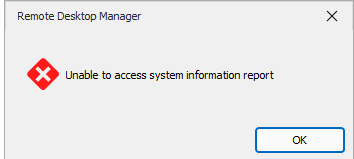
When I enable the 'system' option in a System Information Report entry, the report generation fails after a few minutes. The target system is a Windows Server 2022 VM. It works fine with all the other options enabled.
Please let me know if you would like any additional info.
Thanks
Joe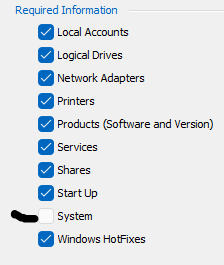
88f50367-a511-47c1-a612-056022e88ab6.png
f674e24e-ac98-4e6f-87a0-41b80a510368.png
All Comments (12)
Hello Joe,
Thank you for reaching out to us regarding this,
- Could you please specify the version of RDM you are currently using?
- What type of data source are you using?
Was this working without issues for you previously?
I'm also wondering if you have any additional details of this error under "Help" -> "Application Logs"?
Let me know,
Best regards,
Samuel Dery
Hi Samuel,
Using v 2024.1.18.0 with DVLS data source.
I didn't attempt to use this feature until current version, so not sure if it worked previously. However the 'Load from system information' button on the entries Asset\Networking page does work fine.
Nothing is shown under Help\Application Logs for when the inventory fails.
Joe
Hello Joe,
Thank you for this feedback.
Since this is a tool from an entry, could you tell me if your management tool credentials are set with an admin account?
Are these credentials linked to the vault or set as username passwords?
Best regards,
Patrick Ouimet
Hi Patrick,
Management Tools credential is set to 'use default credentials'. Changing to to 'use session credentials' makes no difference, which are an explicity defined admin account on the entries main property page.
Joe
Hello Joe,
Our quality assurance team was able to reproduce this issue on our side.
An internal ticket regarding this issue is open.
I'll keep you posted here on any progress.
Best regards,
Patrick Ouimet
Great, thanks Patrick
Hi Patrick,
Any progress on this one yet?
Thanks
Joe
Hello Joe,
Unfortunately, I don't know when this will be fixed and which version will be used.
I'll let you know as soon as a fixed version is available.
Best regards,
Patrick Ouimet
Hi Patrick,
Collecting 'system' information still not working with 2024.1.31.
Joe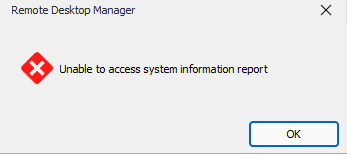
0a54df12-13b7-4464-9710-24c79cedabb1.png
Hello jm2,
I appreciate your patience.
Could you tell me if this issue still occurs?
Also, could you use the cmdlet Get-Tpm and send us the result?
Best regards,
Patrick Ouimet
Hi Patrick,
Yes the issue still occurs. Pls see this thread for results of Get-Tpm.
https://forum.devolutions.net/topics/41596/system-information-report-entry-questions#194688
Joe
Hello Joe,
Thank you for your feedback.
As I mentioned in the other thread, our developer team is analyzing this issue.
Once they find a solution, we will update both threads.
Thank you so much for being so patient!
Best regards,
Érica Poirier