Can't login to Devolutions Account
Hi,
I was prompted to login with my Devolutions Account this morning (following an update, if that matters), but I am getting this:
Click through a few 'Yes', I get a blank page.
Currently using:
I searched the forum, and clear my IE cache/cookies but it did not help.
Going to https://account.devolutions.com/ on IE just gives me a blank page.
Going to https://customer-portal.devolutions.com/ on IE, I am able to login, but then I get this:
I'm not sure what to try next?
Thanks!
... Alex ...
All Comments (20)

Disabled
Hi Alex,
Thanks for reaching out! We are currently investigating your issue.
When using IE to sign in (either on account.devolutions.com or customer-portal.devolutions.com), is there any error logs in the console while on the login page?
It would help us a lot if you could share this information, to do so you can:
- Press the F12 key to open the Developer Tools Window
- From the Console Tab, Right click and click Copy All
Regards,
Richer Archambault
Hi,
There you go:
DOM7011: The code on this page disabled back and forward caching. For more information, see: http://go.microsoft.com/fwlink/?LinkID=291337
customer-portal.devolutions.com
HTML1300: Navigation occurred.
customer-portal.devolutions.com
TypeError: Object doesn't support property or method 'includes'
   {
      [functions]: ,
      __proto__: { },
      description: "Object doesn't support property or method 'includes'",
      message: "Object doesn't support property or method 'includes'",
      name: "TypeError",
      number: -2146827850,
      stack: "TypeError: Object doesn't support property or method 'includes'
   at t.prototype.setLocale (https://customer-portal.devolutions.com/main.8be05dfeffcb9550b518.js:1:1892691)
   at Anonymous function (https://customer-portal.devolutions.com/main.8be05dfeffcb9550b518.js:1:1944295)
   at e.prototype._tryNext (https://customer-portal.devolutions.com/main.8be05dfeffcb9550b518.js:1:1248405)
   at e.prototype._next (https://customer-portal.devolutions.com/main.8be05dfeffcb9550b518.js:1:1248309)
   at e.prototype.next (https://customer-portal.devolutions.com/main.8be05dfeffcb9550b518.js:1:710219)
   at e.prototype.__tryOrUnsub (https://customer-portal.devolutions.com/main.8be05dfeffcb9550b518.js:1:708555)
   at e.prototype.next (https://customer-portal.devolutions.com/main.8be05dfeffcb9550b518.js:1:707697)
   at e.prototype._next (https://customer-portal.devolutions.com/main.8be05dfeffcb9550b518.js:1:706761)
   at e.prototype.next (https://customer-portal.devolutions.com/main.8be05dfeffcb9550b518.js:1:706444)
   at e.",
      Symbol()_8.a00zogsm4fg: undefined,
      Symbol(INITIAL_VALUE)_k.a00zogsm4fg: undefined,
      Symbol(rxSubscriber)_i.a00zogsm4fg: undefined,
      Symbol(rxSubscriber)_j.a00zogsm4fg: undefined
   }

SCRIPT1002: Syntax error
silent-callback.html (9,45)
... Alex ...
DOM7011: The code on this page disabled back and forward caching. For more information, see: http://go.microsoft.com/fwlink/?LinkID=291337
account.devolutions.com
HTML1300: Navigation occurred.
account.devolutions.com
TypeError: Object doesn't support this action
   {
      [functions]: ,
      __proto__: { },
      description: "Object doesn't support this action",
      message: "Object doesn't support this action",
      name: "TypeError",
      number: -2146827843,
      stack: "TypeError: Object doesn't support this action
   at e.areURLsSameSite (https://account.devolutions.com/main.ca0a7f24e508317e69a3.js:1:1107159)
   at t (https://account.devolutions.com/main.ca0a7f24e508317e69a3.js:1:1279250)
   at t (https://account.devolutions.com/main.ca0a7f24e508317e69a3.js:1:326167)
   at t.ɵfac (https://account.devolutions.com/main.ca0a7f24e508317e69a3.js:1:327287)
   at t.prototype.hydrate (https://account.devolutions.com/main.ca0a7f24e508317e69a3.js:1:831991)
   at t.prototype.get (https://account.devolutions.com/main.ca0a7f24e508317e69a3.js:1:829644)
   at e.prototype.get (https://account.devolutions.com/main.ca0a7f24e508317e69a3.js:1:874369)
   at get (https://account.devolutions.com/main.ca0a7f24e508317e69a3.js:1:868286)
   at fn (https://account.devolutions.com/main.ca0a7f24e508317e69a3.js:1:792031)
   at Zo (https://account.devolutions.com/main.ca0a7f24e508317e69a3.js:1:837145)",
      Symbol()_8.a317kie5u2i: undefined,
      Symbol(INITIAL_VALUE)_j.a317kie5u2i: undefined,
      Symbol(nodejs.util.inspect.custom)_k.a317kie5u2i: undefined,
      Symbol(rxSubscriber)_i.a317kie5u2i: undefined
   }

TypeError: Object doesn't support this action
   {
      [functions]: ,
      __proto__: { },
      description: "Object doesn't support this action",
      message: "Object doesn't support this action",
      name: "TypeError",
      number: -2146827843,
      stack: "TypeError: Object doesn't support this action
   at e.areURLsSameSite (https://account.devolutions.com/main.ca0a7f24e508317e69a3.js:1:1107159)
   at t (https://account.devolutions.com/main.ca0a7f24e508317e69a3.js:1:1279250)
   at t (https://account.devolutions.com/main.ca0a7f24e508317e69a3.js:1:326167)
   at t.ɵfac (https://account.devolutions.com/main.ca0a7f24e508317e69a3.js:1:327287)
   at t.prototype.hydrate (https://account.devolutions.com/main.ca0a7f24e508317e69a3.js:1:831991)
   at t.prototype.get (https://account.devolutions.com/main.ca0a7f24e508317e69a3.js:1:829644)
   at e.prototype.get (https://account.devolutions.com/main.ca0a7f24e508317e69a3.js:1:874369)
   at get (https://account.devolutions.com/main.ca0a7f24e508317e69a3.js:1:868286)
   at fn (https://account.devolutions.com/main.ca0a7f24e508317e69a3.js:1:792031)
   at Zo (https://account.devolutions.com/main.ca0a7f24e508317e69a3.js:1:837145)",
      Symbol()_8.a317kie5u2i: undefined,
      Symbol(INITIAL_VALUE)_j.a317kie5u2i: undefined,
      Symbol(nodejs.util.inspect.custom)_k.a317kie5u2i: undefined,
      Symbol(rxSubscriber)_i.a317kie5u2i: undefined
   }

SCRIPT5011: Can't execute code from a freed script
polyfills-es5.3b8e1c7a7d08a73b4289.js (1,37195)
SCRIPT5011: Can't execute code from a freed script
polyfills-es5.3b8e1c7a7d08a73b4289.js (1,37195)
... Alex ...
Disabled
Those error logs seems to be from account.devolutions.com and customer-portal.devolutions.com. Do you get any error while signing in on login.devolutions.com (this is the page being rendered by RDM)?
Richer Archambault
Hi Richer,
Similar sort of difference when I go to https://login.devolutions.com although it happens after I login (which is more than I can do in the app):
HTML1300: Navigation occurred.
authenticate
DOM7011: The code on this page disabled back and forward caching. For more information, see: http://go.microsoft.com/fwlink/?LinkID=291337
login
TypeError: Object doesn't support this action
   {
      [functions]: ,
      __proto__: { },
      description: "Object doesn't support this action",
      message: "Object doesn't support this action",
      name: "TypeError",
      number: -2146827843,
      stack: "TypeError: Object doesn't support this action
   at e.areURLsSameSite (https://account.devolutions.com/main.ca0a7f24e508317e69a3.js:1:1107159)
   at t (https://account.devolutions.com/main.ca0a7f24e508317e69a3.js:1:1279250)
   at t (https://account.devolutions.com/main.ca0a7f24e508317e69a3.js:1:326167)
   at t.ɵfac (https://account.devolutions.com/main.ca0a7f24e508317e69a3.js:1:327287)
   at t.prototype.hydrate (https://account.devolutions.com/main.ca0a7f24e508317e69a3.js:1:831991)
   at t.prototype.get (https://account.devolutions.com/main.ca0a7f24e508317e69a3.js:1:829644)
   at e.prototype.get (https://account.devolutions.com/main.ca0a7f24e508317e69a3.js:1:874369)
   at get (https://account.devolutions.com/main.ca0a7f24e508317e69a3.js:1:868286)
   at fn (https://account.devolutions.com/main.ca0a7f24e508317e69a3.js:1:792031)
   at Zo (https://account.devolutions.com/main.ca0a7f24e508317e69a3.js:1:837145)",
      Symbol()_8.3hv7qyy04qx: undefined,
      Symbol(INITIAL_VALUE)_j.3hv7qyy04qx: undefined,
      Symbol(nodejs.util.inspect.custom)_k.3hv7qyy04qx: undefined,
      Symbol(rxSubscriber)_i.3hv7qyy04qx: undefined
   }

TypeError: Object doesn't support this action
   {
      [functions]: ,
      __proto__: { },
      description: "Object doesn't support this action",
      message: "Object doesn't support this action",
      name: "TypeError",
      number: -2146827843,
      stack: "TypeError: Object doesn't support this action
   at e.areURLsSameSite (https://account.devolutions.com/main.ca0a7f24e508317e69a3.js:1:1107159)
   at t (https://account.devolutions.com/main.ca0a7f24e508317e69a3.js:1:1279250)
   at t (https://account.devolutions.com/main.ca0a7f24e508317e69a3.js:1:326167)
   at t.ɵfac (https://account.devolutions.com/main.ca0a7f24e508317e69a3.js:1:327287)
   at t.prototype.hydrate (https://account.devolutions.com/main.ca0a7f24e508317e69a3.js:1:831991)
   at t.prototype.get (https://account.devolutions.com/main.ca0a7f24e508317e69a3.js:1:829644)
   at e.prototype.get (https://account.devolutions.com/main.ca0a7f24e508317e69a3.js:1:874369)
   at get (https://account.devolutions.com/main.ca0a7f24e508317e69a3.js:1:868286)
   at fn (https://account.devolutions.com/main.ca0a7f24e508317e69a3.js:1:792031)
   at Zo (https://account.devolutions.com/main.ca0a7f24e508317e69a3.js:1:837145)",
      Symbol()_8.3hv7qyy04qx: undefined,
      Symbol(INITIAL_VALUE)_j.3hv7qyy04qx: undefined,
      Symbol(nodejs.util.inspect.custom)_k.3hv7qyy04qx: undefined,
      Symbol(rxSubscriber)_i.3hv7qyy04qx: undefined
   }
... Alex ...
Disabled
Hi Alex,
We are looking into this issue with the information you've given us.
Thanks a lot,
Richer Archambault
Hi Alex,
A lot of clients have been reporting similar issues recently, it seems like some default settings might have changed for IE on Windows 10. One of our users reported that unticking “Display internet sites in Compatibility View” in the Compatibility View Settings for IE fixed the issue. Logging your progress here while you change your settings might help others as well.
Thank you,
Luc Fauvel
Hi Luc,
This is what Compatibility View settings look like for me:
... Alex ...
Hi again Alex,
Can you try doing the steps in this article to try and resolve this issue? https://docs.microsoft.com/en-us/troubleshoot/browsers/troubleshoot-script-errors.
I can't seem to replicate this issue so I'm fairly certain it must be some obscure IE 11 setting that's been changed for some reason.
Thank you,
Luc Fauvel
For info, I'm still having a similar issue,
although the error message is the same one as https://forum.devolutions.net/topics/35037/script-errors-when-login-to-account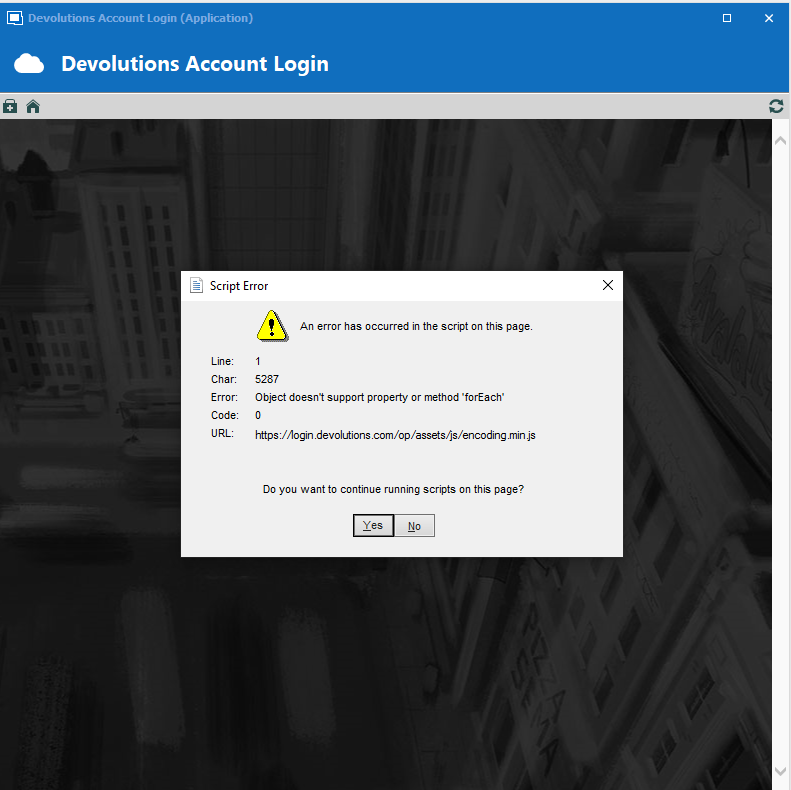
I have switched to File Backup for now, until there is news regarding the change in authentication method.
... Alex ...
Screenshot.png
Hello Alex,
Thank you for providing us this information. We will inform you once the new authentication method has been implemented.
Best regards,
James Lafleur
i have the same problem
@daniel6,
The error message appear when exactly?
What version of RDM are you running?
What type of datasource are you using?
Best regards,
Jeff Dagenais


i can not start the Program. when i start and want to login, the error message appears
i want to use the online datasource
@daniel6,
As of now, the authentication is performed via Internet Explorer and this explain why some of you encounter connection issues like you have.
Our engineering department has worked on a new way to perform the authentication and this should be available very soon.
We will post here when it's gonna be available.
As of now, as a workaround, I would suggest to use an application password to authenticate on your online datasource.
1- Go into your Devolutions account here: https://account.devolutions.com/security/app-passwords and use the "+" sign to create an application password.
2- In RDM go under File -> Data sources -> Edit and change the "Connection Mode" to "Application Password".
3- Enter the email address of your Devolutions Account along with the "Application Password" you have configured at step #1.
Best regards,
Jeff Dagenais
great. this works!
Hello,
In the past, you had encountered an issue with the authentication on our cloud portal via RDM because of errors with our Internet Explorer implementation. This is now resolved in RDM 2021.x, since the authentication method is now completely changed. You can download the proper version (free or enterprise) here https://remotedesktopmanager.com/home/download . Please note that if you are running an advanced datasource, a database upgrade is required - https://help.remotedesktopmanager.com/database_upgrade.html
If you we're using the Online backup with Devolutions and that you had switch to a local backup as a workaround, you can reactivate the Online backup by going in File – Data sources – Edit – Backup tab and select Online backup.
Best regards,
Jeff Dagenais
Hi,
That seems to do the trick, thanks!
... Alex ...
Excellent, and thank you Alex for taking the time to confirm.
Have a nice day!
Christine Breault