vasilas98
RDM 2026.3 - Quick Connect ignores linked credentials in RDP templates
Hi,
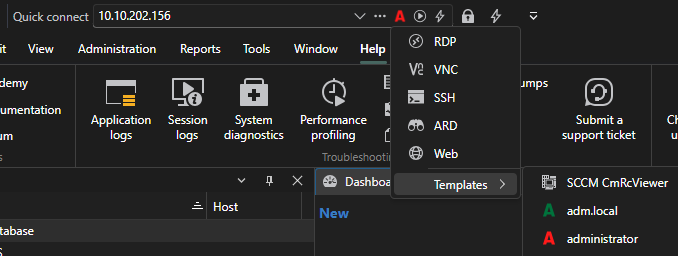
I’ve found where the problem lies: whatever you select in this menu (see attached photo), it doesn’t show which option is currently active. Furthermore, the icon at the top, next to the red "A," remains stuck on the "Open" icon and never changes. When I updated RDM to 2026.3 something changed in that menu, changing the "Open" option to something else and I never noticed because the icon was always the correct one for me.
I would also like to point out that before the update, when you entered an IP and connected, the IP remained inside the text box, but now it disappears. Furthermore, the "Auto-select text on focus" option does not seem to be working.
Thanks for the support!
RDM 2026.3 - Quick Connect ignores linked credentials in RDP templates
Hello,
Thank you for your reply.
I've performed both tests you suggested:
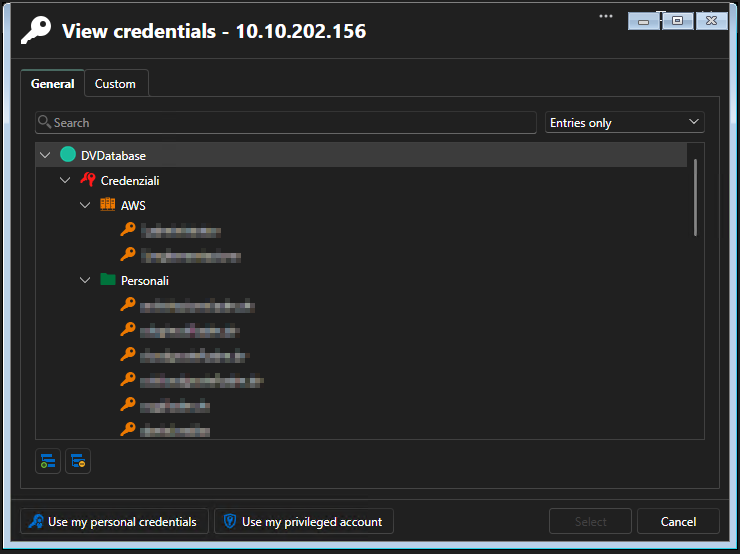
Selecting the Credenziali vault: I selected the Credenziali vault before launching Quick Connect with the administrator template, but the issue persists. RDM still prompts me to select credentials.
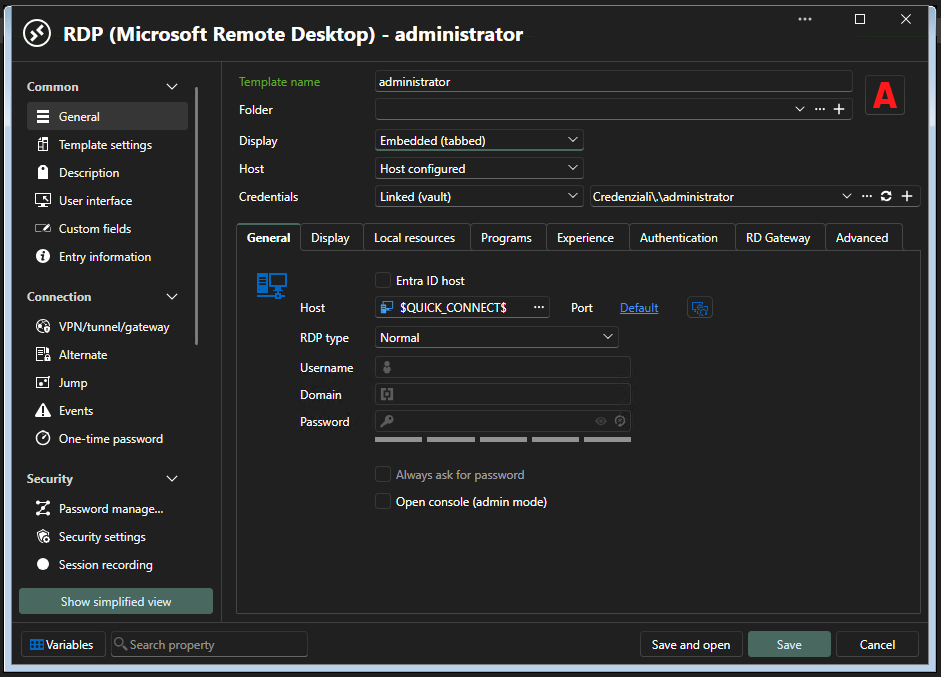
Cross-vault credentials: I checked the template's credential settings, but I couldn't find any cross-vault option. The template is currently configured with "Linked (vault)", pointing to Credenziali\.\administrator.
Regarding your other questions:
Data source: I'm using a Local Data Source based on SQLite. The credential selection window displays it as DV_Database.
Template location: The administrator template is stored under the Workspace tab, not Local machine.
Please let me know if you need any additional information or further testing.
Thank you!
RDM 2026.3 - Quick Connect ignores linked credentials in RDP templates
Hello,
Since upgrading Remote Desktop Manager to version 2026.3, I've been experiencing an issue with Quick Connect when using RDP templates with linked credentials.
Before the update, I could simply enter an IP address in the Quick Connect bar, select my RDP template, and press Enter. The connection would open automatically using the credentials configured in the template.
However, since upgrading to 2026.3, RDM prompts me to enter credentials every time, even though the selected template already has a valid linked credential entry.
The issue persists even after updating to version 2026.3.15.0.
Thank you!