mark_emeny
Remove undocked floating connection toolbar
That's fabulous news, thanks Alexis.
Please let the development team know that to many this might sound like a trivial request but it will save me a great deal of frustration!
Keep up the great work!
Remove undocked floating connection toolbar
Thanks again, Alexis. Unfortunately, I do have "Current Work area size" selected as I want the RDP session to be as large as possible, without hiding the Taskbar (which is why I don't use Full Screen). It is a shame, as I'm sure it used to work fine. I have a different machine, with possibly an older version of RDM, so will see if I can verify that.
Remove undocked floating connection toolbar
Thanks Alexis. Glad to hear I didn’t imagine it then!
Remove undocked floating connection toolbar
Thanks for the reply. I'm fairly sure the "Show close button on undocked windows" option used to hide the toolbar, but now it doesn't appear to do anything.
I used to use the Taskbar to close the window, so didn't need the toolbar.
It gets in the way for me as it appears when the cursor is at the top of the window, which can cause me to close the session by mistake, as it appears just before a mouse-click.
Remove undocked floating connection toolbar
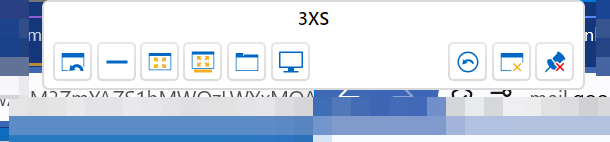
Hi. How can I permanently remove the floating connection toolbar that appears within undocked RDP sessions? I'm sure this used to be possible.
I know it hides itself but then re-appears when the cursor reaches the top of the screen.