
joaopnascimento
OTP auto fill not working after upgrade to 2026.3.13.0
Hi,
Sorry for the delay in the reply.
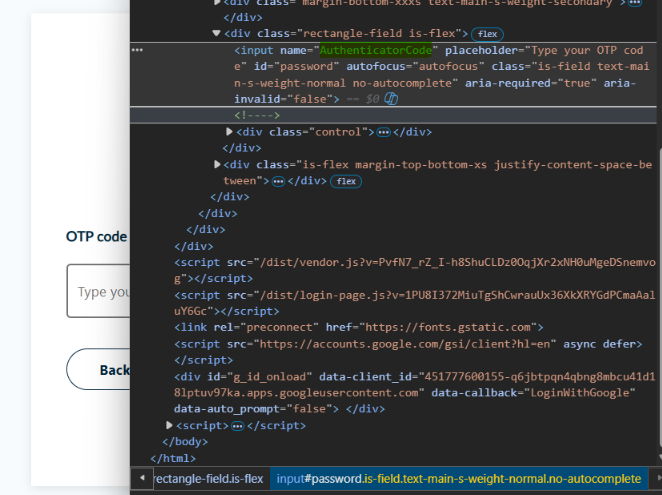
Nothing works, apparently as you've said, because Password and OTP fields have the same ID.
I've solved it by using this macro:
{DELAY:5000}$ONE_TIME_PASSWORD${ENTER}
It allows time to fill the username and the password fields using it's IDs and then auto-type the OTP from a variable.
Thank you for your support.
OTP auto fill not working after upgrade to 2026.3.13.0
Hi,
In the configuration I use this:

As for the HTML Controls, these is how is set:
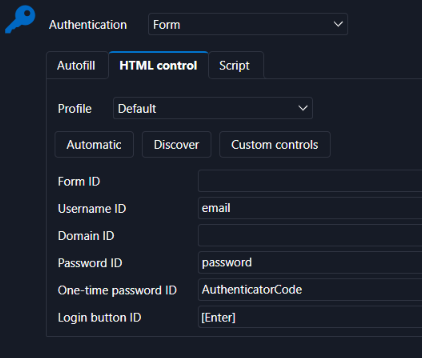
Also confirmed that the One-time Password ID is the one that is set:
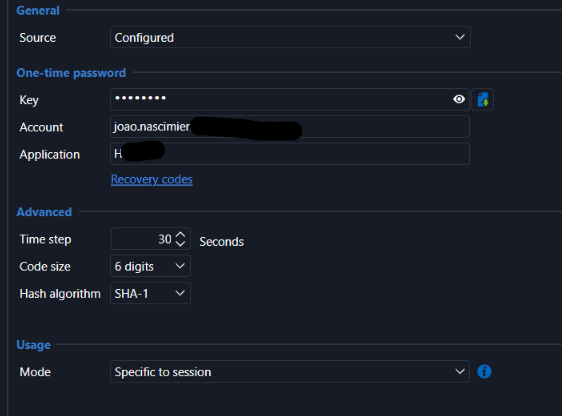
This is the OTP configuration within the entry (I've tried to configure it on the account entry also)
As for the question: Whether the OTP field appears on the same page as the password, or on a separate step after you log in.
The OTP field appears on a separate page after the initial login.
I had previously the 2026.2.19.0 version where I've set this entry and it worked perfectly. It stopped working after the update. As said, the login process halts in the OTP page. If I press Auto-Type for OTP, it fills correctly. Just not automatically as it did before.
OTP auto fill not working after upgrade to 2026.3.13.0
After updating RDM to 2026.3.13.0 the OTP auto fill is not working for a browser session. It was working before.
If I manually press the auto-typing, it fills the correct OPT. The HTML controls are OK. Didn't change. it's using the Chrome extension, but I have the same result with the Edge's.