OTP auto fill not working after upgrade to 2026.3.13.0

After updating RDM to 2026.3.13.0 the OTP auto fill is not working for a browser session. It was working before.
If I manually press the auto-typing, it fills the correct OPT. The HTML controls are OK. Didn't change. it's using the Chrome extension, but I have the same result with the Edge's.
All Comments (3)
Hi joaopnascimento,
Thanks for the report. We checked what changed in RDM 2026.3.13 and the way RDM hands the OTP to the browser extension is the same as in the previous version, which fits with the manual fill still entering the right code. A recent browser extension update changed how the automatic fill behaves on pages where the username or password fields configured in the entry aren't present, so we'd like to check whether that's what you're hitting.
Could you tell us:
- The extension version shown in chrome://extensions (and edge://extensions).
- Whether the OTP field appears on the same page as the password, or on a separate step after you log in.
- In the website entry, which control IDs are filled in (username, password, OTP).
Also, as a quick test: if the OTP control ID isn't set in the entry, try setting it to the ID of the OTP field and let us know if the automatic fill picks it up.
Best regards,
Eduard Sepulveda Lopez
Hi,
In the configuration I use this:
As for the HTML Controls, these is how is set: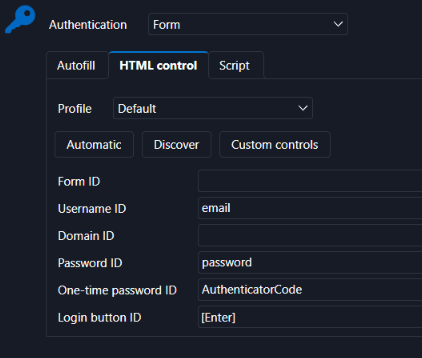
Also confirmed that the One-time Password ID is the one that is set: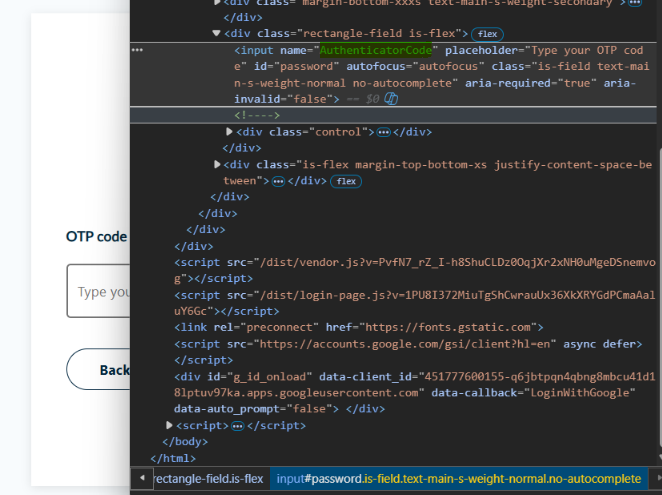
This is the OTP configuration within the entry (I've tried to configure it on the account entry also)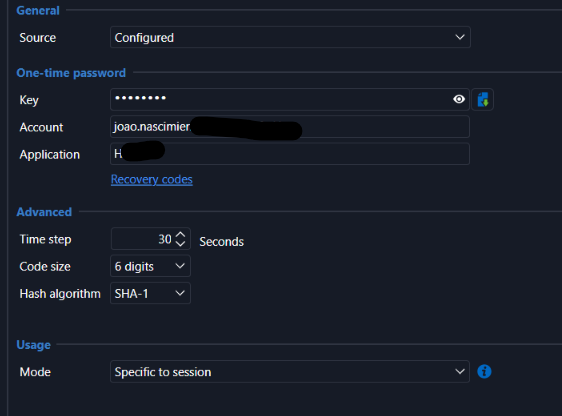
As for the question: Whether the OTP field appears on the same page as the password, or on a separate step after you log in.
The OTP field appears on a separate page after the initial login.
I had previously the 2026.2.19.0 version where I've set this entry and it worked perfectly. It stopped working after the update. As said, the login process halts in the OTP page. If I press Auto-Type for OTP, it fills correctly. Just not automatically as it did before.
00f78b0b-5cd8-4d94-88e7-89d8e42fe575.png
85b010ab-510f-49de-bdf2-8cb2b2c36d5d.png
65f39c50-0b09-4ad5-b523-4adb266ebced.png
c1ba47a3-589c-437b-954f-faa3da3b409a.png
Hi joaopnascimento,
Thanks for the screenshots, they helped a lot. The DevTools capture shows something important. On the OTP page, the code field has name="AuthenticatorCode" but its id is password. Your entry uses password as the Password ID, and the extension checks the password control before the OTP control. So on the second page it can grab that field as the password field before it gets to the OTP. Recent extension versions changed how autofill on page load works on multi-step logins, which would explain why it worked with your previous setup and stopped now.
Could you try this:
- In the entry, go to the HTML control tab and clear the Password ID field. Leave the OTP ID as AuthenticatorCode.
- Save, open the session again and go through the login.
The extension should still find the password field on the first page by itself. Then the OTP field on the second page won't be taken by the password ID.
If the first page stops filling the password after that, set the Password ID to the name of the password field on the first page instead, as long as it's something other than "password".
If it still doesn't work, please send us:
- The extension version from chrome://extensions.
- The full HTML of the OTP input, including its type attribute.
- Whether the OTP field stays empty or gets something typed into it (for example, your password).
Best regards,
Eduard Sepulveda Lopez