
Marco
Dynamic Mermaid Flowchart
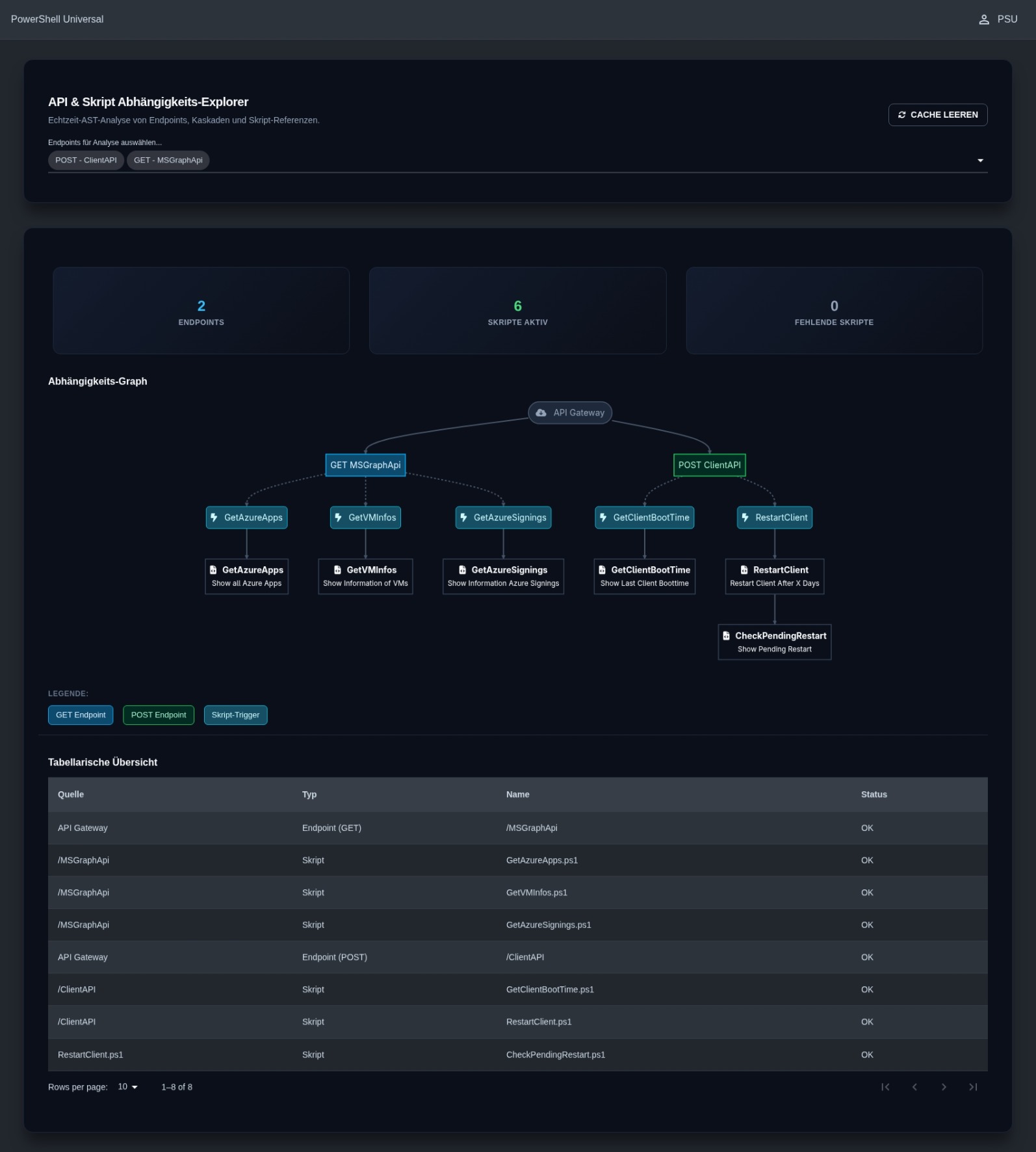
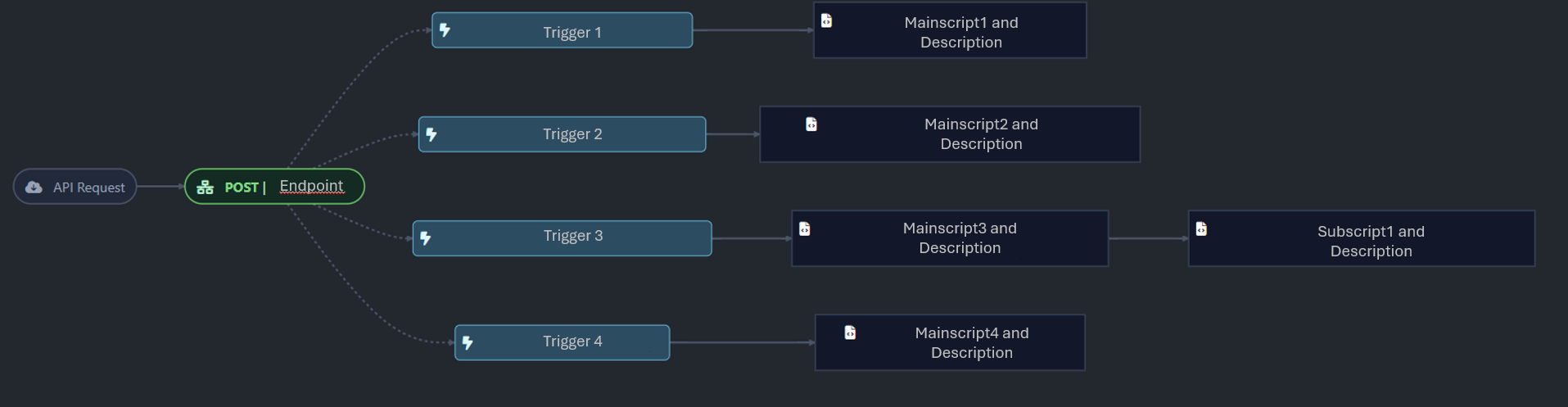
A little update of my flowchart. All the Informations you see are just examples.
Filter Jobs by Execution Time
Hi,
I have another feature request. Would it be possible to provide an option in the future to specify a time range and display which jobs were executed between, for example, 1:00 a.m. and 3:00 a.m.?
Currently, I either change the number of jobs displayed per page (10 or 50), which can lead to performance issues, or navigate through the pages one by one.
Dynamic Mermaid Flowchart
Hey @Dynamic66 ,
I will take a look in the upcoming days. To bad, a direct conversation isnt possible anymore.
Thx for the invitation. Maybe I ll be there.
Dynamic Mermaid Flowchart
Hello everyone,
I would also like to give some insight into one of my projects. This script is a dynamic application. The main task of this app is to graphically and interactively display the architecture and dependencies of interfaces (endpoints) and the underlying automation scripts (PowerShell scripts).
Users can select one or more API endpoints via a dropdown menu. The application then automatically and in real-time analyzes in the background which scripts are called by these endpoints and which further sub-scripts are triggered from there. The result is visualized as a dynamic, automatically updating flowchart using the Mermaid diagram library.
Thanks to integrated, high-performance session caching, the application runs very smoothly, and the diagram nodes are linked directly to the corresponding scripts in the PowerShell Universal admin area, which significantly simplifies troubleshooting and system analysis for administrators and developers.
Due to sensitive data, I have kept the descriptions general.
2026.3.2 - Remove-PSUSchedules fails
Thanks @Adam Driscoll, exactly what was missing. Thank you.
Extension of the “Max History” Script Setting
Hi @Adam Driscoll , thanks alot.
Extension of the “Max History” Script Setting
Hi,
I would like to ask whether it would be possible to extend the “Max History” setting in the script configuration so that it can be specified in days.
For example: retain the jobs for a maximum of 30 days before they can be removed.
Thank you in advance.
2026.3.2 - Remove-PSUSchedules fails
Hi, today we noticed that using Remove-PSUSchedule no longer works in version 2026.3.2. The following error message appears: (Screenshot)
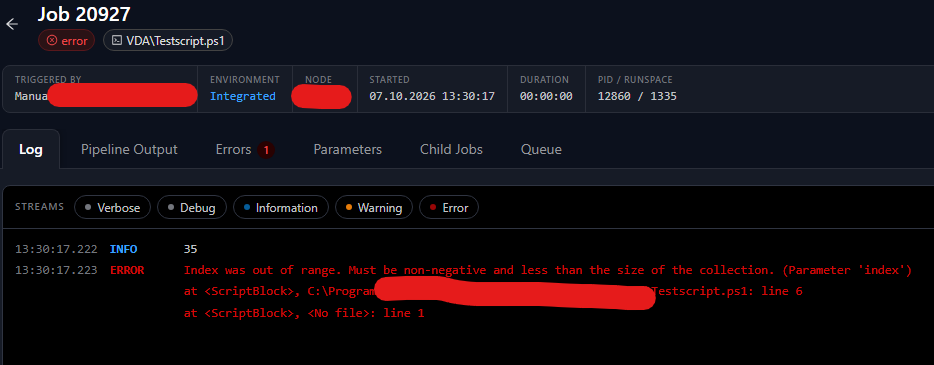
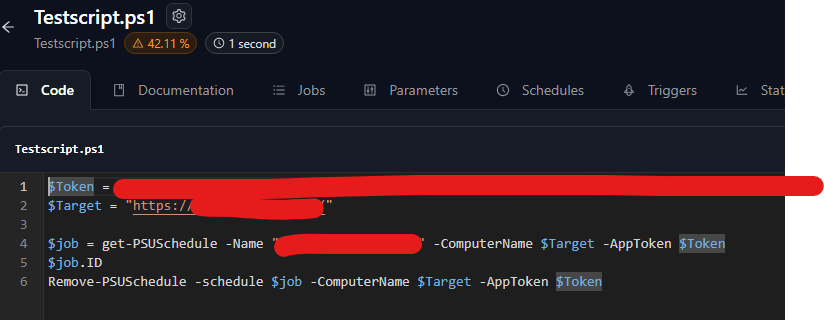
It works perfectly under version 2026.2.0.
2026.3.2 – Jobs are displayed only temporarily
Hi again,
it seems that this is not actually a bug, but rather the result of user error. In the script settings, Max History for the script that runs regularly was set to zero. This also explains why the jobs disappear shortly afterward.
2026.3.2 – Jobs are displayed only temporarily
Hi,
I have just updated to version 2026.3.2 and immediately noticed that no current executions are displayed permanently under Jobs. I can see that a new Job ID is assigned each time, but it is only visible for about one minute before disappearing.
PSU is working on IIS.

XLSX Export Options - New-UDTable
Hello everyone,
I have a feature request regarding the export functionality of new-udtable.
The PSU app already allows users to filter and sort columns. Would it be possible to export the data exactly as it is displayed in the app?
Additionally, it would be great if the following options could be enabled when exporting:
AutoFilter
AutoSize
FreezeTopRow
Pin Sidebar Menu Items
Hey there,
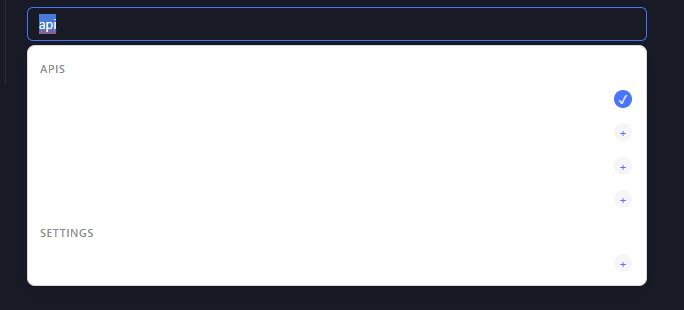
I just saw the post and wanted to implement the option right away, and while doing so I noticed a bug in Dark Mode.
Icon button
Hi @Lars Lervik ,
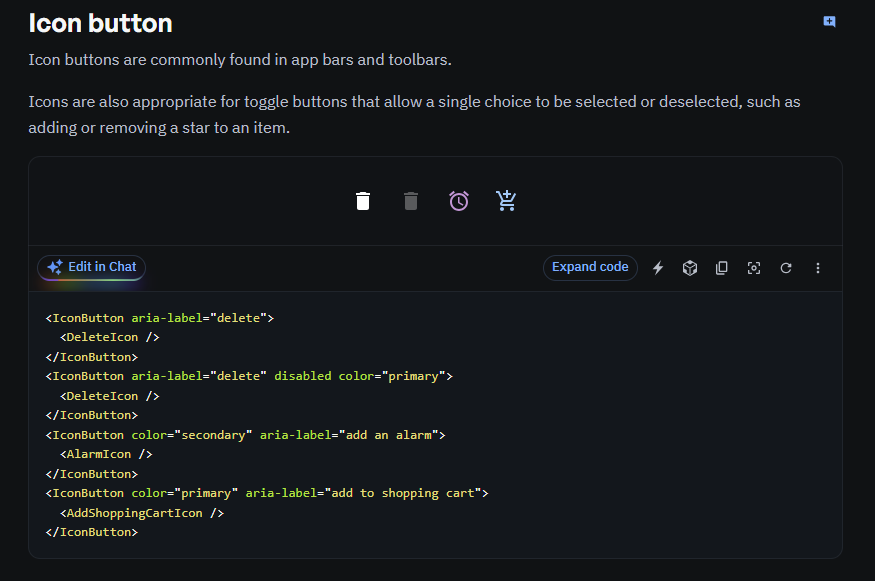
sorry for the late response. I would be thankful, when you can decide the color bei your own. Maybe to change the size of the button should also be possible. Thank you. If you have any other best practice attributes, feel free to include it. :)
best regardst
Icon button
Hi there,
is it possible to update the button possibilities (Icon button) like MUI website?
best regards
Best practices for handling Local Windows Credentials in an Azure AD authenticated PowerShell App
Hi everyone,
I'm looking for architectural best practices regarding credential handling in a hybrid scenario.
Our Setup & Problem:
Users authenticate to our web app (PowerShell Universal) using Azure AD / Entra ID. However, the app needs to perform remote actions on local On-Premises PCs (via WinRM/CIM).
Because the Azure identity cannot be used directly for local Windows authentication, we need a separate set of Active Directory credentials.
What we want to achieve:
Prompt the user inside the app for their local Windows/AD credentials.
Cache these credentials securely only for the duration of their browser session (they must expire when the browser is closed).
Reuse the cached credentials during the session to query remote PCs by passing them to background jobs via Invoke-PSUScript.
My Questions:
What is the most secure way to temporarily store a PSCredential object in the server's session memory (e.g., $Session scope) without risking plaintext exposure?
How do you reliably ensure the credentials are wiped as soon as the user closes the browser?
Are there better alternative architectural patterns for this specific "Azure App to On-Premises Management" transition? Serviceuser aint an Option.
Thanks in advance for your advice!
@Marco
Dear Marco,
Thank you very much for contacting Ironman Software!
My name is Ruben Tapia, a support engineer in charge of request #F-55534. While we review the details provided, please remember that you can add additional information by replying to this email.
To start over kindly share with me the following information:
• When did you start designing or testing this workflow?
• PSU Version:
• Installation type: MSI, ZIP, IIS, Docker, or other:
• Are the remote WinRM/CIM calls executed from an app event handler, API, or background job only?
• Are you currently passing the credential object directly to Invoke-PSUScript, or only planning the design?
• Do users need to authenticate with their own AD accounts, or would delegated/controlled access through roles be acceptable?
Based on the PowerShell Universal v5 documentation, the $Session scope is the closest documented pattern for per-user app session storage. The documentation states that session variables are per app session, have an idle timeout, are cleared when the session ends, and are not persisted to disk. It also specifically documents storing credentials in session scope for the duration of a user session.
One important limitation is that $Session variables are not available in REST API endpoints or scheduled endpoints, so we should confirm how the background job is launched and whether the credential needs to cross into Automation.
https://docs.powershelluniversal.com/apps/custom-variable-scopes
https://docs.powershelluniversal.com/platform/cache
https://docs.powershelluniversal.com/automation/triggers
Best regards,
Ruben Tapia
@rubentapia
Hello Ruben,
thanks for your message.
I am still in the design phase, as we generally work with roles, but for the app we are currently planning we need to rethink things a bit.
Basically, we are still starting with the app structure.
We are using PSU version 2026.2.0 via IIS.
Ideally, when opening the app, the credentials would be requested and temporarily stored in a variable for further processing.
From within the app, the credentials should then either be passed to scripts in PSU via Invoke-PSUScript or possibly handled through the Modules tab.
In principle, I prefer using roles, but on the on-premise side (using Azure login) there are problems with using WinRM or CIM.
That’s why I was asking how I should best proceed.
Best regards,
Marco
@rubentapia
Couldn’t this be turned into a feature in the future, so that when creating an app (PSU mask) there is also the option to decide which type of authorization you want to use? (forms, windows, entra...)
Best practices for handling Local Windows Credentials in an Azure AD authenticated PowerShell App
Hi everyone,
I'm looking for architectural best practices regarding credential handling in a hybrid scenario.
Our Setup & Problem:
Users authenticate to our web app (PowerShell Universal) using Azure AD / Entra ID. However, the app needs to perform remote actions on local On-Premises PCs (via WinRM/CIM).
Because the Azure identity cannot be used directly for local Windows authentication, we need a separate set of Active Directory credentials.
What we want to achieve:
Prompt the user inside the app for their local Windows/AD credentials.
Cache these credentials securely only for the duration of their browser session (they must expire when the browser is closed).
Reuse the cached credentials during the session to query remote PCs by passing them to background jobs via Invoke-PSUScript.
My Questions:
What is the most secure way to temporarily store a PSCredential object in the server's session memory (e.g., $Session scope) without risking plaintext exposure?
How do you reliably ensure the credentials are wiped as soon as the user closes the browser?
Are there better alternative architectural patterns for this specific "Azure App to On-Premises Management" transition? Serviceuser aint an Option.
Thanks in advance for your advice!
@Marco
Dear Marco,
Thank you very much for contacting Ironman Software!
My name is Ruben Tapia, a support engineer in charge of request #F-55534. While we review the details provided, please remember that you can add additional information by replying to this email.
To start over kindly share with me the following information:
• When did you start designing or testing this workflow?
• PSU Version:
• Installation type: MSI, ZIP, IIS, Docker, or other:
• Are the remote WinRM/CIM calls executed from an app event handler, API, or background job only?
• Are you currently passing the credential object directly to Invoke-PSUScript, or only planning the design?
• Do users need to authenticate with their own AD accounts, or would delegated/controlled access through roles be acceptable?
Based on the PowerShell Universal v5 documentation, the $Session scope is the closest documented pattern for per-user app session storage. The documentation states that session variables are per app session, have an idle timeout, are cleared when the session ends, and are not persisted to disk. It also specifically documents storing credentials in session scope for the duration of a user session.
One important limitation is that $Session variables are not available in REST API endpoints or scheduled endpoints, so we should confirm how the background job is launched and whether the credential needs to cross into Automation.
https://docs.powershelluniversal.com/apps/custom-variable-scopes
https://docs.powershelluniversal.com/platform/cache
https://docs.powershelluniversal.com/automation/triggers
Best regards,
Ruben Tapia
@rubentapia
Hello Ruben,
thanks for your message.
I am still in the design phase, as we generally work with roles, but for the app we are currently planning we need to rethink things a bit.
Basically, we are still starting with the app structure.
We are using PSU version 2026.2.0 via IIS.
Ideally, when opening the app, the credentials would be requested and temporarily stored in a variable for further processing.
From within the app, the credentials should then either be passed to scripts in PSU via Invoke-PSUScript or possibly handled through the Modules tab.
In principle, I prefer using roles, but on the on-premise side (using Azure login) there are problems with using WinRM or CIM.
That’s why I was asking how I should best proceed.
Best regards,
Marco
Best practices for handling Local Windows Credentials in an Azure AD authenticated PowerShell App
Hi everyone,
I'm looking for architectural best practices regarding credential handling in a hybrid scenario.
Our Setup & Problem:
Users authenticate to our web app (PowerShell Universal) using Azure AD / Entra ID. However, the app needs to perform remote actions on local On-Premises PCs (via WinRM/CIM).
Because the Azure identity cannot be used directly for local Windows authentication, we need a separate set of Active Directory credentials.
What we want to achieve:
Prompt the user inside the app for their local Windows/AD credentials.
Cache these credentials securely only for the duration of their browser session (they must expire when the browser is closed).
Reuse the cached credentials during the session to query remote PCs by passing them to background jobs via Invoke-PSUScript.
My Questions:
What is the most secure way to temporarily store a PSCredential object in the server's session memory (e.g., $Session scope) without risking plaintext exposure?
How do you reliably ensure the credentials are wiped as soon as the user closes the browser?
Are there better alternative architectural patterns for this specific "Azure App to On-Premises Management" transition? Serviceuser aint an Option.
Thanks in advance for your advice!
SQLite Error 5: 'database is locked'
Hi @Adam Driscoll , after I performed the update to version 26.2.0, I was no longer able to detect any SQL error messages. Furthermore, there are no longer any issues with the (sporadic) execution of app tokens.
Docker 2026.2.0-ubuntu-24.04 blazor.server.js missing
@Marco When you say stand alone, are you not using a docker container but are using Linux?
@Adam Driscoll
“I’m using it on a VM with Ubuntu LTS. It’s only my private test environment, so it’s not of great relevance. I just wanted to add my comment to the discussion.”
Docker 2026.2.0-ubuntu-24.04 blazor.server.js missing
Heya, i have the same issue on standalone.
SQLite Error 5: 'database is locked'
Hi @Adam Driscoll , I will test Version 2026.1.7 the upcoming days on our development environment.
SQLite Error 5: 'database is locked'
a little update - nothing changed. I still have the problem, that the db ist blocked
SQLite Error 5: 'database is locked'
I have now set the grooming interval from 1 to 60 minutes as a test, hoping that this will help.
SQLite Error 5: 'database is locked'
Product: PowerShell Universal
Version: 2026.1.5
Hello everyone, I currently have a (serious) problem with a dispatcher script that throws errors when executing around 150 scripts, for some of them:
Status(StatusCode="Unknown", Detail="Exception was thrown by handler.", DebugException="Grpc.Core.Internal.CoreErrorDetailException: {"created":"@1778133607.433000000","description":"Error received from peer ipv6:[::1]:50383","file":"..\..\..\src\core\lib\surface\call.cc","file_line":953,"grpc_message":"Exception was thrown by handler.","grpc_status":2}")
Failed to check concurrency limits.: SQLite Error 5: 'database is locked'. ,
Status(StatusCode="Unknown", Detail="Exception was thrown by handler. SqliteException: SQLite Error 5: 'database is locked'.")
and
SQLite Error 5: 'database is locked'.
It is only a handful of scripts, but this could cause major issues in the production environment.
For executing the 150 scripts I use several predefined caches, which save me from constantly querying Active Directory. I have already limited the maximum number of parallel executions to 5. The whole setup runs on IIS and PowerShell 7.
I hope someone can help me as soon as possible.
Should i enable the IIS advanced setting property “Disable Overlapped Recycle” from “false” to “true”?
Using Cache in App without Authentication
hi @AnonymousUser , do you use any “tag” in your App propterties?