seansauve
Invoke-UDRedirect -OpenInNewWindow On iPhone
When using the following code in the navigation and the user is on iPhone, tapping on the link does not do anything:
(PU version 5.6.7)
```powershell
New-UDListItem -Label ‘Feedback’ -Icon @(New-UDIcon -Icon ‘comments’) -OnClick {
Invoke-UDRedirect -OpenInNewWindow -Url ‘https://google.com’
}
```
Generate Shorter API Token
Product: PowerShell Universal
Version: 5.5.2
Is there a way to specify a shorter API token? One vendor we are working with does not support tokens longer than 255 characters.
Docs for upgrading LiteDB to SQLite have wrong parameter
Docs (link below) for upgrading LiteDB to SQLite need the “–Path” parameter changed to “–path” (lower case “p”).
Invoke-UDRedirect Doesn't Reload Query Parameters in URL
I’m using Invoke-UDRedirect to refresh the page and query parameters (the automatic $Query variable). I’m doing this because I’m trying to garbage-collect the memory from a New-UDDynamic component. Since that component contains many objects, including hundreds of map polygons, the page will error with “out of memory” after being on the page and refreshing the dynamic component a few dozen times.
The trouble I’m hitting is that after an Invoke-UDRedirect reloads the page, the $Query variable still contains the values originally passed to the page, not the new query parameters in the new, redirected URL.
Here is a test page to demonstrate:
New-UDPage -Name 'TestPage' -Title 'TestPage' -Url 'TestPage' -Role @('Administrator') -Content {
    $ValuePassed = $Query.ValuePassed
    New-UDTypography -Text "Value passed: $ValuePassed" -Variant 'h6'
    New-UDTextbox -Id 'NewValue' -Label 'New Value' -Value $ValuePassed
    New-UDButton -Text 'Submit' -OnClick {
        Invoke-UDRedirect -Url "/TestPage?ValuePassed=$((Get-UDElement -Id 'NewValue').Value)"
    }
}
If I fully specify the new URL and using the “Native” parameter than this problem is avoided. However, with development environments in the mix, I prefer never to specify the base URI of the server where PU is running.
Maybe I’m doing this all wrong? Is there a way to garbage collect the objects in a New-UDDynamic without redirecting/refreshing the page? Is it wrong to assume that a New-UDRedirect should be refreshing the $Query variable?
PSU - Pros and Cons of having code in script versus code in API
I take a balanced approach to this, like others have mentioned it’s very much a case-by-case basis.
First off, I do not keep anything in endpoints.ps1 except the declaration of the endpoints. Create separate files for the code of every endpoint, and put them in a folder inside the .universal folder. Declare your endpoints like so:
New-PSUEndpoint -Url ‘/api/systemName/enpointName’ -Description ‘My description’ -Method @(‘GET’) -Authentication -Role @(‘Administrator’, ‘MyThirdPartyAPIRole’) -Path ‘Endpoints\systemName\endPointName.ps1’ -Tag ‘SystemName’ -Documentation ‘SystemName’
I wouldn’t consider this much of an abstraction, as you’re still maintaining the code “close by.”
Second, I like to abstract out the code that is common among all of your APIs to handle data structure and formatting. For instance, if the procedure fails, you can include an application/problem+json response. Also, I like to include a wrapper around API responses that includes the count, pagination details, etc.
The body of your endpoint code can then become as simple as this:
# comment based help
# parameter declaration
$NewPUDApiResponseSqlParam = @{
    'ServerInstance'              = 'MyServerInstance'
    'Database'                    = 'MyDatabase'
    'Query'                       = 'select * from dbo.MyTable'
    'Credential'                  = $SQLInfo.Credential
    'UseResponseBodyWrapper'      = $true
    'ReturnEmptyArrayOnNoResults' = $true
    'ErrorAction'                 = 'Stop'
}
$Response = $null
$Response = New-PUDApiResponseSql @NewPUDApiResponseSqlParam
# Logging
$Response.Response
Third, there are three reasons why I would abstract the data gathering or processing to another function:
The logic is complex enough that I want to be able to easily test it without running through the API.
The code needs to be re-used somewhere else.
It’s a SQL call; use a stored procedure where it makes sense, which it often does to prevent SQL injection attacks. While I’m able to write dynamic SQL to prevent SQL injection without a sproc, I have a custom written Invoke-SqlCmd2 and even then prefer to have a sproc.
API Documentation Body Doc
I think the difficulty here would be that using something like json or another “data” format wouldn’t allow defining the data type of the expected response properties. A PSCustomObject or hashtable wouldn’t allow defining the type either if the example value given was a null. Classes are really the only thing that can do this effectively and are a familiar architype to most. It doesn’t need to be anything complex, just the simplest definition.
P.S. I’m generally a proponent of functional programming and composition over inheritance, but the right tool for the job always trumps philosophical arguments.
Swagger Docs - Schemas Defined in Other Documentations Are Shown
Created an issue here: Swagger Docs - Schemas Defined in Other Documentations Are Shown · Issue #2830 · ironmansoftware/issues (github.com)
Swagger Docs - Schemas Defined in Other Documentations Are Shown
Product: PowerShell Universal
Version: 4.1.8
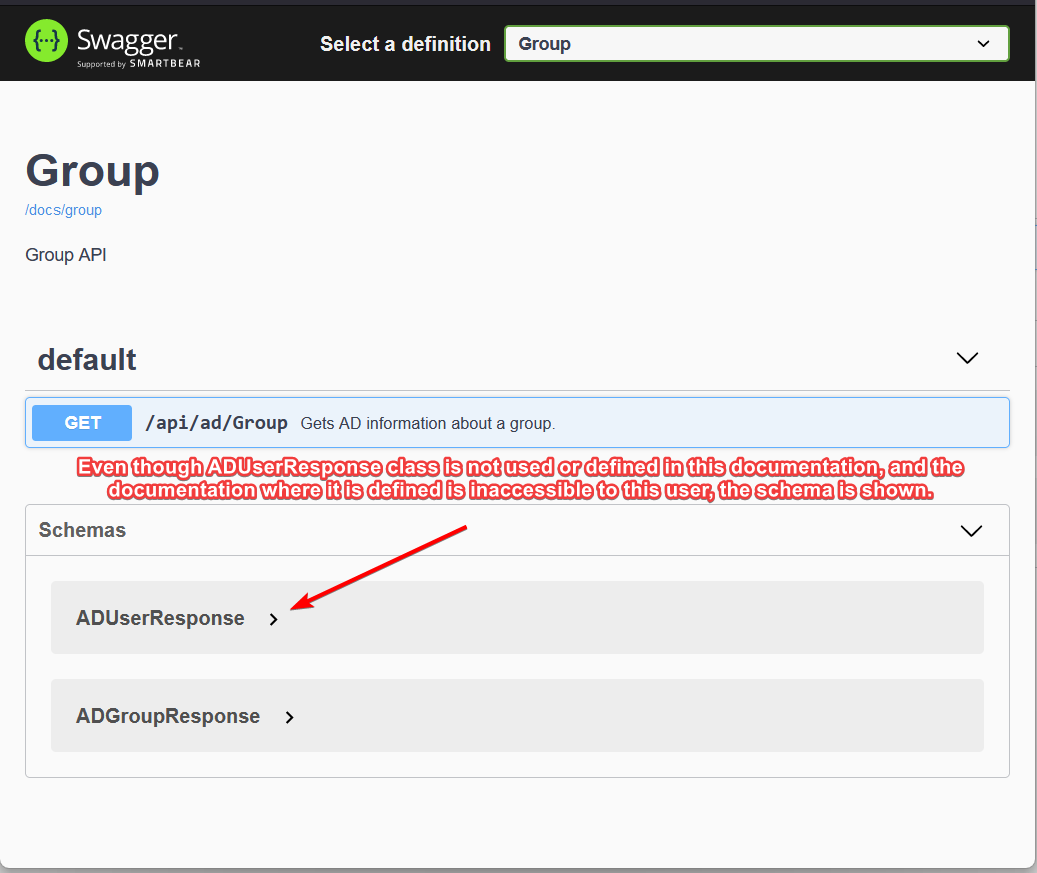
When defining multiple documentation groups with New-PSUEndpointDocumentation, all schemas from all documentations are shown on the swagger page for each individual documentation group.
Steps to reproduce:
Define 2 roles; Administrator and ContosoVendorAPI.
Define 2 documentations (user and group) with New-PSUEndpointDocumentation and define a different class using “[Documentation()]; class …” for each. Restrict the “user” documentation so only “Administrator” can see and use it.
Define 2 endpoints, user and group. Use the .OUTPUTS to specify the documentation classes for each. Restrict the “user” endpoint so only the first role can see and use it. Specify the tag and documentation for each.
Restart the PowerShell Unversal service. This may not be strictly required, but I tend to do this when modifying files those are used by Swagger to ensure they are updated.
Under a user with only the ContosoVendorAPI role visit the Swagger page for the “group” documentation; https://myserver.com/swagger/index.html?urls.primaryName=Group
Check under “Schemas” on this page. The documentation class (schema) for the “user” endpoint will be shown.
I’ve posted the source code for reproducing this here: sean-sauve/PUDSwaggerDemo (github.com)
New-UDTinyMCE - Cannot Type in Modals When Declared Inside New-UDModal
Issue created here: New-UDTinyMCE - Cannot Type in Modals When Declared Inside New-UDModal · Issue #2827 · ironmansoftware/issues (github.com)
New-UDTinyMCE - Cannot Type in Modals When Declared Inside New-UDModal
@Support
New-UDTinyMCE - Cannot Type in Modals When Declared Inside New-UDModal
When declaring a New-UDTinyMCE inside of New-UDModal, any modal that TinyMCE opens cannot be typed in.
Modals in TinyMCE work for this:
########################## TinyMCE Full Editor ##########################
        New-UDTypography -Variant 'h5' -Text 'TinyMCE Full Editor'
        New-UDForm -Id 'TinyMCEFormID' -ButtonVariant 'contained' -Content {
            $TinyMCEOptions = @{
                'plugins' = @('advlist', 'autolink', 'link', 'image', 'lists', 'charmap', 'preview', 'anchor', 'pagebreak', 'searchreplace', 'wordcount', 'visualblocks', 'visualchars', 'code', 'fullscreen', 'insertdatetime', 'media', 'table', 'emoticons', 'template', 'help')
                'toolbar' = 'undo redo | styles | bold italic | alignleft aligncenter alignright alignjustify | bullist numlist outdent indent | link | preview fullscreen | forecolor backcolor emoticons | code | help'
                'menubar' = 'favs file edit view insert format tools table help'
                'icons'   = 'material'
            }
            New-UDElement -Tag 'div' -Attributes @{ 'style' = @{ 'display' = 'none' } } -Content {
                New-UDTextbox -Id 'TinyMCEFullTextID' -Multiline -Value 'Test initial value'
            }
            New-UDTinyMCE -Init $TinyMCEOptions -InitialValue 'Test initial value' -OnEditorChange {
                Set-UDElement -Id 'TinyMCEFullTextID' -Properties @{
                    'value' = $EventData
                }
            }
        } -OnSubmit {
            $EventData.TinyMCEFullTextID | Out-File C:\ProgramData\PowerShellUniversal\TinyFullTest.txt
        }
But not in this:
########################## TinyMCE Inside Modal ##########################
        New-UDTypography -Variant 'h5' -Text 'TinyMCE Inside Modal'
        New-UDButton -Text 'Open Modal' -Id 'btnOpenModal' -OnClick {
            New-UDModal -Content {
                New-UDForm -Id 'TinyMCEFormInsideModalID' -ButtonVariant 'contained' -Content {
                    $TinyMCEOptions = @{
                        'plugins' = @('advlist', 'autolink', 'link', 'image', 'lists', 'charmap', 'preview', 'anchor', 'pagebreak', 'searchreplace', 'wordcount', 'visualblocks', 'visualchars', 'code', 'fullscreen', 'insertdatetime', 'media', 'table', 'emoticons', 'template', 'help')
                        'toolbar' = 'undo redo | styles | bold italic | alignleft aligncenter alignright alignjustify | bullist numlist outdent indent | link | preview fullscreen | forecolor backcolor emoticons | code | help'
                        'menubar' = 'favs file edit view insert format tools table help'
                        'icons'   = 'material'
                    }
                    New-UDElement -Tag 'div' -Attributes @{ 'style' = @{ 'display' = 'none' } } -Content {
                        New-UDTextbox -Id 'TinyMCEFullInsideModalTextID' -Multiline -Value 'Test initial value'
                    }
                    New-UDTinyMCE -Init $TinyMCEOptions -InitialValue 'Test initial value' -OnEditorChange {
                        Set-UDElement -Id 'TinyMCEFullInsideModalTextID' -Properties @{
                            'value' = $EventData
                        }
                    }
                } -OnSubmit {
                    $EventData.TinyMCEFullInsideModalTextID | Out-File C:\ProgramData\PowerShellUniversal\TinyFullInsideModalTest.txt
                    Hide-UDModal
                }
            }
}Search won't work when using -LoadData for tabel
This is how I filter data when using LoadData. Sorry for the ugly lack of a codeblock, I’m on mobile right now.
foreach ($Filter in $EventData.Filters) {
$Data = $Data | Where-Object -Property $Filter.ID -Match -Value $Filter.Value
}
if (-not [string]::IsNullOrEmpty($EventData.OrderBy.Field)) {
$Descending = $EventData.OrderDirection -ne ‘asc’
$Data = $Data | Sort-Object -Property ($EventData.orderBy.Field) -Descending:$Descending
} else {
$Data = $Data | Sort-Object -Property ‘Name’
}
$TotalCount = $Data.Count
$Data = $Data | Select-Object -First $EventData.PageSize -Skip ($EventData.Page * $EventData.PageSize)
$Data | Out-UDTableData -Page $EventData.Page -TotalCount $TotalCount -Properties $EventData.Properties
New-UDTextBox Doesn't Allow a Single Character "Value" to be Deleted
Product: PowerShell Universal
Version: 4.1.4
When we do this:
New-UDTextbox -Value 'A'The only way for a user to remove the A is to add one or more additional characters; they cannot remove the A and “clear” the textbox until they add something else to it first.
However, when we do this:
New-UDTextbox -Value 'AB'The A and the B can be deleted from the textbox by the user without adding additional input.
Our use case here is we are using a textbox for a middle initial and want to allow our users to delete the middle initial, but they think that they can’t.
@Support
Added issue to github here: New-UDTextBox Doesn’t Allow a Single Character “Value” to be Deleted · Issue #2800 · ironmansoftware/issues (github.com)
Utter Newbie wants to know if PSU is right for me
Welcome to the community!
Version in your forum post
This is auto-generated by the forum when you make a post. No need for concern, just update it with your PSU version number
API Endpoints in PUD
These are the APIs that you have created and “published” using PSU, not the APIs that you consume.
Port 5000
This is the port that you or users use to connect to your dashboards or your API endpoints (that you’ve created and are hosting). This can be changed in your app settings. See here: Hosting - PowerShell Universal
Summary
I think PSU is perfect for your use case . Create a dashboard and a page that consumes your powershell module (the one that queries the OME API) and displays it with some dashboard components. This help section may be relevant to you:
New-UDTinyMCE Checkbox or Checklist Options
Product: PowerShell Universal
Version: 4.1.4
I’ve started using the TinyMCE editor and so far it’s working out nicely. I’ve been trying to add a checkbox, but can’t figure out how.
I’ve tried adding ‘checkbox’ to the ‘toolbar’ string in the -Init hashtable, but it didn’t change anything. I also tried adding ‘lists checklist’ to the plugins and ‘checklist’ to the -Init, but I understand that’s a premium addon so I didn’t really expect that to work.
Has anyone been able to add a checkbox to the TinyMCE toolbar?
Swagger Auto Docs Not Including Endpoint's .OUTPUT yaml Definition
I’ll also mention that when I declare the class under a Documentation “Definition” scriptblock the class appears as a schema on every swagger documentation page. For instance, I have two Documentations in endpointDocumentation.ps1. One of the Documentations is created with a Definition containing a new class that is intended to be used as the output type for one of the APIs in this documentation. That class is shown under the other documentation page. Ideally, if schemas have to be shown on a documentation page for swagger, they would only appear on the documentation pages that defined that underlying class.
Swagger Auto Docs Not Including Endpoint's .OUTPUT yaml Definition
Product: PowerShell Universal
Version: 3.9.8
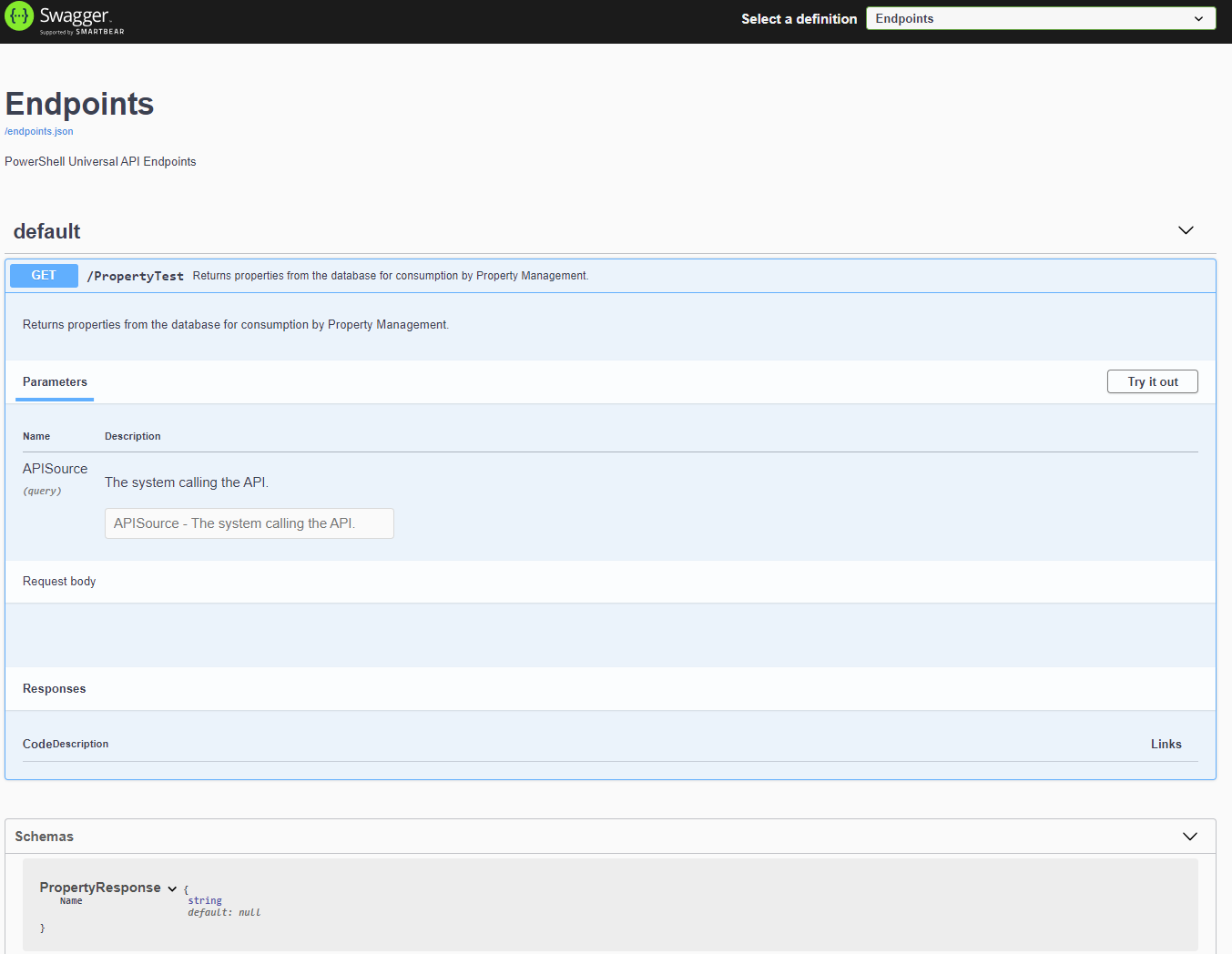
Expected behavior: output definition appears under the endpoint on the swagger docs.
Current behavior: output definition appears under “schemas” on the swagger docs.
I’m having trouble getting the contents of .OUTPUT in my comment-based help to appear in the swagger documentation under the endpoint.
I believe that I’m defining the class and endpoint correctly. Here is my code in endpoints.ps1:
#region PSUHeader
#Use this section to include code that will not be overwritten by the Universal platform.
[Documentation()]
class PropertyResponse {
    [string]$Name
}
#endregion
New-PSUEndpoint -Url "PropertyTest" -Description "Returns properties for syncing with Property Management" -Method @('GET') -Authentication -Role @('Administrator', 'SoftwareSolutionsAPI')  -Endpoint {
<#
.SYNOPSIS
Returns properties from the database for consumption by Property Management.

.DESCRIPTION
Returns properties from the database for consumption by Property Management.

.PARAMETER APISource
The system calling the API.

.OUTPUTS
	200:
		Description: A successful return code.
		Content:
			application/json: PropertyResponse

	500:
		Description: Internal server error.

#>
[CmdletBinding()]
param (
    [string]$APISource
)
'Gainesville Center - Basketball Court (Playground)'
}
Here is what I see on the swagger docs: