
pventurini
Upgrade Path
I'm running Powershell Universal version 5.6.9. is it possible to upgrade directly to 2026.2.3.0?
Error executing job: SQLite Error 5: 'database is locked'
This issue seemed to have mysteriously gone away on its own which is weird. I also just updated to 5.6.9 today and will keep an eye on whether or not I get any more database locking issues. the scheduled tasks seem to be working fine.
Endpoints no longer working after upgrade to 5.6.7
I updated to version 5.6.9. seems to be working now
Endpoints no longer working after upgrade to 5.6.7
I am seeing >net runtime errors with Universal.Server.exe
Faulting application name: Universal.Server.exe, version: 1.0.0.0, time stamp: 0x68a40000
Faulting module name: KERNELBASE.dll, version: 10.0.17763.7553, time stamp: 0x296284f5
Exception code: 0xe0434352
Fault offset: 0x0000000000041b39
Faulting process id: 0x1628
Faulting application start time: 0x01dc458593c7c466
Faulting application path: C:\Program Files (x86)\Universal\Universal.Server.exe
Faulting module path: C:\Windows\System32\KERNELBASE.dll
Report Id: 01b3dac0-7409-4b83-ac51-244c6c42e97b
Faulting package full name:
Faulting package-relative application ID:
Application: Universal.Server.exe
CoreCLR Version: 9.0.925.41916
.NET Version: 9.0.9
Description: The process was terminated due to an unhandled exception.
Exception Info: System.AggregateException: One or more hosted services failed to stop. (A task was canceled.) (The operation was canceled.) (The operation was canceled.)
—> System.Threading.Tasks.TaskCanceledException: A task was canceled.
at Universal.Server.Services.Configuration.ConfigurationSystemWatcher.StopAsync(CancellationToken cancellationToken) in D:\a\universal\universal\src\PowerShellUniversal.Configuration\ConfigurationSystemWatcher.cs:line 87
at Microsoft.Extensions.Hosting.Internal.Host.ForeachService[T](IEnumerable1 services, CancellationToken token, Boolean concurrent, Boolean abortOnFirstException, List1 exceptions, Func3 operation)    --- End of inner exception stack trace ---    at Microsoft.Extensions.Hosting.Internal.Host.StopAsync(CancellationToken cancellationToken)    at Microsoft.Extensions.Hosting.HostingAbstractionsHostExtensions.WaitForShutdownAsync(IHost host, CancellationToken token)    at Microsoft.Extensions.Hosting.HostingAbstractionsHostExtensions.RunAsync(IHost host, CancellationToken token)    at Microsoft.Extensions.Hosting.HostingAbstractionsHostExtensions.RunAsync(IHost host, CancellationToken token)    at Microsoft.Extensions.Hosting.HostingAbstractionsHostExtensions.Run(IHost host)    at Universal.Server.Program.Main(String[] args) in D:\a\universal\universal\src\Universal.Server\Program.cs:line 37  ---> (Inner Exception #1) System.OperationCanceledException: The operation was canceled.    at System.Threading.CancellationToken.ThrowOperationCanceledException()    at System.Threading.CancellationToken.ThrowIfCancellationRequested()    at Hangfire.Processing.TaskExtensions.WaitOneAsync(WaitHandle waitHandle, TimeSpan timeout, CancellationToken token) in C:\projects\hangfire-525\src\Hangfire.Core\Processing\TaskExtensions.cs:line 80    at Hangfire.Processing.BackgroundDispatcher.WaitAsync(TimeSpan timeout, CancellationToken cancellationToken) in C:\projects\hangfire-525\src\Hangfire.Core\Processing\BackgroundDispatcher.cs:line 82    at Hangfire.Server.BackgroundProcessingServer.WaitForShutdownAsync(CancellationToken cancellationToken) in C:\projects\hangfire-525\src\Hangfire.Core\Server\BackgroundProcessingServer.cs:line 148    at Hangfire.BackgroundJobServerHostedService.StopAsync(CancellationToken cancellationToken) in C:\projects\hangfire-525\src\Hangfire.NetCore\BackgroundJobServerHostedService.cs:line 134    at UniversalAutomation.StartupService.StopAsync(CancellationToken cancellationToken) in D:\a\universal\universal\src\Universal.Server\Services\StartupService.cs:line 610    at Microsoft.Extensions.Hosting.Internal.Host.ForeachService[T](IEnumerable1 services, CancellationToken token, Boolean concurrent, Boolean abortOnFirstException, List1 exceptions, Func3 operation)<—

—> (Inner Exception #2) System.OperationCanceledException: The operation was canceled.
at System.Threading.CancellationToken.ThrowOperationCanceledException()
at System.Threading.CancellationToken.ThrowIfCancellationRequested()
at Microsoft.Extensions.Hosting.WindowsServices.WindowsServiceLifetime.StopAsync(CancellationToken cancellationToken)
at Microsoft.Extensions.Hosting.Internal.Host.StopAsync(CancellationToken cancellationToken)<—Endpoints no longer working after upgrade to 5.6.7
All of my endpoints stopped working again. I’ve tried restarting the puniversal windows service. i’ve also tried restarting each powershell environment. When I try to edit an endpoint I get this error saying that the API environment is not running. When trying to use an endpoint I get this:
Invoke-RestMethod : The underlying connection was closed: An unexpected error occurred on a send.

Error executing job: SQLite Error 5: 'database is locked'
Is there any update on this database locking issue?
Error executing job: SQLite Error 5: 'database is locked'
one of my problems was that I had one script set to only execute one instance at a time. and since I have a few jobs for that script stuck in the cancelling state, it was keeping new instances in the queued state. so at least I can manually execute jobs again even though the scheduler is still not working properly.
Error executing job: SQLite Error 5: 'database is locked'
my problem may also be that I have one script with three job instances stuck in the canceling state. how can we force cancel a job?
Error executing job: SQLite Error 5: 'database is locked'
I’ve added this at the top of the scripts i’m trying to run and they are still getting stuck in the queued state.
$PSDefaultParameterValues = @{
'*:ProgressAction' = "SilentlyContinue"
}
Error executing job: SQLite Error 5: 'database is locked'
that’s good to hear. I’m looking at it now. what is the workaround? it is not clear to me
Error executing job: SQLite Error 5: 'database is locked'
things are getting worse for me now. not only are schedule tasks not running but even when I try to manually submit a job it never runs and says it being queued. i’ve tried to restart services several times and the issue remains.
Error executing job: SQLite Error 5: 'database is locked'
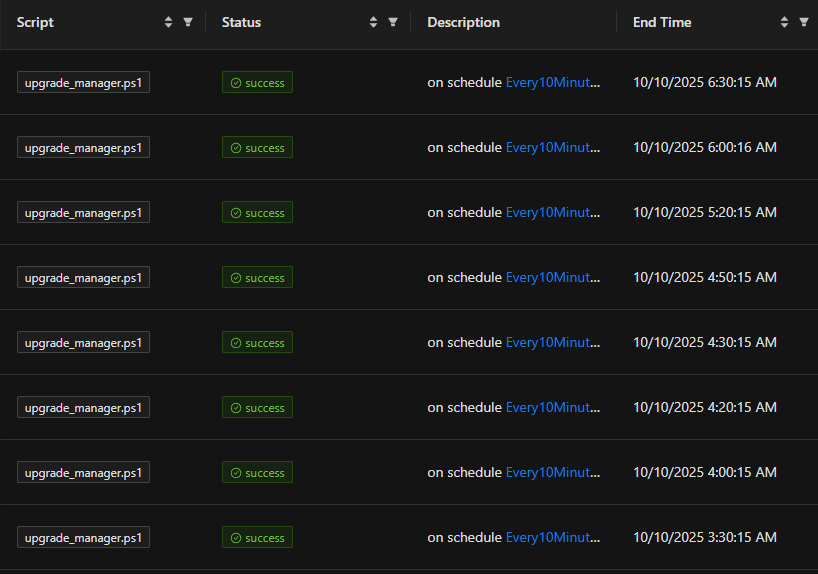
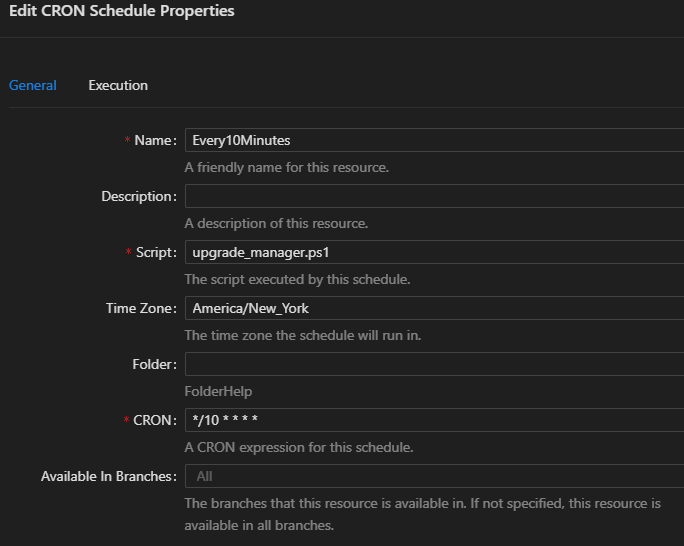
Besides the database lock issue, i’m having problems with scheduled tasks simply not running according to the schedules. this is probably a different issue but I did mention this before in this thread. here’s a script set to run every 10 minutes and you can clearly see it does not.
Error executing job: SQLite Error 5: 'database is locked'
the error occurred on a git sync attempt. first time i’ve seen it happen on a git sync attempt.

Error executing job: SQLite Error 5: 'database is locked'
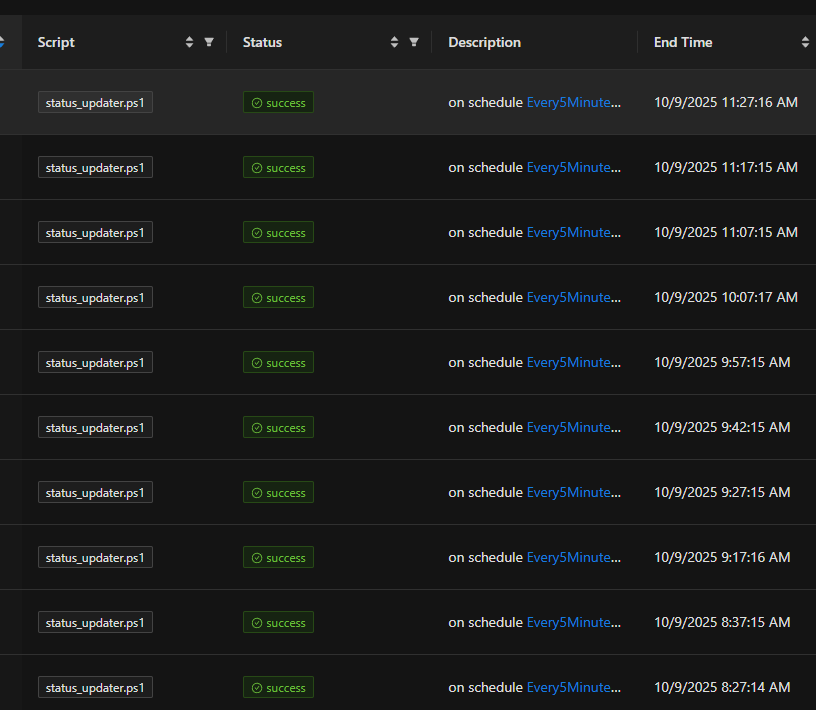
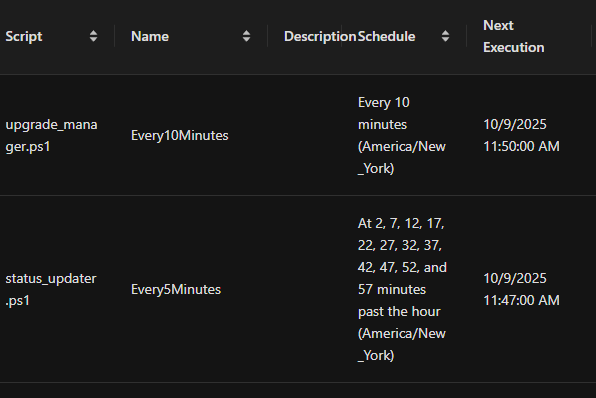
Here you can see the two schedules and when they get executed. you can see they get skipped often.
Error executing job: SQLite Error 5: 'database is locked'
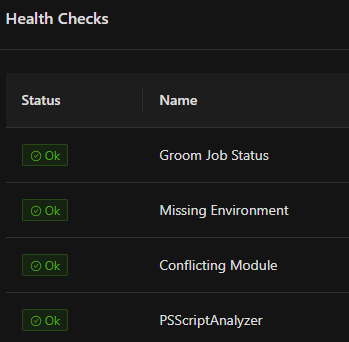
health checks look good. I also want to add that this error only seems to happen with scheduled scripts. I have apps that also submit jobs and those never run into the issue. in addition it looks like the schedules are not working properly. I have two schedules. one to run a script every 5 minutes another to run a script every 10 minutes and they do not run at the same time. I can see that they do not always run when expected.
Error executing job: SQLite Error 5: 'database is locked'
my database size is 53MB. Is that large for a sql lite db? I’m not aware of any grooming job failures. where would I see those?
Error executing job: SQLite Error 5: 'database is locked'
@Adam Driscoll wanted to know if you’re aware of this issue?
Error executing job: SQLite Error 5: 'database is locked'
I am still seeing this error even when it is only one job running at a time. This is going to be a big problem for me as we’re about to kickoff a project where scheduled tasks need to be able to run consistently.
Error executing job: SQLite Error 5: 'database is locked'
Product: PowerShell Universal
Version: 5.6.7
Seeing frequent database locked errors. This started to happen when on version 5.4.3 and now continues with version 5.6.7.
For a long time I had two scheduled scripts running. One every 10 minutes and one every 5 minutes and never ran into this error. Not too long ago I added another scheduled script to run every 10 minutes and then I started to run into this issue. I adjusted the schedules so that the jobs would not run at the same time and that did not help. Right now, I’ve disabled the other scheduled scripts and have only 1 running and i’m still running into this issue.
Is there perhaps some grooming needed on the database? Cleanup of old events or log files? Ultimately, I will migrate to a SQL database but i’m not ready to do that yet.
Endpoints no longer working after upgrade to 5.6.7
wow that worked. my endpoints work now. and I am now able to edit the code in the UI and not getting that “API environment is not running” error anymore.
strange that restarting the entire powershell universal service wouldn’t accomplish the same thing. also would be good to know why the environments get into a bad state.
thanks for the suggestion
Endpoints no longer working after upgrade to 5.6.7
never mind I see where now. trying that
Endpoints no longer working after upgrade to 5.6.7
how did you restart the environments?
Endpoints no longer working after upgrade to 5.6.7
At the moment, I’m not able to edit endpoints in the UI at all. I keep getting that “API environment is not running! Please ensure your environment is configured correctly” error. So right now I have to manually edit the endpoints.ps1 file and restart the powershell universal service every time which is very annoying.
I started by commenting out everything in each endpoint and slowly adding things back until I got an error. It seems that if I set the environment to powershell 5.1, it causes the endpoints to fail. Unfortunately, if I remove powershll 5.1 it still fails. I think I ran into this issue in the past on prior versions and needed 5.1 in order for my code to work. Is there a reason why 5.1 doesn’t work in version 5.6.7?
Endpoints no longer working after upgrade to 5.6.7
I can see part of the problem now. the changes I make in the UI are not actually being written to the endpoints.ps1 file. this seems to only be happening with endpoints. Everything else seems to be updating and saving just fine.
Endpoints no longer working after upgrade to 5.6.7
I typically do not edit the file itself. I do all my editing from the UI. I’ll backup my files and try deleting the endpoints.
In general there is definitely something wrong with this version. I keep getting this API Environment is not running error. and now i’m also getting frequent errors running scripts. some jobs are failing database is locked errors.