
viajaz
Numerous v5 Issues
Should I create a GitHub issue for the “Run Script” issue?
Numerous v5 Issues
I updated to 5.2.1, unfortunately, it didn’t seem to resolve the Graph issue for me:
Could not load file or assembly 'Microsoft.Identity.Client, Version=4.67.2.0, Culture=neutral, PublicKeyToken=0a613f4dd989e8ae'. Could not find or load a specific file. (0x80131621)EDIT: Updating the Azure Modules resolved the issues.
Numerous v5 Issues
What’s your preferences regarding forum posts versus GitHub issues? I only try to submit GitHub issues for issues with a reproduction, which often requires understanding causation.
I try to avoid submitting GitHub Issues for problems which could just be environmental.
Numerous v5 Issues
Microsoft.Graph Module works in Integrated environment and PowerShell 7 outside of PSU but doesn’t seem to work in my PowerShell 7 Custom Environment:
Could not load file or assembly 'Microsoft.Identity.Client, Version=4.61.3.0, Culture=neutral, PublicKeyToken=0a613f4dd989e8ae'. Could not find or load a specific file. (0x80131621)I removed all versions of all Microsoft.Graph, Microsoft.Graph.* modules and installed them fresh from PSGallery (2.25.0.0) to no avail.
Numerous v5 Issues
Removing PSU 4 appears to have resolved the custom environments problem, I’ve updated our change management process for PSU major version upgrades.
Might I recommend perhaps using a CustomAction in the MSI to warn the user if an older major version of PSU is detected? You might be able to get away with some of the native version checking stuff (depending on what you’re using to package your MSI) but that depends if you’re using the UpgradeCode GUID correctly but it also might not work if you need to support non-MSI installs, hence why a CustomAction might work better.
Numerous v5 Issues
No, I installed the MSI over the top like I’ve always done. I see now in the docs that’s an unsupported scenario.
Numerous v5 Issues
Do you have a different version of the Universal module installed in this environment that might be conflicting with PSU itself?
I ask because the StartJob exception and assembly issue sound like it’s mixing versions.
Strangely enough, PowerShell 5.1 and 7+ (outside of PSU) report that Universal module isn’t even installed in CurrentUser (Of the PSU Service User) or AllUsers. I’m using the MSI install of PSU.
What type of authentication are you using?
OpenID Connect with Azure/EntraID
Can you share your param block for this script?
Param(
    $ServiceNames = @()
)Numerous v5 Issues
Some more information on using custom Environments for Dashboards, the following test dashboard:
New-PSUApp -Name "Test" -FilePath "dashboards\Test\Test.ps1" -BaseUrl "/d/test" -Environment "PowerShell 7" -Authenticated -Role @('Administrator') -AutoDeploy -Description "Test dashboard with minimal functionality." defined as-
New-UDApp -Content { 'Hello, World!' }Results in “Start failed” with the log:
[1/13/2025 4:51:21 PM] [Information] [App-Test] Dashboard configuration complete.
[1/13/2025 4:51:21 PM] [Error] [App-Test] Inner Exception: System.IO.FileLoadException
[1/13/2025 4:51:21 PM] [Error] [App-Test] Failed to get dashboard. Assembly with same name is already loaded System.Management.Automation.CmdletInvocationException
[1/13/2025 4:51:20 PM] [Information] [App-Test] Creating services.
[1/13/2025 4:51:20 PM] [Information] [App-Test] Dashboard information received. Starting dashboard.
[1/13/2025 4:51:20 PM] [Information] [App-Test] Waiting for dashboard information... Numerous v5 Issues
Apologies for the lack of GitHub issues and reproducibility, but there is often little obvious reason as to the cause of these and I don’t have hours to spend collecting information on each issue, so I’m just posting it here.
Upgraded from v4 to 5.1.2 and having lots of issues.
Custom Environments for PowerShell 7 don’t seem to work at all, I’ve had to switch Apps and Scripts to use the Integrated environment, otherwise I get all sorts of strange exceptions such as:
MethodException: Cannot find an overload for "StartJob" and the argument count: "3". for jobs. The dashboards just don’t even seem to start at all.
Environment:
New-PSUEnvironment -Name "PowerShell 7" -Version "7.4.6" -Path "C:\Program Files\PowerShell\7\pwsh.exe" -Variables @('*') -MaxRunspaces 50 -Description "PowerShell 7" I’ve tried switching my dashboards to use the Integrated environment but I really need the custom environments feature to work because I’m getting type pollution between dashboards.
I can’t seem to reload/refresh pages in the Admin Console (e.g., /admin/apps) because it gives an Unauthorised error, sometimes it’ll even occur when I’m navigating around the sidebar menu in admin. I’m assuming this is due to some sort of CSRF protection? Either way, it makes the app even more difficult to use especially with how often the v5 admin console errors out.
The “Run Script” button seems to always fail for PSU Script Jobs with (Optional?) Parameters:
An error occured. Sequence contains no elements
at System.Linq.ThrowHelper.ThrowNoElementsException()
at System.Linq.Enumerable.First[TSource](IEnumerable`1 source)
at PowerShellUniversal.DefaultParameterValueService.SetDefaultValue(JobParameter jobParameter, ScriptParameter scriptParameter) in C:\actions-runner\_work\universal\universal\src\Universal.Server\Services\Automation\DefaultParameterValueService.cs:line 105
at PowerShellUniversal.ScriptParameters.FilterParameters() in C:\actions-runner\_work\universal\universal\src\Universal.Server\Shared\Automation\ScriptParameters.razor:line 196
at PowerShellUniversal.ScriptParameters.OnParametersSetAsync() in C:\actions-runner\_work\universal\universal\src\Universal.Server\Shared\Automation\ScriptParameters.razor:line 208
at Microsoft.AspNetCore.Components.ComponentBase.CallStateHasChangedOnAsyncCompletion(Task task)
at Microsoft.AspNetCore.Components.RenderTree.Renderer.GetErrorHandledTask(Task taskToHandle, ComponentState owningComponentState)
There also appears to be some issue with setting the Portal Roles from the Admin UI, I don’t think it saves it correctly to settings.ps1 or something.
Unit Testing for UD Components for new PSU Releases
I would really appreciate an update on this, we’re at our breaking point for the Dashboards feature.
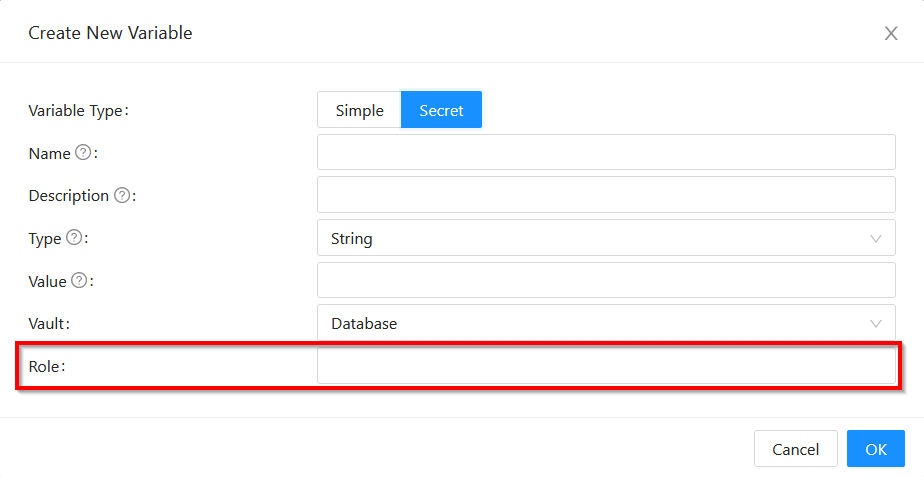
Secret Variable Role?
That document doesn’t talk about what I’m referring to as far as I can tell:
Dark Theme Example
Excellent thank you.
I’ve noticed that static variant of UDDatePicker has some styling problems:
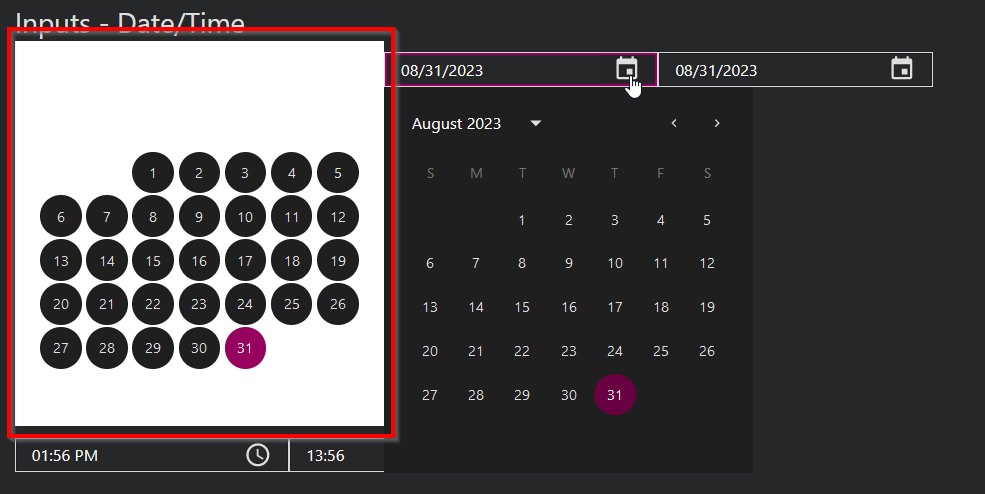
Dark Theme Example
Product: PowerShell Universal
Version: 4.0.11
I’m trying to make a better dark theme but when I define a custom one I have to redefine every, single, control styling from scratch. This is extremely tedious.
Can you please provide a Hashtable of what the default PowerShell Universal dark theme is or is there a better way to do this?
Secret Variable Role?
@Adam Driscoll Can you help?
Secret Variable Role?
Product: PowerShell Universal
Version: 4.0.7
Can someone explain how the Secret Variable role works? Presumably, it’s only available to a runspace if the contextual user roles said role?
The documentation needs to be updated for it.
Unit Testing for UD Components for new PSU Releases
How’s this going?
UDDataGrid Row Selection Example?
Product: PowerShell Universal
Version: 4.0.6
Could someone provide an example on how to utilise the Row Selection functionality with UDDataGrid?
There are no examples.
Unit Testing for UD Components for new PSU Releases
Please consider developing some sort of unit testing for UD Components so they can be tested before releasing new versions of PSU.
The constant regressions/bugs in UD dashboard components have become so disruptive we’ve halted further development on our PSU dashboards until the feature has stabilized.
@Adam Driscoll
Manual Filter Options for UDTableColumn in a UDTable with -LoadData
@Adam Driscoll Was a GitHub Issue ever created for this?
Manual Filter Options for UDTableColumn in a UDTable with -LoadData
If I have a UDTable with LoadData with server-side Out-UDTableData server-side processing for paging etc. then a UDColumn Filter of FilterType ‘select’ only has options for the partial dataset.
Is there a way to manually override this so I can present the user with Filter select options from the global data set?