Dark Theme Example

Product: PowerShell Universal
Version: 4.0.11
I’m trying to make a better dark theme but when I define a custom one I have to redefine every, single, control styling from scratch. This is extremely tedious.
Can you please provide a Hashtable of what the default PowerShell Universal dark theme is or is there a better way to do this?
Recommended Answer
You can use Get-UDTheme to return the theme hashtable and modify it rather than defining the entire thing yourself. The themes are also defined in the PSM1 for the Universal module. Search for $AntDesign and you will find the theme definition.
Adam Driscoll
PowerShell Expert and Software Architect at Devolutions
All Comments (2)
You can use Get-UDTheme to return the theme hashtable and modify it rather than defining the entire thing yourself. The themes are also defined in the PSM1 for the Universal module. Search for $AntDesign and you will find the theme definition.
Adam Driscoll
PowerShell Expert and Software Architect at Devolutions
Excellent thank you.
I’ve noticed that static variant of UDDatePicker has some styling problems: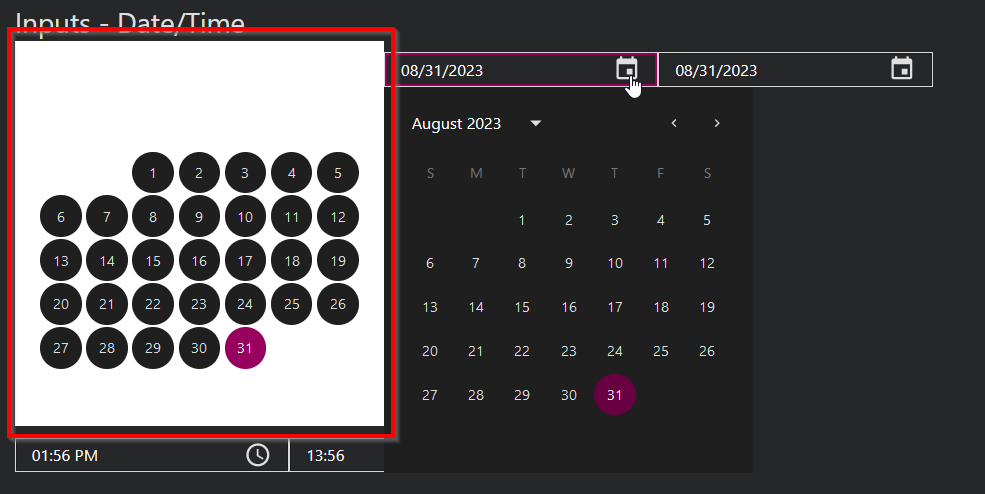
cf4200654c6f53d03e81946e3755477091332e61.png