
neilwalker
Published Folders Not Working in 2026.2.0
Nothing in notifications or platform logs, but I'm seeing this in the browser dev tools....
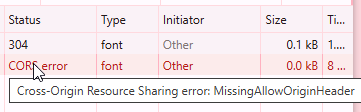
Published Folders Not Working in 2026.2.0
@Adam Driscoll I also have the issue & managed to partially fix it by changing to an absolute path (https://myserver.mydomain.com/assets/ as opposed to '/assets/', however while that seemed to work for an image, I have a custom font in there that won't work at all since the upgrade.
This is working fine on my dev server that's still on version 2026.1.6
Hope this helps!
Adding a URL to an App Bar Logo
Update: I found an older post in here that suggests creating a custom app bar & the following code does what I need it to do, but the theme colors no longer apply…I can’t win
New-UDAppBar -Position fixed -Children { New-UDElement -Tag ‘a’ -Attributes @{ href = ‘/home’ } -Content { new-udimage -Path ‘f:\Assets\MyPIc.png’ } } -Drawer $Drawer
Is there an easier way to do this?
Running as a service vs IIS
Thanks for the confirmation @AnonymousUser , that was pretty much my understanding. I think we’ll most likely keep it simple & go down the Kestrel route then
Running as a service vs IIS
Hi,
We’ve been running PSU on IIS for a couple of years now without any issues, but as the dependency on the dashboards is growing, we’re starting to build out a new HA environment from scratch. Looking at the installation options, the MSI installation as a service is looking far more favorable than IIS, but are there any drawbacks to this aside from the cert management side of things & the ability to create additional sites in IIS (which we’re not interested in) please?
Thanks in advance!
Product: PowerShell Universal
Version: 4.2.18Adding a URL to an App Bar Logo
Hi,
I’m sure I’m missing something obvious here, but how do I turn the logo on the nav bar into a ‘Home’ link please?
This code works just fine to show the logo…
New-UDApp -Navigation $Navigation -Theme $theme -Logo ‘/assets/MyPic.png’ -Title ’ ’ -Pages @(
Get-UDPage -Name ‘Home’
)
…but I can’t figure out how to make it a link.
Is this even possible?
Thanks in advance!
Neil
Product: PowerShell Universal
Version: 4.2.18Viewing dashboards on different sceen resolutions
Hi,
I’m building an AD management dashboard & so far so good, but I decided to work on it with my laptop while my wife watches trash TV this evening & noticed that while the UDCard seems to scale to the laptop resolution, the UDForm contained within doesn’t.

In all of the excitement of getting something working, I took it for granted that the dashboards would be responsive
Is there a workaround for this please?
Thanks!
Product: PowerShell Universal
Version: 4.18