Published Folders Not Working in 2026.2.0

Looks like Published Folders stopped working. I'm seeing this repeated in the system logs.
2026-06-01 09:38:01.561 -05:00 [INF][Microsoft.AspNetCore.Hosting.Diagnostics] Request starting HTTP/2 GET https://dev-universal.xxxxxx.com/login?returnUrl=/admin/platform/publishedFolders - null null
2026-06-01 09:38:01.566 -05:00 [INF][Microsoft.AspNetCore.Authentication.Cookies.CookieAuthenticationHandler] Cookies was not authenticated. Failure message: Identity missing in session store
2026-06-01 09:38:01.580 -05:00 [INF][Microsoft.AspNetCore.Routing.EndpointMiddleware] Executing endpoint '/Login'
2026-06-01 09:38:01.580 -05:00 [INF][Microsoft.AspNetCore.Mvc.RazorPages.Infrastructure.PageActionInvoker] Route matched with {page = "/Login", action = "", controller = ""}. Executing page /Login
2026-06-01 09:38:01.583 -05:00 [INF][Microsoft.AspNetCore.Mvc.RazorPages.Infrastructure.PageActionInvoker] Executing handler method PowerShellUniversal.Login.OnGet - ModelState is "Valid"
2026-06-01 09:38:01.690 -05:00 [INF][Microsoft.AspNetCore.Mvc.RazorPages.Infrastructure.PageActionInvoker] Executed handler method OnGet, returned result Microsoft.AspNetCore.Mvc.RazorPages.PageResult.
2026-06-01 09:38:01.692 -05:00 [INF][Microsoft.AspNetCore.Mvc.RazorPages.Infrastructure.PageActionInvoker] Executed page /Login in 109.4217ms
2026-06-01 09:38:01.693 -05:00 [INF][Microsoft.AspNetCore.Routing.EndpointMiddleware] Executed endpoint '/Login'
2026-06-01 09:38:01.693 -05:00 [INF][Microsoft.AspNetCore.Hosting.Diagnostics] Request finished HTTP/2 GET https://dev-universal.xxxxxx.com/login?returnUrl=/admin/platform/publishedFolders - 200 null text/html; charset=utf-8 129.376ms
All Comments (15)
@dbytes I moved this into a bug report. I'm assuming you are just using a standard published folder with authentication? Are you accessing it via a browser or some other way?
Adam Driscoll
PowerShell Expert and Software Architect at Devolutions
@Adam Driscoll, correct just a standard published folder to serve up some images. Both authenticated and unauthenticated, with roles and without. Accessing it with the browser and also have the admin console pointing to it for branding.
Additional information from another user with a similar problem on Discord: https://discord.com/channels/1360088229461889255/1360088910402687126/1511249076086112306
Adam Driscoll
PowerShell Expert and Software Architect at Devolutions
@dbytes Can you share the properties for your published folders? I'm mostly looking for the URLs you use.
Adam Driscoll
PowerShell Expert and Software Architect at Devolutions
@Adam Driscoll I have this issue too.
I have 5 published folders are configured as follows:
Name - They are all single strings with no spaces, sometimes pascal case. e.g 'docs' or 'PubImages'
Path - almost all of them follow this format as theyre outside the repo: 'C:\ProgramData\UniversalAutomation\Published\Folder1\Folder2', however I have a single one inside, configured as just 'docs\'
Request Path - e.g "/docs", or "/pub/images"
Auth - mixed some are enabled others disabled
@insomniacc Thanks. That's helpful.
Adam Driscoll
PowerShell Expert and Software Architect at Devolutions
@Adam Driscoll I also have the issue & managed to partially fix it by changing to an absolute path (https://myserver.mydomain.com/assets/ as opposed to '/assets/', however while that seemed to work for an image, I have a custom font in there that won't work at all since the upgrade.
This is working fine on my dev server that's still on version 2026.1.6
Hope this helps!
@Adam Driscoll
Here are the contents of publishedFolders.ps1
New-PSUPublishedFolder -RequestPath "/images/" -Path "C:\DashboardFiles\Images" -Name "Images"
New-PSUPublishedFolder -RequestPath "/migration-dashboard/" -Path "C:\DashboardFiles\MigrationDashboard" -DefaultDocument @('index.html') -Name "MigrationDashboard"@Adam Driscoll I also have the issue & managed to partially fix it by changing to an absolute path (https://myserver.mydomain.com/assets/ as opposed to '/assets/', however while that seemed to work for an image, I have a custom font in there that won't work at all since the upgrade.
This is working fine on my dev server that's still on version 2026.1.6
Hope this helps!
@neilwalker
I tried that and it didn't work for me.
Does anyone have errors in their notifications related to published folders? This may have to do with internal URL validation but I would expect an error in the notifications if that was the case.
Adam Driscoll
PowerShell Expert and Software Architect at Devolutions
Nothing in notifications or platform logs, but I'm seeing this in the browser dev tools....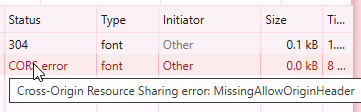
11ef6ecd-5d5d-44a5-b195-3f4f848170b2.png
@neilwalker Interesting. Thanks for the info. That's helpful.
Adam Driscoll
PowerShell Expert and Software Architect at Devolutions
@Adam Driscoll
We also have the same issue with Published Folders in 2026.2.0. Is this a confirmed bug, and is a fix planned for an upcoming release? Are there any recommended workarounds in the meantime?
We have the same issue in our environment and are waiting for a fix.
The issue has been tested and should be fixed for the next version coming later this week.
Thank you all for your patience.
Best regards.
Olivier Provost
QA specialist at Devolutions