
badgerface
Changing PSU theme
Totally forgot to include a link to this resource where you can see the themes:
Changing PSU theme
To apply a pre-supplied theme I use:
$Theme = (Get-UDTheme -Name 'MaterialDesign')
New-UDApp -Title "AppTitle -Theme $Theme -Content {}
It looks like the theme files are located here: C:\Program Files (x86)\Universal\Modules\Universal\themes
Cheers
New-UDTextBox -RowsMax not honouring value
Hiya,
I am using the code below but the -RowsMax value is not being honoured. Is this a bug or am I using it incorrectly ?
New-UDTextbox -Id 'txtExample2' -Label 'Feedback' -Placeholder 'Please enter your feedback' -Type 'text' -Multiline -Rows 10 -RowsMax 15 -Variant outlined Product: PowerShell Universal
Version: 4.1.2Cheers
New-UDList Spacing
OK, this looks better
$Theme = Get-UDTheme -Name 'MaterialDesign'
$Theme = @{
overrides = @{
MuiListItemIcon = @{
        root = @{
          minWidth = '25px'
}
    }
}
  }
Hopefully someone else will find this helpful
New-UDList Spacing
(I don`t know all the correct terms so if anyone wants to jump in and enlighten me, it would be appreciated ) …
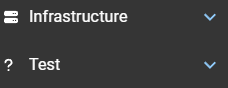
The gap between the icon and text in MaterialDesign ListItems appears to be due to this element which has a min-width attribute of 56px
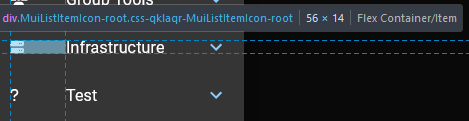
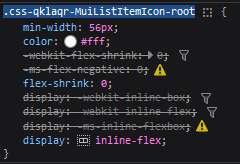
Altering it in the browser developer tools results in a far “nicer looking” space but I have no idea how to override the defaults in the PSU code.
This is with it set to 30px
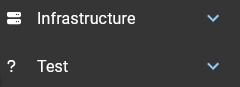
And this is with it set to 25px
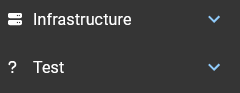
Cheers
New-UDList Spacing
Not using that module specifically but have applied the MaterialDesign theme (which I believe is included in a standard install) to the entire app:
New-UDApp -Title “Test” -Theme (Get-UDTheme -Name ‘MaterialDesign’) -Pages $Pages
New-UDList Spacing
This is using the code you linked to with the default theme on 4.0.12
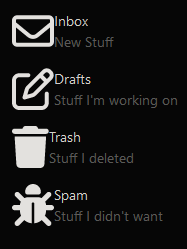
and this is with MaterialDesign
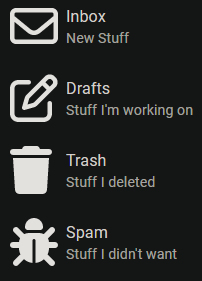
Cheers
New-UDList Spacing
I`m on version 4.0.12 which I installed yesterday over the top of 4.0.11 and to be honest, I can’t recall if I was still on 4.0.11 when I noticed the lack of spacing issue as you described it or when I set the theme to MaterialDesign.
Cheers
New-UDList Spacing
I found exactly the same issue with the Label and Icon spacing but wasn’t sure if it had anything to do with the MaterialDesign theme I`m using. Not had time to dig into it yet though…
I`d also be interested in the reason and a fix
… Just tried changing the theme and now I`m confused as the spacing appears to be OK in the default theme
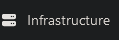
And huge in MaterialDesign

Cheers
Styling New-UDCard
Replying to myself in case anyone else runs into this …
I ended up defining the MaterialDesign theme and the first card then worked without any code changes. The second card needed the word ‘backgroundcolor’ changed to ‘background’
New-UDApp -Title 'Grid Example' -Theme (Get-UDTheme -Name 'MaterialDesign') -Content {

 New-UDGrid -Container -Children {

        New-UDColumn -LargeSize 3 -MediumSize 9 -SmallSize 12 -ExtraSmallSize 12 -Content {

            New-UDCard -Title "Card 1" -Id "Card 1" -TitleAlignment center  -Content {
              New-UDTypography -Text "This is card one" -Align 'center'
        } -Style @{
           border = '2px solid blue'
          backgroundColor = 'red'
        }
    }
        New-UDColumn -LargeSize 3 -MediumSize 9 -SmallSize 12 -ExtraSmallSize 12 -Content {

            New-UDCard -Title "Card 2" -Id "Card 2" -TitleAlignment center -Style @{Border = '2px solid red';background = 'green'}  -Content {
              New-UDTypography -Text "This is card two" -Align 'center'
        }
    }
}
 }

CheersStyling New-UDCard
I`m sure this will be a simple one to solve for someone here but it’s really confusing me … can anyone please explain why the backgroundcolor styling is not working in either of these examples (the borders will render fine) ?
New-UDApp -Title 'Grid Example' -Content {

 New-UDGrid -Container -Children {

        New-UDColumn -LargeSize 3 -MediumSize 9 -SmallSize 12 -ExtraSmallSize 12 -Content {

            New-UDCard -Title "Card 1" -Id "Card 1" -TitleAlignment center  -Content {
              New-UDTypography -Text "This is card one" -Align 'center'
        } -Style @{
           border = '2px solid blue'
          backgroundColor = 'red'
        }
    }
        New-UDColumn -LargeSize 3 -MediumSize 9 -SmallSize 12 -ExtraSmallSize 12 -Content {

            New-UDCard -Title "Card 2" -Id "Card 2" -TitleAlignment center -Style @{border = '2px solid red';backgroundcolor = 'green'}  -Content {
              New-UDTypography -Text "This is card two" -Align 'center'
        }
    }
}
    }
Thanks in advance
Product: PowerShell Universal
Version: 4.0.9UDRedirect to refresh the same page
What happens if you try Invoke-UDRedirect -Url “/” ?
VSCode Extenson AppToken issues
Now fixed - see 401 with API or VS Code - #3 by Kepabar
401 with API or VS Code
Thank you for posting this, it fixed the API token problem for me too
VSCode Extenson AppToken issues
I am attempting to get the PowerShell Universal extension working in VSCode 1.80.2
http://localhost:5000/admin/security/tokens page does not show any Tokens granted and I don`t seem to be able to create one as the modal will not accept any input so, I created one using the instructions here:https://docs.powershelluniversal.com/config/security/app-tokens and it now shows up on the Tokens page, so I added it to the settings in VSCode but when I click on any of the items in the left hand pane of the extension, it invokes Connect-PSUServer as expected but I get an error toast: Failed to query apps. Request failed with status code 401 This is a connection error. Click Settings to adjust your connection settings or App Tokens to generate a new token.
Any help would be greatly appreciated
Cheers
Product: PowerShell Universal
Version: 4.0.8Installed from MSI, keeps saying bad username or password
Not clear from your post but have you tried:
User admin
Password admin