
konradbauckmeier
How to run Devolutions Gateway under Linux
Hello,
we have a problem using and debugging Devolutions Gateway running under Linux (Oracle Linux Server release 9.7)
I have an external IP and doing NAT on our firewall and ACL rules allowing 7474 and 8181 are in place. The Devolution Gateway ist running as a service on a VM and listening on Port 7474 and 8181. We deployed a actual lets-encrypt certifiacate.
Now we tried the following two use-cases:
using RDM from within the company office. RDM is configured to use the Devolutions Gateway to reach the destinations. All destinations are also reachable directly via LAN. -> Connections works
using RDM from outside the company office. RDM is configured to use the Devolutions Gateway to reach the destinations. All destinations are not reachable directly via LAN. -> Connections do no work
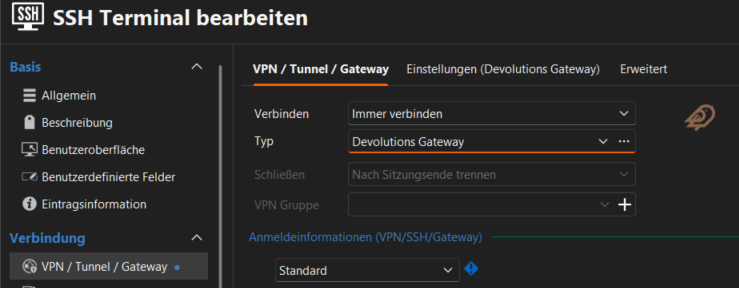
All destinations we try to reach from are in a private network (192.168.0.0/16) and have an URI *.internal.lan witch is only resolvable by an internal DNS-Server reachable form the devolutions gateway. We also tried public dns names and internal IP Adresses.
So in conclution we are not able to access internal ressources via devolutions gateway without an VPN.
We try to debug the problem by tracing traffic on the firewall, but did not capture traffic incoming to the devolutions gateway via the external IP from my non-office IP. On the other hand, I am able to create traffice via telnet 7474 and 8181 from my client. So it looks like Remote Desktop Manager does not try to connect via Devolutions Gateway
Autostart SSH Key Agents starts without keys
Thank you for your fast reply. I installed RDM version 2026.1.14.0 and the problem is still existing.
Autostart SSH Key Agents starts without keys
Hello,
I am using RDM Version 2025.3.32.0 64bit (german) with Devolution Hub Business on a Windows 11 24H2 (german) PC and have the following problem:
In my private user-vault I created two SSH keys entries by importing SSH keys as data and set the option to automatically load them into SSH-key agent.
If I check the funktion I go to "tools > SSH-key agent" and start the agent manually, both keys are loaded.
I now went to settings > tools >SSH-key agent to start the agent automatically with the application.
My problem: after start of RDM, the SSH-key agents starts too, but ist empty, because it does NOT load the keys from my user-vault. If I then stop/start the agent manually, the keys are loaded correcly.
I feel automatic start of SSH-key agent is useless without loading the right keys. Please advise how to debug the problem, any help appriciated.