bpoitdev
Navigation pane as tab
Hello,
Thank you for your patience while our team looked into the issue you reported.
I'm happy to let you know that the latest version of Remote Desktop Manager (2026.3.16.0) includes a fix for this problem. You can download it from our website here:
https://devolutions.net/remote-desktop-manager/download/
Once you have installed the update, could you please test it in your environment and confirm that everything now works as expected? If the issue persists or if you notice anything unusual related to the same original problem, just reply to this message with a few details, and we will be glad to look into it further.
Thank you for your collaboration.
Best regards,
@Maxim Robert
Hi Maxim, I've downloaded the newest version and it is working as expected.
Thanks in advance!
How to hide the “Search Everywhere” bar in Remote Desktop Manager 2026.3?
Just follow the steps mentioned by David Hervieux:
In the meantime, you can move the box out of the title bar:
Right-click the status bar at the bottom of the main window.
Under Position, open Quick search location and select Status bar.
The box leaves the title bar right away and the setting is kept after a restart. If you also uncheck Show status bar in that same menu, the search box is no longer shown anywhere.
How to hide the “Search Everywhere” bar in Remote Desktop Manager 2026.3?
Hello,
Thank you for your patience while our team looked into the issue you reported.
I'm happy to let you know that the latest version of Remote Desktop Manager (2026.3.13.0) allows to hide the “Search Everywhere” bar. You can download it from our website here:
https://devolutions.net/remote-desktop-manager/download/
Let us know if this implementation doesn't work.
Thank you for your collaboration.
Best regards,
@Erica Poirier
And where is located the option? In Settings?
I can't see the option.
Thanks in advance.
Navigation pane as tab
Hi all, just to know if this problem was been treated in the last version .3.13, because I can see that the behavior remains the same.
Thanks in advance!
Navigation pane as tab
Hello,
Thank you for the message.
You are very welcome!
Best regards,
@Sam Moynihan
Sorry for the inconvenience, but the behavior is a little bit weird.
When we open a second or third entry, the navigation tab, goes to the right (last tab), even though I wont that it stays at the left side, first tab. It's some focus parameter config?
Just a little annoyance thing ;)
Navigation pane as tab
I can confirm.
It's working as expected, the navigation is now a tab.
Thank you for you support!
Navigation pane as tab
navigation pane to be as a tab like the dashboard or other entries for example
Hi Hubert, that's correct, I would like to have the option
Navigation pane as tab
Hi all,
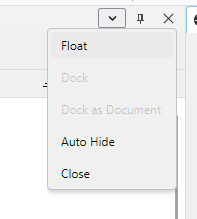
I think in this newer versions, I can't put the Navigation pane as a tab. Only floated, auto-hide etc...
In attached, the option "dock as document" (the one that I think it will be ok) is grayed.
Any option in settings that I can put the navigation as a permanent tab?