
nicolaskuri
Support Microsoft SQL Server entries in the Devolutions Server web interface
Hi Devolutions team,
We store Microsoft SQL Server entries in Devolutions Server and would like to access them through the web interface. Support has confirmed that this entry type is currently unsupported there. As a result, its details, including the password, are not reliably available in the browser. We have to open Remote Desktop Manager to view, reveal or copy the password.
Could you add full support for Microsoft SQL Server entries in the web interface, including the ability to view the entry details and reveal and copy the stored password?
We are currently using Devolutions Server 2026.2.12.0.
Thank you!
Support Microsoft SQL Server entries in the Passwords app
Hi Devolutions team,
We store Microsoft SQL Server entries in Devolutions Server and would like to access them through the Passwords app. Currently, this entry type is not supported, so we cannot view its details or reveal and copy its password in the app. We have to open Remote Desktop Manager for that.
Could you add support for Microsoft SQL Server entries in the Passwords app, including the ability to view the entry details and reveal and copy the stored password?
Our current versions are Devolutions Server 2026.2.12.0 and Passwords app 2026.2.3.
Thank you!
Feature Request: Support Variables from Linked Credentials in Entry Names
Hi Hubert,
I am referencing to a credential entry in the same vault. In my case I have a folder at the top of the vault with general credentials used in more than one entry to which I am referencing in session entries in the same vault.
Hope this makes it clearer.
Thank you for your effort.
Feature Request: Support Variables from Linked Credentials in Entry Names
Description
Currently, variables such as $USERNAME$ can only be used when the username is embedded directly in the session entry.
Many environments use Linked (Vault) Credentials to centralize credential management. In these cases, the linked credential already contains the username, but variables like $USERNAME$ are not available for use in entry names or naming templates.
It would be very helpful if Remote Desktop Manager could resolve and expose selected fields from linked credentials (for example $USERNAME$) so they can be used in entry names and other dynamic naming scenarios.
Use Case
We use linked credentials extensively to avoid duplicating usernames and passwords across multiple entries.
For example, it would be useful to create entry names such as:
Server01 - $USERNAME$
VPN - $USERNAME$
SQL - $USERNAME$
where the username is automatically pulled from the linked credential.
This would improve consistency, reduce manual naming efforts, and make entries easier to identify when multiple accounts are used for the same target system.
Expected Behavior
When an entry references a Linked (Vault) Credential, variables such as $USERNAME$ should resolve to the corresponding value stored in the linked credential, just as they do when credentials are embedded directly in the session.
Thank you for considering this enhancement.
Feature Request: Configurable Naming Pattern for Duplicated Entries
Thank you for this fast hint. This is cool already. Only one point. If I leave the field blank, it still adds a “(2)”
Do you have a solution for this. But already a big improvement.
Feature Request: Configurable Naming Pattern for Duplicated Entries
Hello,
I would like to request a feature that allows administrators or users to customize the naming convention used when duplicating entries in Remote Desktop Manager.
Currently, when an entry is duplicated, RDM automatically appends the suffix "- Copy" to the entry name. While this behavior makes sense as a default, there is currently no option to modify or disable it.
Suggested enhancement:
Provide a setting that allows users to define how duplicated entries should be named. For example:
Keep the current behavior ("Entry Name - Copy")
Use a custom suffix (e.g., "- Template", "- New", "- Clone")
Use a custom naming pattern with variables
Do not append anything and keep the original name until the user changes it manually
Benefits:
Better alignment with company naming conventions
Faster workflows when creating multiple similar entries
Reduced need for manual renaming after duplication
Greater flexibility for environments that rely on structured naming standards
This would be especially useful for teams that frequently duplicate entries as templates when onboarding new customers, servers, VPN connections, or other managed resources.
Thank you for considering this feature request.
Feature Request: Support Dynamic Variables in Software License Entry Names
Hello Devolutions Team,
I would like to submit a feature request regarding the Software License entry type.
Currently, it appears that variables such as $SOFTWARE$ or $VERSION$ cannot be used within the entry name or related fields to dynamically generate the entry title.
My original question was:
Is there a way to use variables here as well, like $SOFTWARE$ or $VERSION$, to build the name of the entry more dynamically?
As far as I can tell, this functionality is not currently available.
It would be very helpful if Software License entries could support the same variable system that is available in other entry types. This would allow administrators to automatically generate consistent and meaningful entry names based on existing fields such as software name, version, vendor, or other custom data.
Thank you for considering this enhancement.
Approval Workflow / Change Request System for Shared Vaults
Hello Devolutions Team,
we are currently using a shared vault within our team and would like to suggest an enhancement regarding permission management and change control.
At the moment, users with write access can directly modify or delete entries. Restricting those permissions completely is also not ideal, because it would require users to contact team leads or administrators for every small change.
A more flexible and secure approach would be a built-in approval workflow or change request system, similar to how firewall or infrastructure changes are handled in enterprise environments.
Example workflow:
Users can propose changes to entries (edit, move, delete, etc.)
The changes are submitted as a “Change Request”
Designated approvers (e.g. team leads or admins) receive a notification
The change only becomes active after approval
Optional: audit trail/history of requested and approved changes
This would improve:
Security and governance
Protection against accidental deletion or modification
Delegation without giving full unrestricted write access
Transparency and accountability within shared vaults
Is something like this planned for future versions, or could it be considered as a feature request?
Thank you!
Devolutions Password Manager App / Keyboard shortcut for copying username, password or both
Hi Maxim,
thank you very much. This helps a lot.
Nico
Per-Connection Override for Forced Logoff on RDP Close
Hi Hubert, thank you for all the effort. Keep me in the loop.
Per-Connection Override for Forced Logoff on RDP Close
Hi Hubert,
this would be incredible helpful. Is this already possible or is it a suggestion of you what could be implemented in a future release?
Thank you
Devolutions Password Manager App / Keyboard shortcut for copying username, password or both
Perfect, I did not know this overview. This helps a lot. Thank you
Per-Connection Override for Forced Logoff on RDP Close
Hi Hubert,
thank you for your suggestion.
Previously, I was using the option “Close with no logoff,” so I understand the approach. However, with both solutions, the user has to actively remember to right-click the tab instead of simply closing it.
We originally introduced this GPO because many users did not properly log off from systems. From my perspective, this now feels somewhat counterintuitive. Personally, I always log off using Alt + F4, and I’m used to simply closing the RDP window when I only want to disconnect.
Since enabling the GPO, I’ve already encountered situations where closing the session triggered a logoff that I did not intend.
Another idea: would it be possible to prompt the user when clicking the “X” (e.g., asking whether to disconnect or log off)? Although I’m concerned that in that case, many users might just confirm without thinking, which would bring us back to the original issue we were trying to solve.
Thank you again for your help, and I’m happy to hear your thoughts on this.
Allow LAPS entries to reference credentials via "Find by Name (User Vault)"
Hello Devolutions Team,
I would like to submit a feature request regarding the usage of LAPS entries in Remote Desktop Manager.
Currently, when configuring a LAPS entry, the username must be defined explicitly. Based on feedback from your development team, it is not possible to link a credential entry to another credential entry, which limits flexibility in certain scenarios.
It would be very helpful if LAPS entries could support dynamic credential resolution, similar to the "Find by Name (User Vault)" option available in other entry types. This would allow administrators to avoid hardcoding usernames and instead reference centrally managed credential entries.
Use case:
In our environment, we aim to standardize credential management and avoid duplication. With the current limitation, we are required to maintain static usernames within LAPS entries, which reduces maintainability and increases administrative overhead.
Suggested improvement:
Introduce an option in LAPS entries to:
Select credentials dynamically via "Find by Name (User Vault)", or
Reference an existing credential entry
This would align LAPS entries with other credential handling mechanisms in RDM and significantly improve flexibility and consistency.
Thank you for considering this request.
Best regards
Per-Connection Override for Forced Logoff on RDP Close
Hello Devolutions Team,
with the recent update, the new GPO option to enforce a logoff when closing an RDP session via the “X” button is a very useful security feature.
However, we have a requirement where this behavior should not apply to all connections. Specifically, we maintain a small number of service accounts that must remain logged in at all times and should not be logged off when the RDP window is closed.
Therefore, we would like to request the ability to override this GPO setting on a per-connection basis (e.g., within the RDP session configuration in RDM). Ideally, this would allow administrators to disable the forced logoff behavior for specific entries while keeping it enforced globally.
This would provide greater flexibility and help accommodate special use cases without compromising the overall security posture.
Thank you for considering this request.
Best regards
Devolutions Password Manager App / Keyboard shortcut for copying username, password or both
Hey Sebastian,
thank you for this heads-up. This is great.
What would be handy as well for me is a shortcut in RDM to get into properties of an entry. Is this possible already or is this planned?
Thank you
Devolutions Password Manager App / Keyboard shortcut for copying username, password or both
Hey,
we are currently in the process of migrating from Netwrix to Devolutions and are overall very satisfied with the platform.
However, there is one feature we are currently missing that would significantly improve usability in our daily workflows.
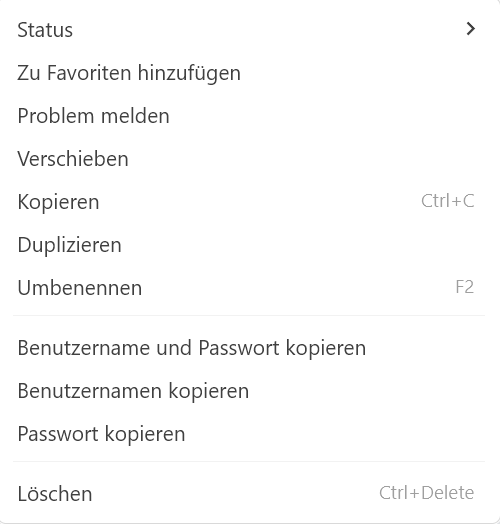
In Netwrix, it is possible to use keyboard shortcuts to quickly copy the username, password, or both at once. This allows for a much faster and more efficient handling of credentials, especially when working with multiple systems.
At the moment, Devolutions does not seem to offer a comparable shortcut-based functionality for copying credentials.
Feature request:
We would like to request the addition of configurable keyboard shortcuts for:
Copying the username
Copying the password
Optionally copying both username and password together
This feature would greatly enhance productivity and streamline workflows, particularly for administrators who frequently need to access and use credentials.
Thank you for considering this request. Please let us know if further details or use cases would be helpful.
Feature Request: Enhanced Variable Handling with Programmable Expressions
Hello,
I would like to submit a feature request regarding variable handling in Devolutions (RDM / Devolutions Server). From a more developer-oriented perspective, it would be extremely useful to have extended variable capabilities similar to programming languages.
1. Accessing Sub-Properties of Entries (Dictionary-like Access)
I was wondering whether it would be possible to reference sub-properties of an entry similar to how dictionaries or objects work in programming languages.
For example, if a credential entry is named:
Testuser
It would be very helpful to access specific properties directly, such as:
Testuser.password
Testuser.username
Testuser.domain
This would allow much more flexible and reusable configurations when building dynamic session entries.
If such functionality is not currently possible, I would like to formally suggest it as a feature enhancement.
2. Dynamic Naming Based on Parent Folder
We have a structure like this:
Folder:
b-data
Session entries below:
be-data01
be-data02
be-data03
This list is growing over time.
It would be very helpful if we could build entry names dynamically using variables, for example:
$PARENT_NAME$ + incremental number
This would reduce manual configuration effort and improve scalability when managing many similar entries.
3. String Manipulation / Substring Support in Variables
Another real-world example:
System name:
be-cdc01Web URL:
be-cdc.domain.com
It would be extremely useful if we could manipulate variables directly, for example:
$PARENT_NAME$[-last two characters].domain.com
or more generically:
substring operations
trimming characters
basic string replacement
simple expressions
This would make variable handling significantly more powerful and flexible, especially in larger environments with structured naming conventions.
Summary
In short, I would like to suggest:
Property access for entries (e.g., EntryName.Property)
Support for string manipulation in variables
Basic expression support in variable handling
More programmable, developer-style variable logic
This would greatly improve automation and reduce repetitive manual configuration, especially in growing infrastructures.
Thank you for considering this request.