Per-Connection Override for Forced Logoff on RDP Close
Per-Connection Override for Forced Logoff on RDP Close
1 vote

Hello Devolutions Team,
with the recent update, the new GPO option to enforce a logoff when closing an RDP session via the “X” button is a very useful security feature.
However, we have a requirement where this behavior should not apply to all connections. Specifically, we maintain a small number of service accounts that must remain logged in at all times and should not be logged off when the RDP window is closed.
Therefore, we would like to request the ability to override this GPO setting on a per-connection basis (e.g., within the RDP session configuration in RDM). Ideally, this would allow administrators to disable the forced logoff behavior for specific entries while keeping it enforced globally.
This would provide greater flexibility and help accommodate special use cases without compromising the overall security posture.
Thank you for considering this request.
Best regards
All Comments (6)
Hello,
We have a feature to show a "Disconnect" button in the context menu of your opened entries, which is located in File > Settings > Entry types > Sessions: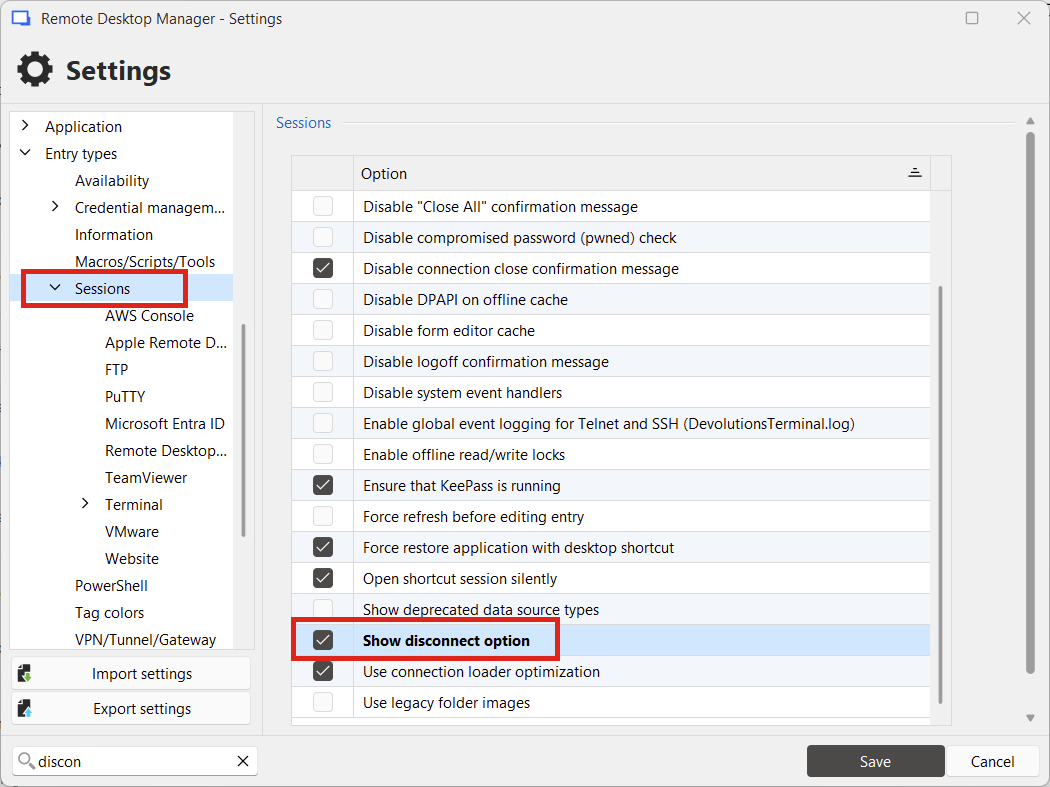
This button's purpose is to let you disconnect from the remote session without necessarily closing it. In your case, since you're using RDP entries, it will not perform the logoff action if you disconnect using this button rather than closing the tab.
Can you try this out and let me know what you think? The reason I'm suggesting this is because GPOs are made to enforce a behavior, meaning that adding a setting in entries to ignore a GPO would go against this design philosophy.
If this doesn't answer your needs, maybe we can figure out a different solution. For example, I'm seeing that by default, this setting in the RDP entries points to the local settings. It could be possible to instead point to a configuration in the vault, meaning you could more easily enforce this setting per vault, and then change the value for specific RDP entries that don't require this behavior.
Regards,
Hubert Mireault
481719ca-ae7a-43f5-badf-3a7e85fdc74d.png
Hi Hubert,
thank you for your suggestion.
Previously, I was using the option “Close with no logoff,” so I understand the approach. However, with both solutions, the user has to actively remember to right-click the tab instead of simply closing it.
We originally introduced this GPO because many users did not properly log off from systems. From my perspective, this now feels somewhat counterintuitive. Personally, I always log off using Alt + F4, and I’m used to simply closing the RDP window when I only want to disconnect.
Since enabling the GPO, I’ve already encountered situations where closing the session triggered a logoff that I did not intend.
Another idea: would it be possible to prompt the user when clicking the “X” (e.g., asking whether to disconnect or log off)? Although I’m concerned that in that case, many users might just confirm without thinking, which would bring us back to the original issue we were trying to solve.
Thank you again for your help, and I’m happy to hear your thoughts on this.
Thank you, this additional information gives me a good overview of what the struggles are with the way things currently work, and what you're trying to accomplish (and why it's important).
Another idea: would it be possible to prompt the user when clicking the “X” (e.g., asking whether to disconnect or log off)? Although I’m concerned that in that case, many users might just confirm without thinking, which would bring us back to the original issue we were trying to solve.
This is probably the easiest thing to implement on our side, as it could be a local option with a GPO to enforce it. I could see it prompting the user for something like this: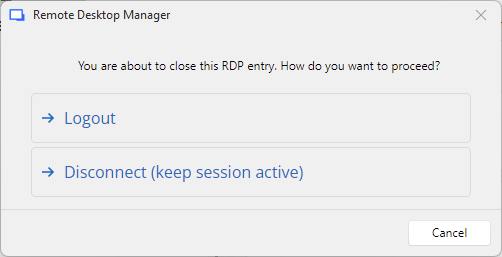
With clear labels, it should (hopefully) guide users to select the correct option, rather than mindlessly pressing "yes" in a yes/no prompt. It's not a guarantee, but it's clearer than simply clicking an "X" and assuming what it will do.
Do you think this could work as a solution?
Regards,
Hubert Mireault
2a4e7059-881a-4864-8bf3-cc6d5e1191d9.png
Hi Hubert,
this would be incredible helpful. Is this already possible or is it a suggestion of you what could be implemented in a future release?
Thank you
Hello,
It's not already possible, I did a quick mockup of the window to give an idea of what the prompt would look like. Since you mention this would be very helpful, I think this could be a good first step.Do you think adding an option to enable this behavior in File>Settings would work in your case? I would hesitate to have this behavior be the default, as I would expect pushback from other users who prioritise reducing the amount of clicks to achieve what they need.
EDIT: Actually, thinking more about this, maybe it would be simpler to simply rework the existing option to support a new mode to prompt to logoff or disconnect. I will note this as a possible improvement as it would make more sense and avoid creating a separate setting.
Regards,
Hubert Mireault
Hi Hubert, thank you for all the effort. Keep me in the loop.