
cf2
RDP keyboard redirection for special keys/combos not working in 2026.3.0.5 64bit Linux Mint 22.3
Hello everyone,
Thank you for testing 2026.3.2.1.
Christoph, thank you for confirming the fix with KDE Plasma on Wayland. 2026.3.2.1 also fixes Ctrl+D opening Duplicate in SSH sessions. Do Ctrl+D in SSH and Ctrl+B in RDP now reach the session for you?
Roland, in 2026.3.2.1 Remote Desktop Manager only tries to capture the Windows key and Alt+Tab while the mouse pointer is over the RDP session, the session has the keyboard focus and the window is active, with Keyboard set to "On the remote computer" under Connection > Local resources. Could you click inside the session, keep the pointer over it and try again? Please also tell us which key still goes to GNOME, whether the session is in a tab or its own window, and whether 2026.2.2.2 sent these keys to the session on this machine.
Thank you also to the original reporter of this topic for confirming that 2026.3.2.1 fixes the issues you reported on Linux Mint 22.3 with Cinnamon.
Best regards,
Stephan
@Stephan Haupt
Hi Stephan,
Yes, I can confirm Ctrl+B and Ctrl+D is working in SSH Sessions as well.
Best regards,
Christoph
RDP keyboard redirection for special keys/combos not working in 2026.3.0.5 64bit Linux Mint 22.3
Hello,
I can confirm that the fix works on Debian Trixie with KDE Plasma on Wayland.
Thank you so much for implementing the fix!
Best regards,
Christoph Fink
Tabs missing when starting Undocked RDP Session
Hi again,
Sounds good. Thanks you!
Also I'd like to thank you for keeping on improving the Linux version. It's refreshing to see continuous development for a platform many others just leave behind.
kind regards,
Christoph Fink
Tabs missing when starting Undocked RDP Session
Hello Alexis,
Yes, I can dock it to the main window and after undocking again i have the tab bar. But since I'm opening lots of sessions and prefer to use the main window mainly as opening connections I'd love to have the tab bar shown immediately so I don't have to dock and undock all the time.
Right now I'm using the embedded setting and then undock manually.
kind regards,
Christoph Fink
Tabs missing when starting Undocked RDP Session
Hello,
Sure, with this setting I'm starting the RDP session embedded:
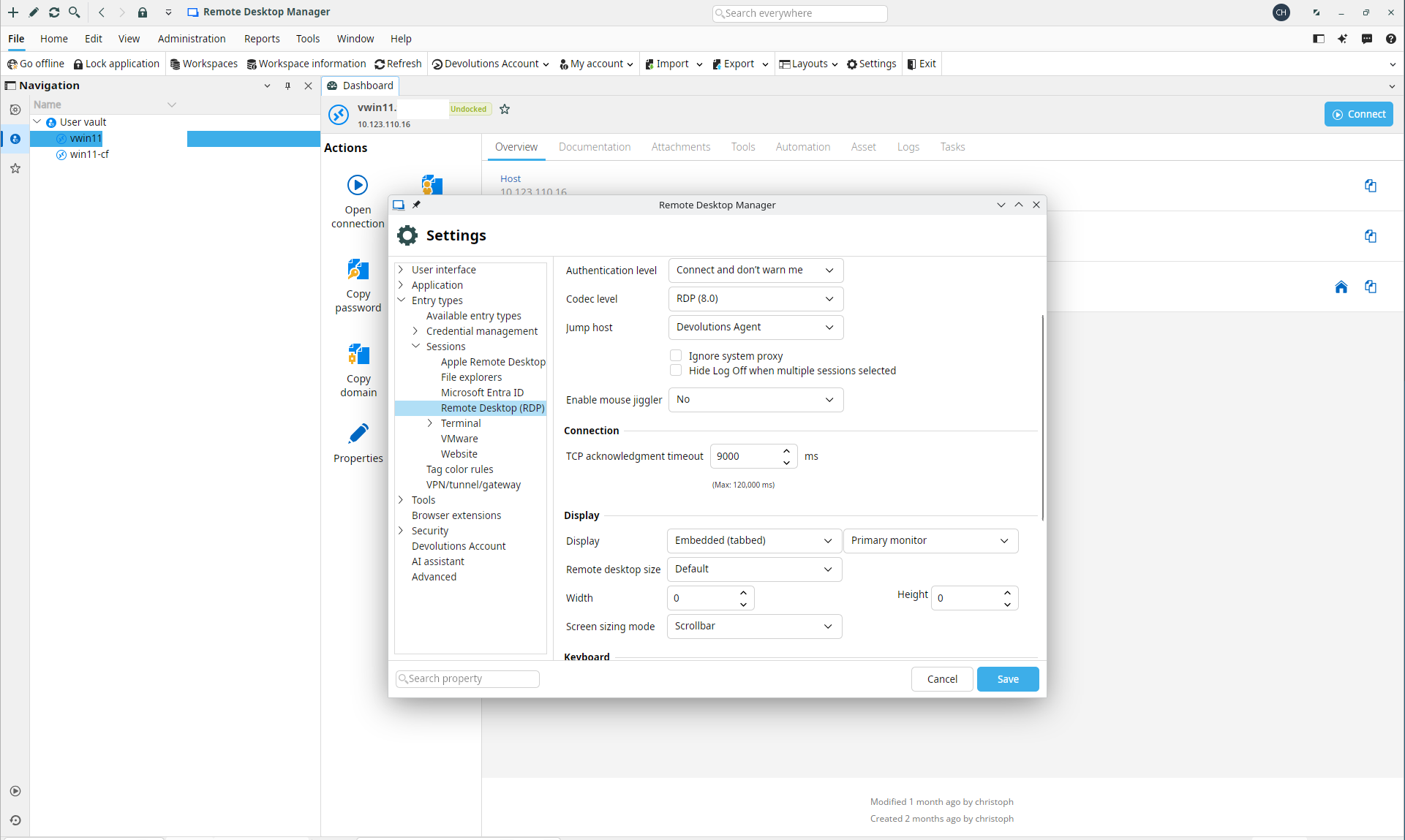
After that, I can detach the window and the Tabs are shown, which allows me to drag in other Session Tabs as well:
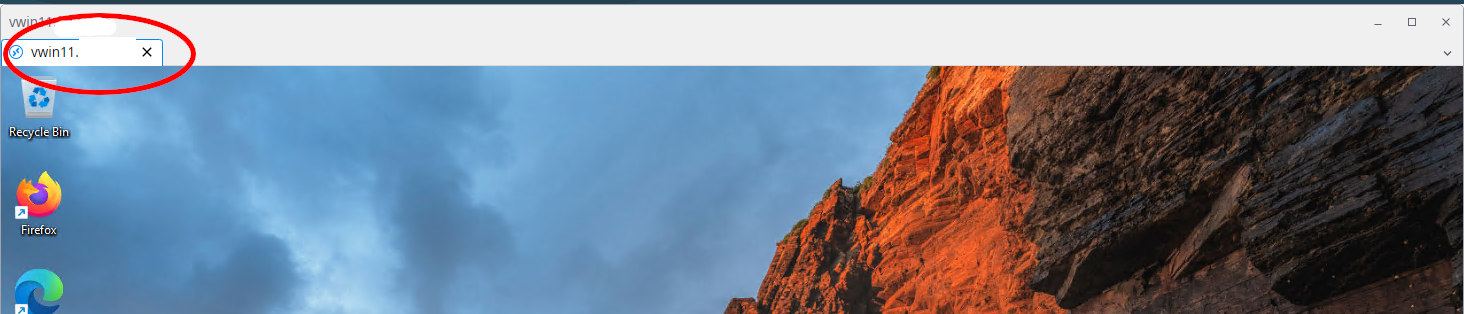
When I open the session as undocked:
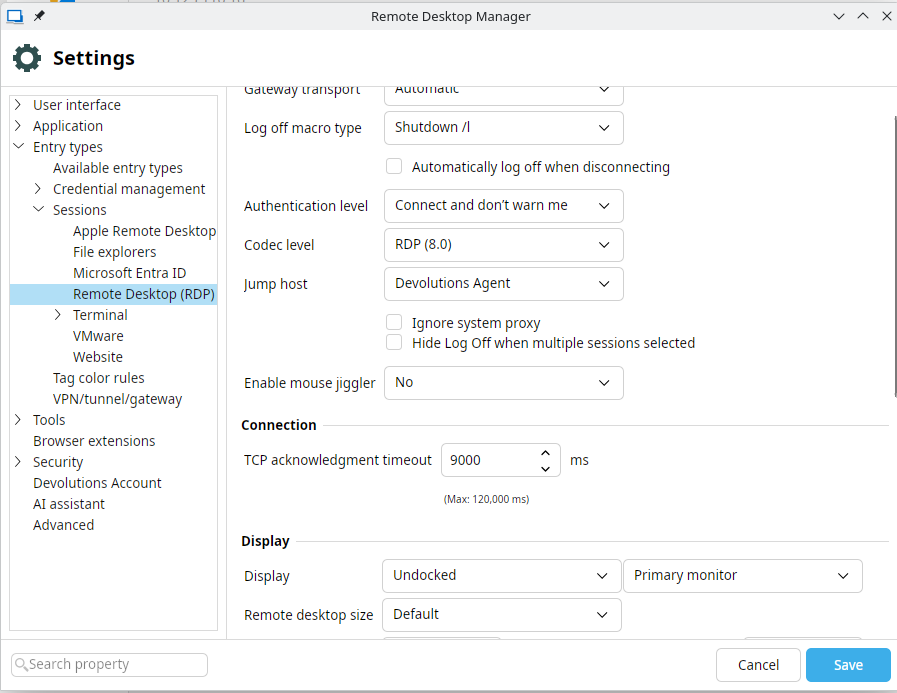
The window does open already detached but it doesn't show me tabs in that window:

So I cannot attach multiple Sessions in the same Window.
I hope this explains it better. In I'll have to make a video I'll send it via a private message to you.
Thank you for listening up. I can make a video if the screenshots don't explain it.
kind regards,
Christoph Fink
Tabs missing when starting Undocked RDP Session
Hi,
I prefer to open RDP Sessions in undocked mode. However, when configure the Undocked mode to be the default in the settings I'm missing the tabs on the window. This makes it also impossible to group the connections in undocked mode.
Tested on version 2026.3.1.1
Best regards,
Christoph Fink
RDP keyboard redirection for special keys/combos not working in 2026.3.0.5 64bit Linux Mint 22.3
Hi!
I just upgraded to 2026.3.1.1 (after the german layout bug got fixed). I've just tested this in an SSH (ctrl+d to logout, wants to duplicate session) and RDP Session (ctrl+b asks for the keeper auth to get the password and alt+tab switches away from RDM instead of tabbing through windows in session).
Tested with the red horseshoe symbol activated and deactivated (I assume that is what you mean with the Grab the keyboard toggle).
Shortcut under Settings should be the defaults AFAIK. In the session config under Local Resources we always configure "Keyboard: On the remote computer" for the Key combinations.
Best regards,
Christoph Fink
Linux 2026.3.0.5: Keypresses to RDP are submitted with wrong keyboard layout
Hello,
I just upgraded RDM and can confirm that the Keyboard Layout is now working as expected.
But another thing I found and is maybe related:
I cannot pass through Shortcuts. For instance: If I have press ctrl+b I get asked the authentication for a connection instead of passing it through to the session. This is annoying when working with an open putty+tmux session in an RDP Connection. I also didn't find anything related to the shortcuts in the settings.
Shoud I file a new bug report for this?
thank you for resolving this issue. Now at least I am able to use the new version!
kind regards,
Linux 2026.3.0.5: Keypresses to RDP are submitted with wrong keyboard layout
Last week I already filed a bug report and the support told me they have a Ticket open for the development Team.
So things seem to be ongoing. I hope this gets resolved soon since there are so many improvements but this is a blocker for the new version for me (since we're using the german keyboard everywhere).
u2f security key support for Keeper integration
I also would love to have this feature. Always having to pull out the phone when I need a secret is so annoying!
Thanks for looking into it!