
mog54
High Memory usage - Growing up
Hello,
same here, after 8h of being open. max 5/10 simultaneous opened windows. No opened session at the time of the screenshot.

RDM: 2026.3.15
Thanks
DVLS 2026.2.16.0 | Reauthenticate frequently
Hello,
My guess is the connection to the DVLS server at the startup of RDM is causing the issue.
I launched an RDM on a PC that I haven't used for 13 days. It can always reach the DVLS server (no external VPN needed), and I didn't need to re-authenticate.
In between, the DVLS has been started, stopped, and upgraded. It's a situation where it could legitimately ask to re-authenticate.
Thanks
DVLS 2026.2.16.0 | Reauthenticate frequently
Hello,
I upgraded DVLS to the latest version. The authentication behavior seems still to happen.
For the login time, i didn't check it after upgrade. The vault is about to reach 1300 entries.
Thanks
DVLS 2026.2.16.0 | Reauthenticate frequently
Hello,
I change it few days ago to none and the behavior is the same.
I'm working on updating DVLS server to the latest version.
Also, i got an "issue" when login. after entering creds and validating. The login process takes between 10 and 15 second before success.
Is it "normal" authentication time?
Thanks
Web session | new tab
Hello,
i can confirm that.
Also, i got UX bug with the navigation pane so i had to downgrade to 2026.3.8.0 and that's working too
thanks
DVLS 2026.2.16.0 | Reauthenticate frequently
Hello,
1) The "Ping online method" is Web request
2) The "Force token public IP validation" is not ticked
Maybe the way i want to use the RDM & DVLS is wrong
For one of my RDM client, i want to use RDM in offline mode almost all the time, and i need to connect to a VPN to synchronize with DVLS
For other RDM client, to be connected almost all of the time.
And for this use case, i wish to not need to re authenticate at every connection to DVLS.
Is this possible?
Thanks
DVLS 2026.2.16.0 | Reauthenticate frequently
Hello,
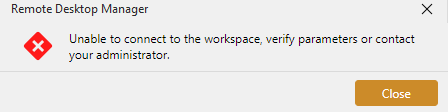
I noticed that when i need to re authenticate i got this message on one of my RDM. i click close, and try to go online again and the authentification process start.
Thanks
DVLS 2026.2.16.0 | Reauthenticate frequently
Hello,
After few days of testing. the behavior is still the same.
I'm using a self signed certificate. can it be a part of the issue ?
Thanks
DVLS 2026.2.16.0 | Reauthenticate frequently
Hello,
Thanks you for the answer.
i got Administration > Server settings > Advanced.and the setting for the token lifetime is the default value (30 days)
i set the "Automatically log out idle users after" to 0 just to try
i check Administration > System settings > RDM and Password Manager clients > RDM tab > Security > Disconnect workspace and every box are not ticked
i'm using local user account only
thanks
DVLS 2026.2.16.0 | Reauthenticate frequently
Hello,
DVLS 2026.2.16.0
RDM 2026.2.19.0
i use dvls with 3 different rdm client on the same account and i need to reauthenticate "frequently".
It's not every rdm startup, but i feel more like on a duration basis. Maybe every 12h hours or something like this.
is use external web browser for authenticate.
I look in the dvls web option, but didn't find revelent settings.
Is there a setting i can adjust on dvls side or rdm?
Thanks
Web session | new tab
Hello,
okay, thanks for the answer.
Web session | new tab
Hello,
i upgrade from 2025.3.32 to 2026.2.18 and since when i use a web session (edge), newly opened tab inside the web session are not "going the front".
I didn't find setting for that. Did miss something?
Thanks
RDM x Moba
Hello,
sorry for the delay, i just tried with 2026.2.17.0 and it's not working.
Thanks
RDM x Moba
Hello,
i got an error with a password that contains only this * and another with thoses one* ^ ^ & @
For both password, i make it work when using
mobaxterm.exe -newtab "sshpass -p '{PASSWORD}' ssh {USERNAME}@{IP}"i got another error with a password finishing with a double $
This one is very interesting; if i launch the command above from powershell terminal, it failed to connect. But if i launch just
sshpass -p '{PASSWORD}' ssh {USERNAME}@{IP}directly inside the moba terminal, it successfully connecting.
Thanks
RDM x Moba
Hello,
For my ssh connection i use moba but launched from RDM, and i noticed that if password contains special characters, the ssh session failed to connect.
From what i understand RDM launch moba with a cmd command like this:
mobaxterm.exe -newtab "sshpass -p {PASSWORD} ssh {USERNAME}@{IP}"And i got same error with this command when i launch it from my own cmd. I managed to make it work with this command
mobaxterm.exe -newtab "sshpass -p '{PASSWORD}' ssh {USERNAME}@{IP}"Is it possible to do the same with RDM ?
Thanks