
lsiekmann
Asset Type Icons/Images for regular Entries/Folders
Hello,
You should be able to click "Show deprecated images" and both the "Session" and "Information" folders will appear, which contain the images used for sessions type and information type entries:
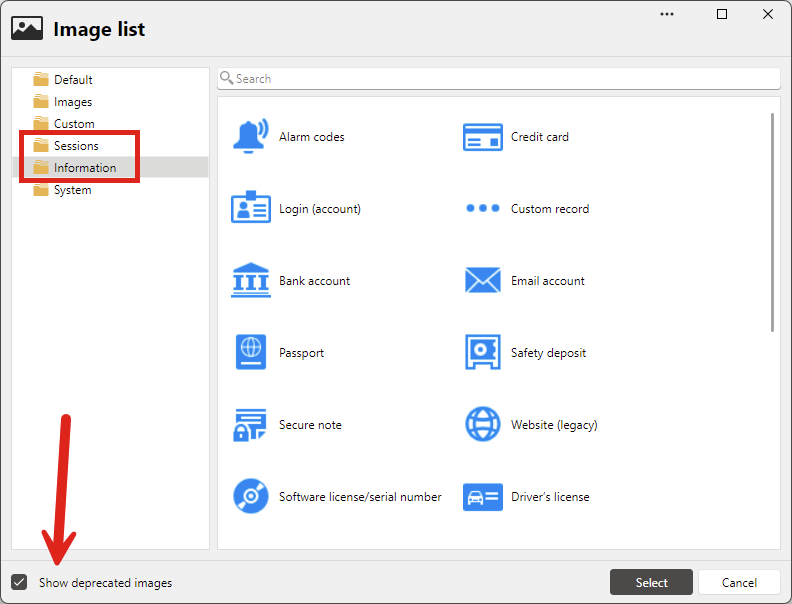
I'll check with the team to see why these icons are flagged as deprecated. Maybe the terminology isn't correct here.
Regards,
@Hubert Mireault
Thanks for the quick reply, I looked through those deprecated icons but couldn't find the ones I was looking for.
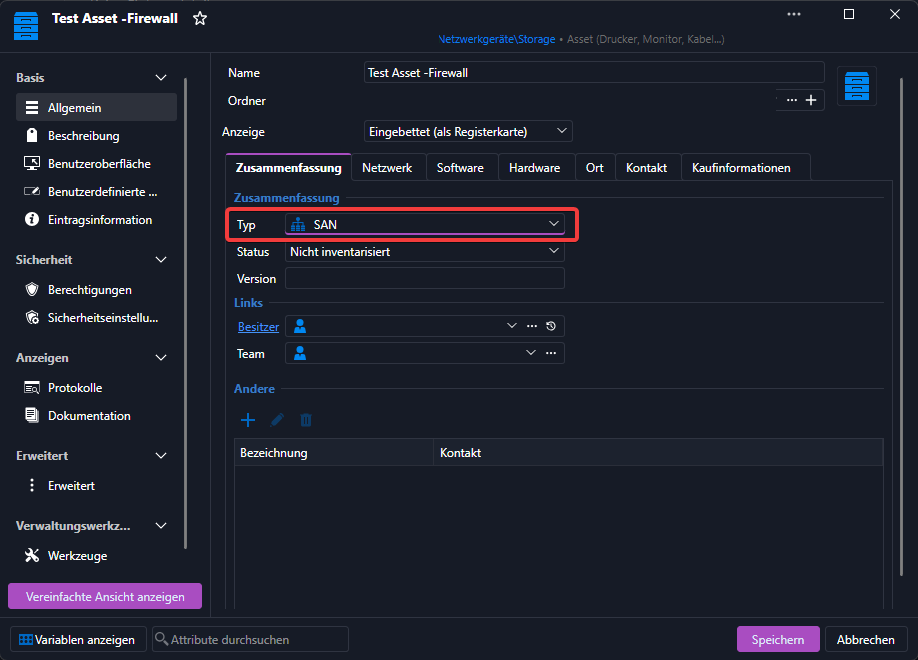
I mean these, which only show up when selecting the type for an Asset.


Asset Type Icons/Images for regular Entries/Folders
The Icons/Images for Asset types like "Firewall" or "SAN" for example, are only available for Assets of that perticular type.
It would be nice if those were available in general for entires and folders.
Questions regarding Devolutions Server and Gateway communication
Hello Lennart,
Question 1: The graph above that line shows that the Devolutions Server only communicates on port 7171 outgoing to the gateway. So I would assume that my firewall rule for Devolutions Server and Gateway communication doesn't need port 8181 outgoing allowed right?
That is correct. This port is used by native clients (in RDM) that only understand how to communicate using TCP, and you don’t have to allow Devolutions Server to use it.
Side note: we also plan to add a feature where the TCP listener is completely optional even for RDM at the cost of a small performance penalty.
Question 2: I know that when using the Remote Desktop Manager and connecting to, for example an RDP session via a gateway its the client running RDM that opens the connection.
However when I use the WebUI of the Devolutions Server to connect to a RDP Session via a gateway does my client running the Browser/WebUI initiate the connection or is it the Devolutions Server that connects to the remote gateway?
It is the client running the browser; everything is happening locally and Devolutions Server is only serving the web page.
Best regards,
@Benoit Cortier
Thank you for the clarification and fast response. That really helps us with planning our future gateway rollouts and confirms our understanding of the required firewall configuration.
Questions regarding Devolutions Server and Gateway communication
Hello,
we've recently setup a Devolutions Gateway on a remote site and we've got a few questions about how the Devolutions Server actually communicates with the gateway.
In the gateway documentation found here: https://docs.devolutions.net/gateway/overview/system-requirements/system-requirements-dvls/
It says:
"The default port for HTTP(s) communication with the gateway is 7171, while the default port for TCP communication is 8181. These ports should be open and not blocked by firewalls to allow proper communication."
Question 1: The graph above that line shows that the Devolutions Server only communicates on port 7171 outgoing to the gateway. So I would assume that my firewall rule for Devolutions Server and Gateway communication doesn't need port 8181 outgoing allowed right?
Question 2: I know that when using the Remote Desktop Manager and connecting to, for example an RDP session via a gateway its the client running RDM that opens the connection.
However when I use the WebUI of the Devolutions Server to connect to a RDP Session via a gateway does my client running the Browser/WebUI initiate the connection or is it the Devolutions Server that connects to the remote gateway?
Best regards,
Lennart
Multiple Privileged Accounts?
Hi,
Thank you for the detailed explanation.
For this use case, you should not need to rely on User-Specific Settings for each entry. A cleaner approach would be to configure the shared entries to use Find by name (User vault) as the credential source.
For example, on the shared RDP/SSH entry for CustomerA, you can set the credential mode to: Find by name (User vault)
Then, in the credential name field, enter something like: CustomerA - Admin
Each technician would then create their own credential entry in their own User Vault using that exact same name: CustomerA - Admin
When the shared entry is launched, Remote Desktop Manager will search the current user’s User Vault for a credential matching that name. This means each technician can use their own private admin credential without exposing it to colleagues, while the shared RDP/SSH entries remain common to the team.
You could then standardize this naming convention per customer, for example:
CustomerA - Admin
CustomerB - Admin
CustomerC - Admin
The important part is that the credential entry name expected by the shared entry matches the credential entry name created in each user’s User Vault.
This should avoid the need to store personal admin credentials in the shared customer folder, and should also reduce the amount of per-user configuration required.
Best regards,
@William Alphonso
Thank you for your explanation.
I've tested it with a colleague on a few customers and it works perfectly!
Multiple Privileged Accounts?
As an MSP we use RDM and Devolutions Server to access our customer infrastructures.
A few of our customers' environments require the use of personalized Administrators. This is where the problem begins.
As far as I know its not possible to setup multiple priviledged accounts in RDM and configure each entry to prompt what priviledged Account is to be used, since each customer has a different domain, admin naming scheme etc.
For clarification, we use a single vault to manage RDP/SSH Connections to our customers. The vault is divided into folders for each customer.
My current workaround is to use user-specific settings on the entries I frequently use and override the login with credentials from my personal vault. But over time this has become quite annoying and confusing.
Saving personalized admins in the folder of each customer and then prompting them on connection and choosing yours is also not viable as my colleagues and I shouldnt be able to eachothers credentials.
Perhaps im missing something here and someone can give me some pointers but it looks like this use-case isnt fully supported.
I've disregarded Devolutions PAM for now as it looks like it wouldnt work with remote connections and different domain environments but maybe im mistaken.