
tomfallon
Frequent application crashes since upgrade to 2026.3.15.0 - .Net runrtime event ID 1026
Im running the newest version 2026.3.16.0 already? It was available for update to me from within the app on Wednesday 28Oct. Having said that it crashed again just now while trying to type on a newly opened SSH session to a linux VM. Only 3 machines open in total.
Faulting application name: RemoteDesktopManager.exe, version: 2026.3.16.0, time stamp: 0x6ada0000
Faulting module name: KERNELBASE.dll, version: 10.0.26100.9711, time stamp: 0xfb9071fb
Exception code: 0xe0434352
Fault offset: 0x00000000000c408a
Faulting process id: 0x651C
Faulting application start time: 0x1DD683C75437C26
Faulting application path: C:\Program Files\Devolutions\Remote Desktop Manager\RemoteDesktopManager.exe
Faulting module path: C:\WINDOWS\System32\KERNELBASE.dll
Report Id: ac44f1d0-41d7-4d77-b7f6-2a329c217db1
Faulting package full name:
Faulting package-relative application ID:
Frequent application crashes since upgrade to 2026.3.15.0 - .Net runrtime event ID 1026
Just seen another post on here ref high RAM on version 2026.3.15 and wondering if that as same thing here - RAM maxing out.
I've since upgraded to 2026.3.16.0 and since then, admittedly only a day, its been OK.
Frequent application crashes since upgrade to 2026.3.15.0 - .Net runrtime event ID 1026
Forgot to add - we are using Microsoft SQL back end on the teams edition and are also connecting to Pleasant Password Server for authentication.
Vault has 250 folders and 1945 sessions with 9 synchronizers
Frequent application crashes since upgrade to 2026.3.15.0 - .Net runrtime event ID 1026
This has been happening for few weeks now but today has happened a half dozen times which is becoming somewhat frustrating.
About 10 days ago I followed all steps outlined in this guide: https://docs.devolutions.net/rdm/knowledge-base/troubleshooting-articles/remote-desktop-manager-crashes-in-versions-2024.1-to-2024.3
Dot net and Windows EdgeView2 are up to date, I, running latest version of RDM and have reset the app by renaming appdata profile RDM folder name.
Still getting crashes.
Found these logs ref the crash in EventViewer.
Event ID 1026 .Net Runtime followed by Event ID 1000 Application Error
Application: RemoteDesktopManager.exe
CoreCLR Version: 10.0.1426.52326
.NET Version: 10.0.14
Description: The process was terminated due to an unhandled exception.
Exception Info: System.InvalidOperationException: Handle is not initialized.
at System.WeakReference`1.SetTarget(T target)
at System.Windows.Forms.ToolStrip.Dispose(Boolean disposing)
at System.ComponentModel.Component.Dispose()
at Devolutions.Protocols.Xterm.Dispose(Boolean disposing)
at Devolutions.Protocols.XtermSsh.Dispose(Boolean disposing)
at System.ComponentModel.Component.Finalize()
at System.GC.RunFinalizers()
Faulting application name: RemoteDesktopManager.exe, version: 2026.3.15.0, time stamp: 0x6ac20000
Faulting module name: KERNELBASE.dll, version: 10.0.26100.9549, time stamp: 0x4370855d
Exception code: 0xe0434352
Fault offset: 0x00000000000c483a
Faulting process id: 0x57B0
Faulting application start time: 0x1DD661F3274C426
Faulting application path: C:\Program Files\Devolutions\Remote Desktop Manager\RemoteDesktopManager.exe
Faulting module path: C:\WINDOWS\System32\KERNELBASE.dll
Report Id: 50417f8d-ae42-468c-b2f3-f4df14480d66
Faulting package full name:
Faulting package-relative application ID:
Any suggestions please on what else to try here?
Version 2025.3.30.0 Search set to filter but operating as quick search
I just did a Windows > Reset layout which seems to have it back to normal.
Version 2025.3.30.0 Search set to filter but operating as quick search
This has happened on a previous version also. I found another post "Search Top Ribbon changed after update to 2025.3.15.0
" which referred to the view having changed at some point but resolved in later version.
On the previous version we were running I kept getting Quick Search behaviour but when I checked Settings > Title Bar > Search mode it was already set to Filter. What worked for me then was to set it to Quick Search and back to Filter and it continued to work in Filter mode.
I upgraded to latest version last week or so and its been fine til this morning when its reverted to Quick Search behaviour and I cannot get it to go back to Filter. How can I resolve this?
grey/blue overlay over sessions - keyboard works but mouse does not. Windows above RDM transparent.
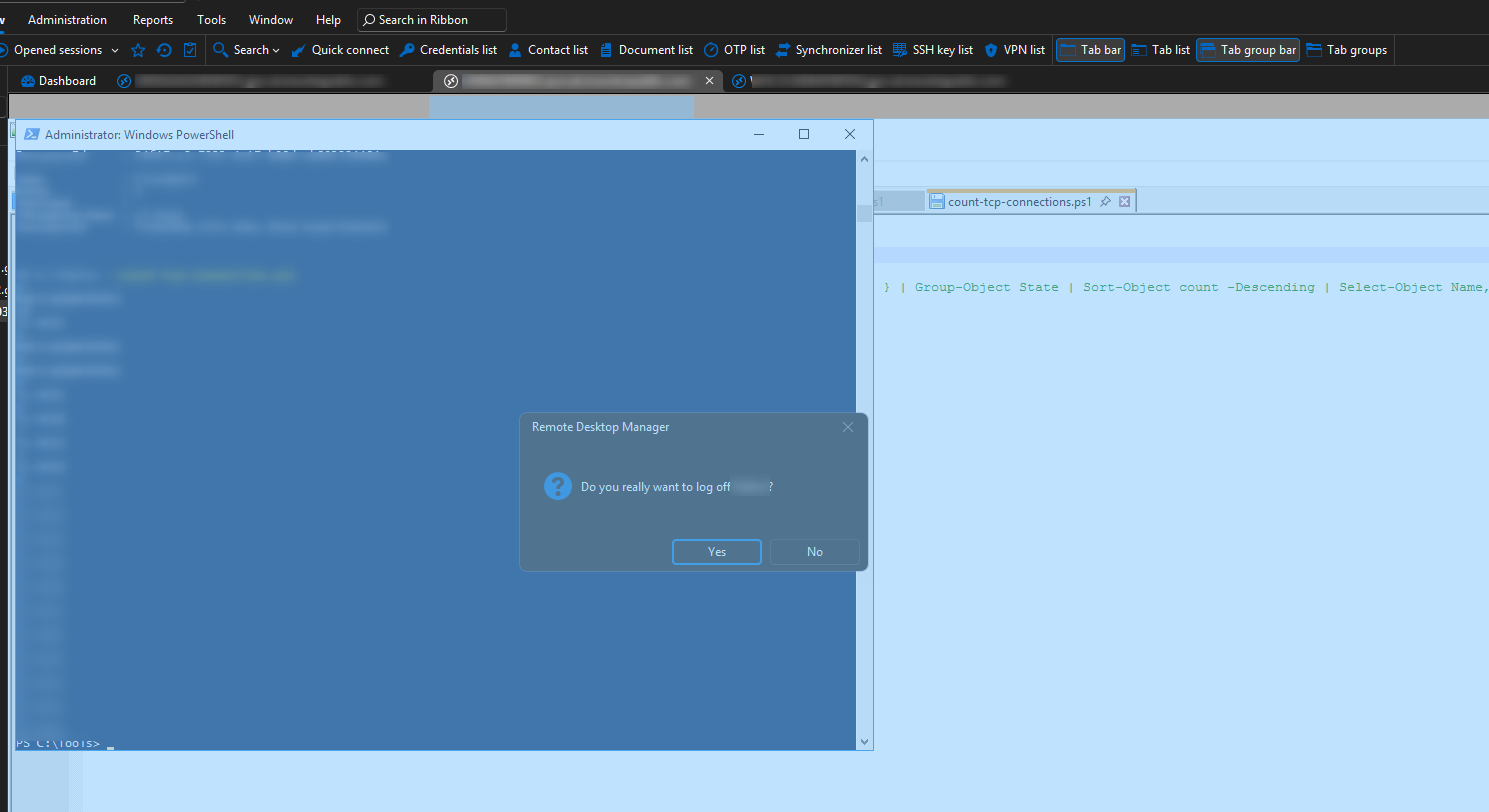
I've had this before and restart of application solves it but im keen to find out what key combination I've accidentally hit to do this and what if anything i can do other than restarting the application to fix it.
Other windows dragged over the top of the RDM Session are also transparent - i can see the RDM window behind them.
I can interract with the session tabs ie right click > logoff works but cant click on the Yes to confirm logoff though keyboard (tab > return) works fine.
Sure its something simple but searching the forum has not thrown up anything obvious.
Cheers, Tom