
onesweetdude
HTML bookmarks import
Thank you, much appreciated as always...Josh
Filter Entries with Boolean
Thank you
Filter Entries with Boolean
The following seem to work best for me...
Navigation Options
Click on "Show Sessions"
Filter Options
Click on "Show Referencing Items"
Field Options
Click on "Include Folder In Search"
Click on "Include Type"
It would be helpful to be able to save the settings with a name that way I can create different searches and simply click on the saved one I want to use, having to change the settings can be tedious especially once you figure out which settings you need based on the given scenario. It would be nice to export the saved settings in case they need to be re-imported.
Thx...Josh
Filter Entries with Boolean
I will play around with the settings when I get time, disabling the folders does change the results
Filter Entries with Boolean
Here are my current settings, I have not changed anything
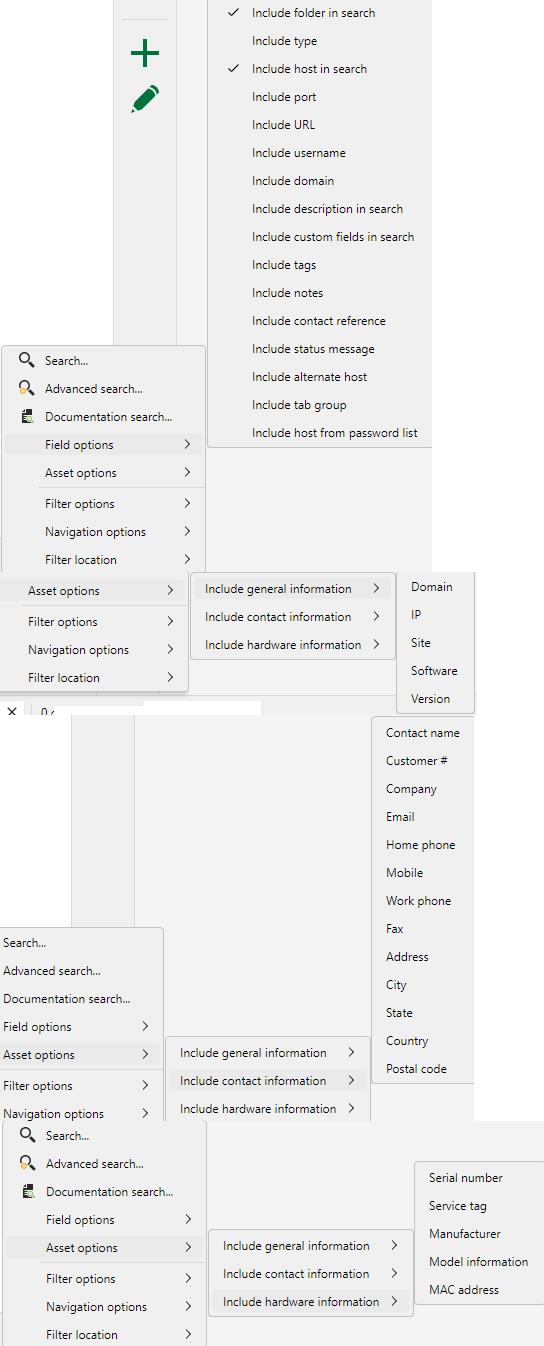
Filter Entries with Boolean
Spoke too soon, it does not work.
Example: When I search for server && ssh it shows me credentials that do not have either keyword included, I see a dashboard in the output, I see an SFTP session in the output, I see an RDP session in the output. I disabled fuzzy search and that helped, however now it still shows ssh sessions that do not apply, do I need to only incldue certain filter options for this to work correctly?
Filter Entries with Boolean
Hubert - both operators work, thank you!
Filter Entries with Boolean
When searching with Filter Entries at the bottom I simply enter a keyword and everything appears which sometimes is more than I need, it would be helpful to limit the search based on boolean ( AND / OR ).
Example: I want to search for "A" AND "SSH" only which would only show me Session "A" for Folder "SSH"
Currently if I search for "A" everything appears in the output
I would ask the search uses Folders and the Session names in the boolean search
Folder: Website
A
Folder: SSH
A
Folder: Credential
A
Folder: Jump Server
A
Typing Macro - Send Contents to Clipboard
thx, the topic was regarding typing macro, all good, I will continue to use powershell scripts to clipboard.
Typing Macro - Send Contents to Clipboard
Currently I create a powershell script that contains a command and when I execute the command it sends the value to the clipboard then I can paste the value, I am looking for Typing Macro to do the same thing, the current clipbaord feature is not the same, I want to create a typing macro that will save the value to the clipboard so I can paste it.
Example:
Typing Macro
Name is MyDailyPassword
Value is TodaysPassword
When I run "MyDailyPassword", it would send "TodaysPassword" to the clipboard.
Ideally I want to assign a keyboard shortcut to the Typing Macro so could easily re-run the password anytime I want.
Navigation Toolbar
thank you
vmware vrealize operations dashboard integration
thank you
Navigation Toolbar
Just RDP's into a server and both "reconnect" and "log off" appeared, that was confusing, I would have expected them to always show, all good.
Navigation Toolbar
Hubert - thx. I added the toolbar and was able to add a few more icons.
I added "Reconnect" and "Log off" icons as icons only and they do not show on the top bar
Please ask to add "Collapse All"
thank you. much appreciated as always...Josh
vCenter Dashboard - Global Search Across All Opened Sessions
Hubert - Thank you, much appreciated as always...Josh
HTML bookmarks import
My teammates add prod, iPMI, etc servers as bookmarks. As servers are added / removed they export the bookmarks as an html file. I then want to import the HTML file into RDM into the Devolutions Workspace folder ( I am using the RDM Chrome Extension ), this way I can easily update the credentials and leverage the RDM extension in Chrome, this allows me to save multiple hours on manually creating the Web session for each server in RDM. Now I need to export the HTML to CSV and then import into RDM using the CSV Wizard, bypassing the CSV export would just save a step, nothing major just asking.
vmware vrealize operations dashboard integration
Access to VROPS allows me to access a single portal to search for a VM to see which vCenter it is hosted on, so instead of adding 50+ vCenter dashboards for my use case accessing VROPS would be simpler.
vCenter Dashboard - Global Search Across All Opened Sessions
We use the same credentials to login to our vCenters.
HTML bookmarks import
Not sure why this feature was deprecated, certainly a lot easier that needing to export HTML to CSV then use the CSV wizard to import, why make things more challenging?
Navigation Toolbar
It would be helpful to create a toolbar in the Navigation section above where is says Name. Example, I tend to use the "collapse all" a lot, instead of right clicking and click on collapse all or Ctrl - adding a button to the toolbar would be helpful.
Or create a toolbar at the top which can be used globally to add a button for any feature RDM provides including custom buttons that can link to scripts, etc.
vmware vrealize operations dashboard integration
Please consider creating a dashboard for vmware vrealize operations, similar to vcenter dashboard.
vCenter Dashboard - Global Search Across All Opened Sessions
Correct, looking for a global search on all opened vCenter sessions to look for a VM instead of clicking on each one and searching.
vCenter Dashboard - Global Search Across All Opened Sessions
I access lots of vCenters, when using the vCenter dashboard I can click on any opened session and search within that session, I would be helpful to run a global search across all opened sessions.
Navigation Pane - Filter On Opened Sessions Only
Thank you
Navigation Pane - Filter On Opened Sessions Only
Yes, I see the Show only opened session's option, not sure how I missed that, thx.