Typing Macro - Send Contents to Clipboard
1 vote

Currently I create a powershell script that contains a command and when I execute the command it sends the value to the clipboard then I can paste the value, I am looking for Typing Macro to do the same thing, the current clipbaord feature is not the same, I want to create a typing macro that will save the value to the clipboard so I can paste it.
Example:
Typing Macro
Name is MyDailyPassword
Value is TodaysPassword
When I run "MyDailyPassword", it would send "TodaysPassword" to the clipboard.
Ideally I want to assign a keyboard shortcut to the Typing Macro so could easily re-run the password anytime I want.
All Comments (2)
Hello,
We've had a few requests in the past to be able to configure a keyboard shortcut to run a specific entry. I think this would solve this problem too, as you could simply run the powershell macro entry that copies a value to the clipboard through this keyboard shortcut. We'll add this thread to our internal ticket.
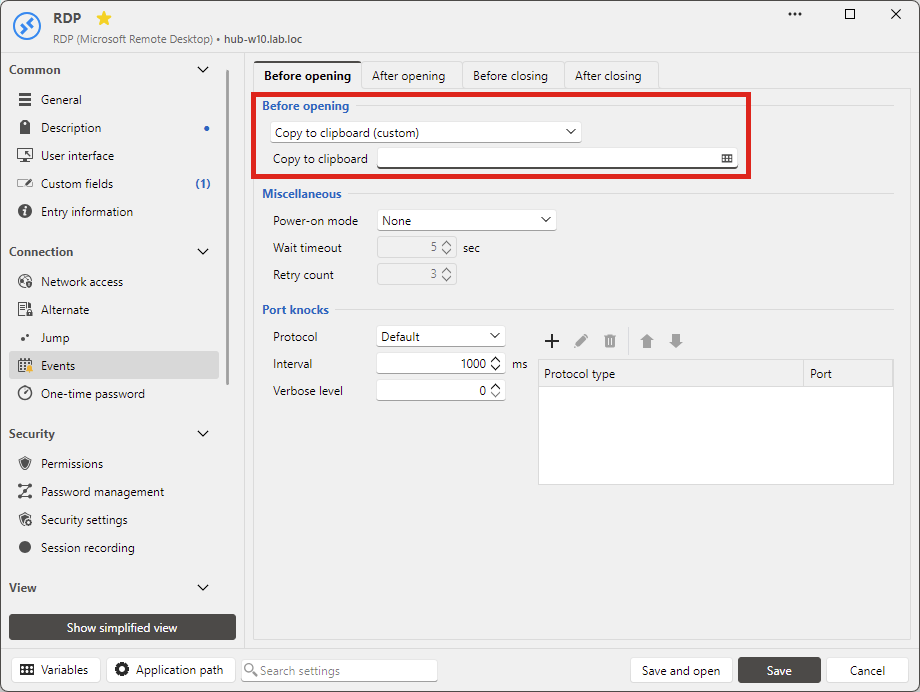
In the mean time, depending on your workflow, you could leverage the "events" tab of entries to copy a value to the clipboard automatically. This supports variables so you could use the $PASSWORD$ variable if this is the same password you use to connect to entries.
Regards,
Hubert Mireault
thx, the topic was regarding typing macro, all good, I will continue to use powershell scripts to clipboard.